3. flutter学习
| 名称 | 连接 | 备注 |
|---|---|---|
| Flutter中文官网 | https://flutterchina.club | |
| Flutter中文官方安装教程 | https://flutterchina.club/get-started/install/ | |
| dart官方语言 | https://dart.cn/ | |
| flutter官方文档 | https://docs.flutter.dev/get-started/install | |
| flutter官方的中文文档 | https://docs.flutter.cn/release/archive |
3.0 Helloworld
入口方法与函数
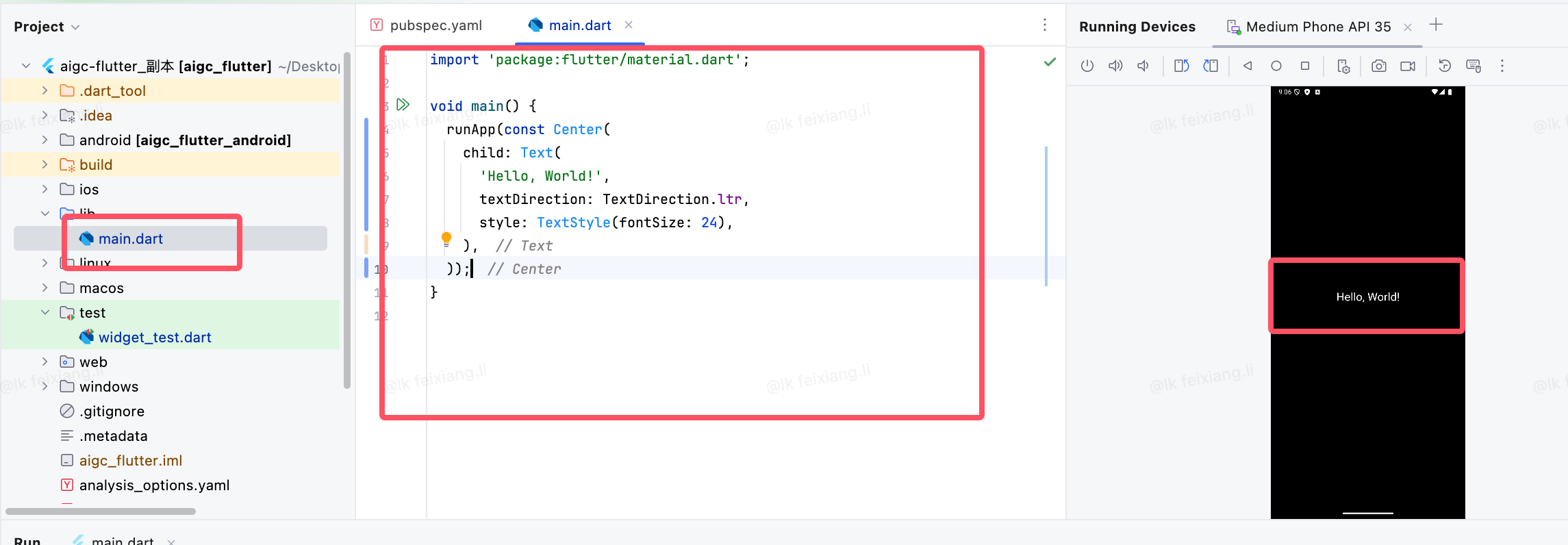
删除所有内容,输入以下内容,就是一个文本
import 'package:flutter/material.dart';

void main() {
  runApp(const Center(
    child: Text(
      'Hello, World!',
      textDirection: TextDirection.ltr,
      style: TextStyle(fontSize: 24),
    ),
  ));
}
可以修改颜色
import 'package:flutter/material.dart';

void main() {
  runApp(const Center(
    child: Text(
      'Hello, World!',
      textDirection: TextDirection.ltr,
      style: TextStyle(fontSize: 24,
      color: Colors.red),
    ),
  ));
}
主题
使用MaterialApp 和 Scaffold两个组件装饰App
MaterialApp是一个方便的Widget,它封装了应用程序实现Material Design所需要的一些Widget。一 般作为顶层widget使用。 常用的属性:
- home(主页)
- title(标题)
- color(颜色)
- theme(主题)
- routes(路由)
Scaffold
Scaffold 有下面几个主要属性:
- appBar- 显示在界面顶部的一个 AppBar。
- body-当前界面所显示的主要内容Widget。
- drawer-抽屉菜单控件。
- Scaffold是Material Design布局结构的基本实现。此类提供了用于显示drawer、snackbar和底部sheet
import 'package:flutter/material.dart';

void main() {
  runApp(MaterialApp(
    home: Scaffold(
      appBar: AppBar(
        title: const Text('Hello World'),
      ),
      body: const Center(
        child: Text('Hello World'),
      ),
    ),
  ));
}
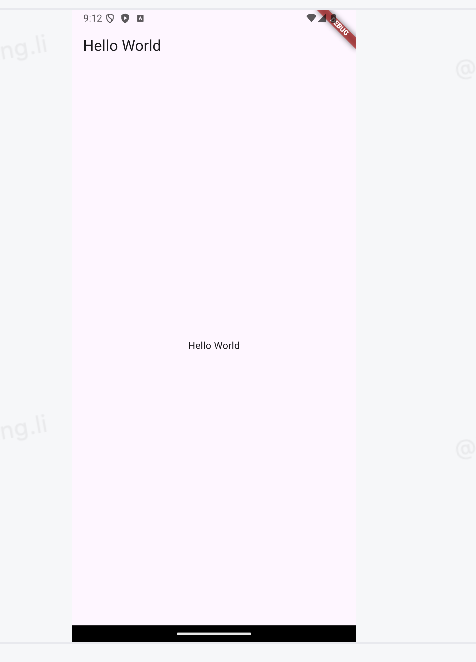
页面就会变成一下这个样子
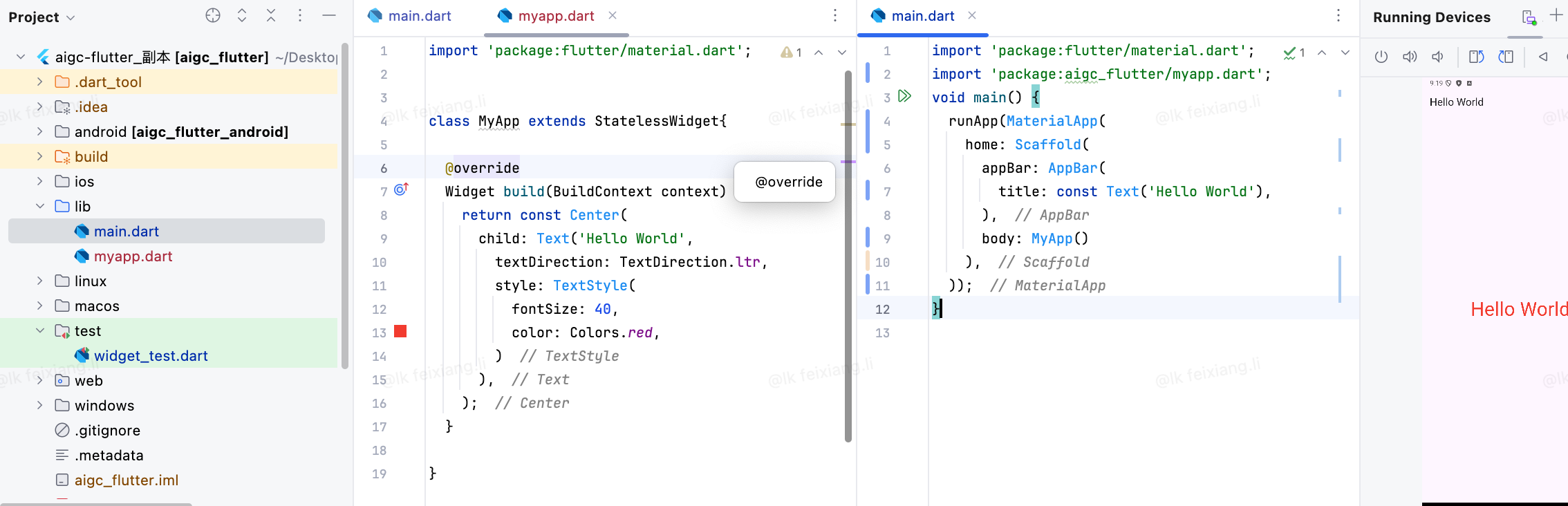
把flutter内容单独抽离成一个组件
在Futter中自定义組件其实就是一个类,这个类需要系StatelessWidget,StatefulWidget
前期我们都继承StatelessWidget。后期给大家讲StatefuIWidget的使用。
- StatelessWidget 是无状态组件,状态不可变的widget
- StatefulWidget 是有状态组件,持有的状态可能在widget生命周期改变
import 'package:flutter/material.dart';


class MyApp extends StatelessWidget{

  @override
  Widget build(BuildContext context) {
    return const Center(
      child: Text('Hello World',
        textDirection: TextDirection.ltr,
        style: TextStyle(
          fontSize: 40,
          color: Colors.red,
        )
      ),
    );
  }

}
Container组件
| 名称 | 功能 | |
|---|---|---|
| alignment | topCenter:顶部居中对齐topLeft:顶部左对齐topRight:顶部右对齐center:水平垂直居中对齐centerLeft:垂直居中水平居左对齐centerRight:垂直居中水。平居右对齐bottomCenter底部居中对齐bottomLeft:底部居左对齐。bottomRight:底部居右对齐 | |
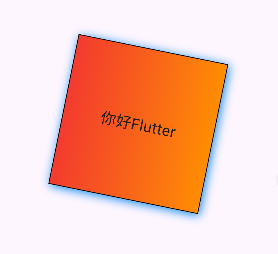
| decoration | decoration: BoxDecoration( color: Colors.blue, border: Border.all( color:Colors.red, width: 2.0), borderRadius:BorderRadius.circular((8)),// 圆角 ,boxShadow: [ BoxShadow( color: Colors.blue, offset: Offset(2.0, 2.0),blurRadius: 10.0, ) ], ) //LinearGradient 背景线性渐变 RadialGradient径向渐变。gradient: LinearGradient( colors: [Colors.red, Colors.orange], ), | |
| margin | margin属性是表示Container与外部其他组件的距离。 EdgeInsets.all(20.0), | |
| padding | padding就是Container的内边距,指Container边缘与Child之间的距离。padding:EdgeInsets.all(10.0) | |
| transform | 让Container容易进行一些旋转之类的transform: Matrix4.rotationZ(0.2) | |
| height | 容器高度 | |
| width | 容器宽度 | |
| child | 容器子元素 | |
import 'package:flutter/material.dart';


class MyApp extends StatelessWidget{

  @override
  Widget build(BuildContext context) {
    return Center(
      child: Container(
        alignment: Alignment.center,
        height: 200,
        width: 200,
        decoration: BoxDecoration(
            color: Colors.yellow,
            gradient: const LinearGradient(
//LinearGradient 背景线性渐变 RadialGradient径向渐变
              colors: [Colors.red, Colors.orange],
            ),
            boxShadow:const [
//卡片阴影
              BoxShadow(
                color: Colors.blue,
                offset: Offset(2.0, 2.0),
                blurRadius: 10.0,
              )
            ],
            border: Border.all(
                color: Colors.black,
                width: 1
            )
        ),
        transform:Matrix4.rotationZ(.2),
        child: const Text(
          "你好Flutter",
          style: TextStyle(fontSize: 20),
        ),
      ),
    );
  }

}
创建按钮
import 'package:flutter/material.dart';

class MyApp extends StatelessWidget{

  @override
  Widget build(BuildContext context) {
    return Center(
      child: Container(
        alignment: Alignment.center,
        height: 40,
        width: 200,
        margin: const EdgeInsets.fromLTRB(0, 20, 0, 0),
        decoration: BoxDecoration(
            color: Colors.blue,
            borderRadius: BorderRadius.circular(15)
        ),
        child: const Text(
          "按钮",
          style: TextStyle(fontSize: 20,color: Colors.white),
        ),
      ),
    );
  }

}
Text组件
padding 和maring
padding 是让容器和里面的元素有相应的间距,margin是让容器和容器外部的其他容器有相应的间距
Container(
margin: EdgeInsets.all(20.0), //容器外补白
color: Colors.orange,
child: Text("Hello world!"),
),
Container(
padding: EdgeInsets.all(20.0), //容器内补白
color: Colors.orange,
child: Text("Hello world!"),
),
平移
transform: Matrix4.translationValues(-40,0,0),//位移| textAlign | 文本对齐方式(center居中,left左对齐,right右对齐,justfy两端对齐) |
| textDirection | 文本方向(ltr从左至右,rtl从右至左) |
| overflow | 文字超出屏幕之后的处理方式(clip裁剪,fade渐隐,ellipsis省略号) |
| textScaleFactor | 字体显示倍率 |
| maxLines | 文字显示最大行数 |
| style | 字体的样式设置 |
下面是 TextStyle 的参数
| 名称 | 功能 |
|---|---|
| decoration | 文字装饰线( none没有线, lineThrough删除线, overline上划线, underline下划线) |
| decorationColor | 文字装饰线颜色 |
| decorationStyle | 文字装饰线风格([dashed,dotted]虚线, double两根线, solid一根实线, wavy波浪线) |
| wordSpacing | 单词间隙(如果是负值,会让单词变得更紧凑 |
| letterSpacing | 字母间隙(如果是负值,会让字母变得更紧凑) |
| fontStyle | 文字样式(italic斜体, normal正常体) |
| fontSize | 文字大小 |
| color | 文字颜色 |
| fontWeight | 字体粗细(bold粗体, normal正常体) |
图片
属性
| 名称 | 类型 | 说明 |
|---|---|---|
| alignment | Alignment | 图片的对齐方式 |
| color和colorBlendMode | 设置图片的背景颜色,通常和colorBlendMode配合一起使 用,这样可以是图片颜色和背景色混合。上面的图片就是进 行了颜色的混合,绿色背景和图片红色的混合 | |
| fit | BoxFit | fit属性用来控制图片的拉伸和挤压,这都是根据父容器来 的。 BoxFit.fill:全图显示,图片会被拉伸,并充满父容器。 BoxFit.contain:全图显示,显示原比例,可能会有空隙。BoxFit.cover:显示可能拉伸,可能裁切,充满(图片要充 满整个容器,还不变形)。 BoxFit.fitWidth:宽度充满(横 向充满),显示可能拉伸,可能裁切。 BoxFit.fitHeight :高度充满(竖向充满) ,显示可能拉伸,可能裁切。BoxFit.scaleDown:效果和contain差不多,但是此属性不 允许显示超过源图片大小,可小不可大。 |
| repeat | 平铺 | ImageRepeat.repeat : 横向和纵向都进行重复,直到铺满整 个画布。 ImageRepeat.repeatX: 横向重复,纵向不重复。ImageRepeat.repeatY:纵向重复,横向不重复。 |
| width | 宽度 一般结合ClipOval才能看到效果 | |
| height | 高度 一般结合ClipOval才能看到效果 |
加载网络图片
import 'package:flutter/material.dart';

class MyApp extends StatelessWidget{

  @override
  Widget build(BuildContext context) {
    return Center(
      child: Container(
        height: 200,
        width: 200,
        decoration: BoxDecoration(
          color: Colors.yellow
        ),
        child: Image.network(
            "https://xiaowang.link/assets/image-20230930190308935.Dq3TvWDI.png",
          fit: BoxFit.fill,
        ),
      ),
    );
  }

}
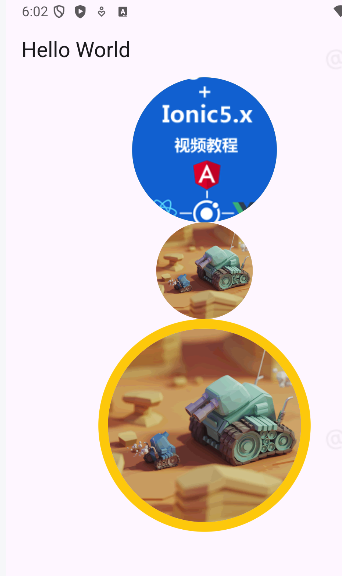
加载网络图片(圆形)
import 'package:flutter/material.dart';

void main() {
  runApp(MaterialApp(
    home: Scaffold(
        appBar: AppBar(
          title: const Text('Hello World'),
        ),
        body: Column(
          children: [MyApp(), Circle(),CircleMyAvatar()],
        )),
  ));
}

class MyApp extends StatelessWidget {
  const MyApp({Key? key}) : super(key: key);

  @override
  Widget build(BuildContext context) {
    return Center(
      child: Container(
        width: 150,
        height: 150,
        decoration: BoxDecoration(
            color: Colors.yellow,
            borderRadius: BorderRadius.circular(75),
            image: const DecorationImage(
                image: NetworkImage(
                  "https://www.itying.com/themes/itying/images/ionic4.png",
                ),
                fit: BoxFit.cover)),
      ),
    );
  }
}

class Circle extends StatelessWidget {
  const Circle({Key? key}) : super(key: key);

  @override
  Widget build(BuildContext context) {
    return CircleAvatar(
      radius: 50,
      backgroundImage:
          NetworkImage("https://www.itying.com/images/flutter/3.png"),
    );
  }
}

class CircleMyAvatar extends StatelessWidget {
  const CircleMyAvatar({Key? key}) : super(key: key);

  @override
  Widget build(BuildContext context) {
    return const CircleAvatar(
        radius: 110,
        backgroundColor: Color(0xffFDCF09),
        child: CircleAvatar(
          radius: 100,
          backgroundImage:
              NetworkImage("https://www.itying.com/images/flutter/3.png"),
        ));
  }
}
加载本地图片
项目根目录新建images文件夹,images中新建2.x 3.x对应的文件
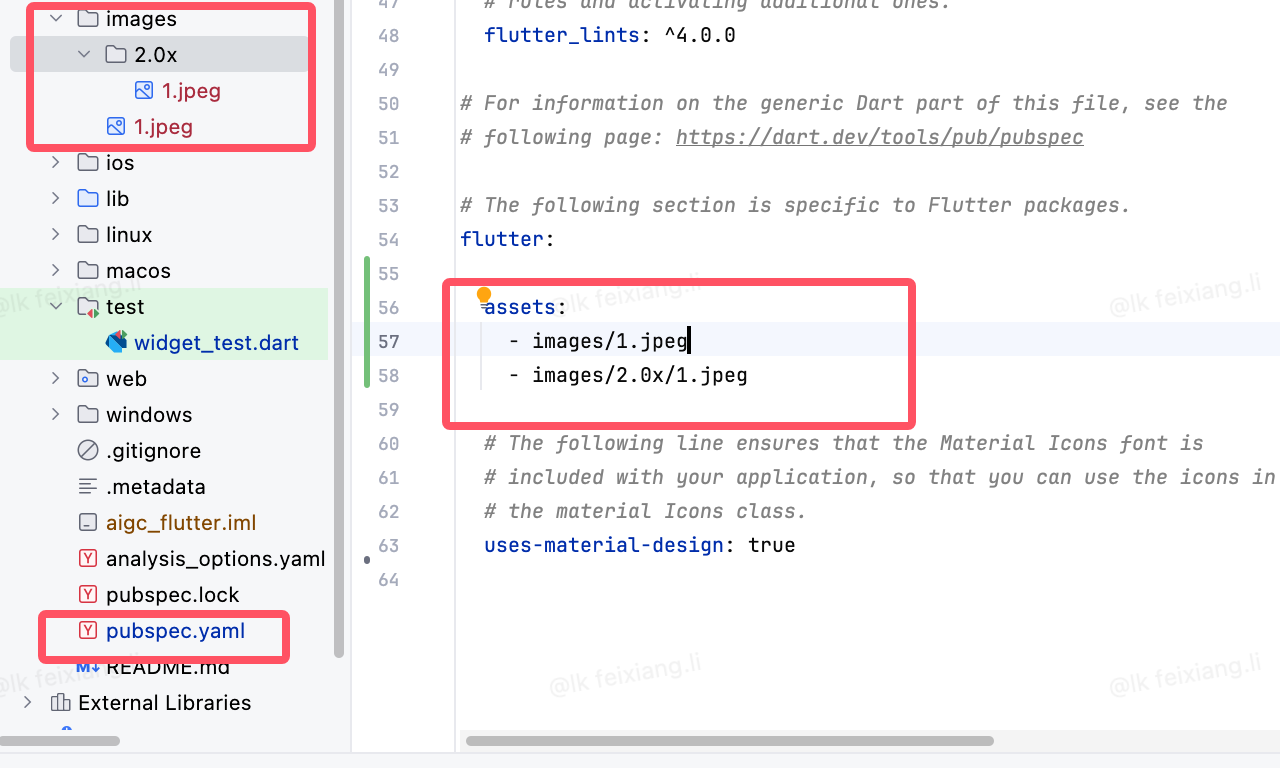
然后,打开pubspec.yaml 声明一下添加的图片文件, 注意: 空格
flutter:

  assets:
    - images/1.jpeg
- images/2.0x/1.jpegimport 'package:flutter/material.dart';
void main() {
runApp(MaterialApp(
home: Scaffold(
appBar: AppBar(
title: const Text('Hello World'),
),
body: Column(
children: [LocalImage()],
)),
));
}
class LocalImage extends StatelessWidget {
const LocalImage({Key? key}) : super(key: key);
@override
Widget build(BuildContext context) {
return Container(
width: 100,
height: 100,
alignment: Alignment.centerLeft,
child: Image.asset('images/1.jpeg'),
);
}
}图标
原始图标
import 'package:flutter/material.dart';

void main() {
  runApp(MaterialApp(
      home: Scaffold(
    appBar: AppBar(
      title: const Text('Hello World'),
    ),
    body: MyApp(),
  )));
}

class MyApp extends StatelessWidget {
  const MyApp({Key? key}) : super(key: key);

  @override
  Widget build(BuildContext context) {
    return Center(
        child: Column(
      children: const [
        Icon(Icons.search, color: Colors.red, size: 40),
        SizedBox(height: 10),
        Icon(Icons.home),
        SizedBox(height: 10),
        Icon(Icons.category),
        SizedBox(height: 10),
        Icon(Icons.shop),
        SizedBox(height: 10),
      ],
    ));
  }
}
自定义字体和图标
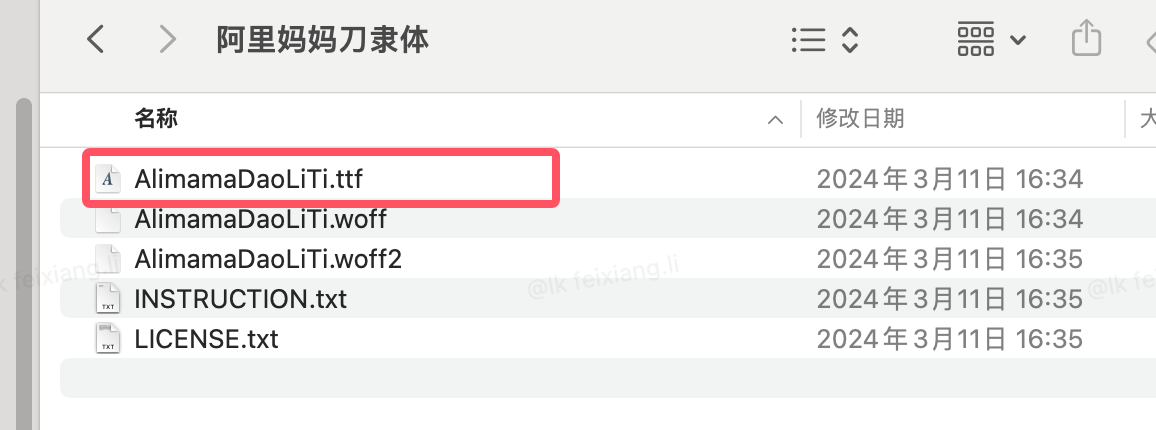
我们首先下载字体
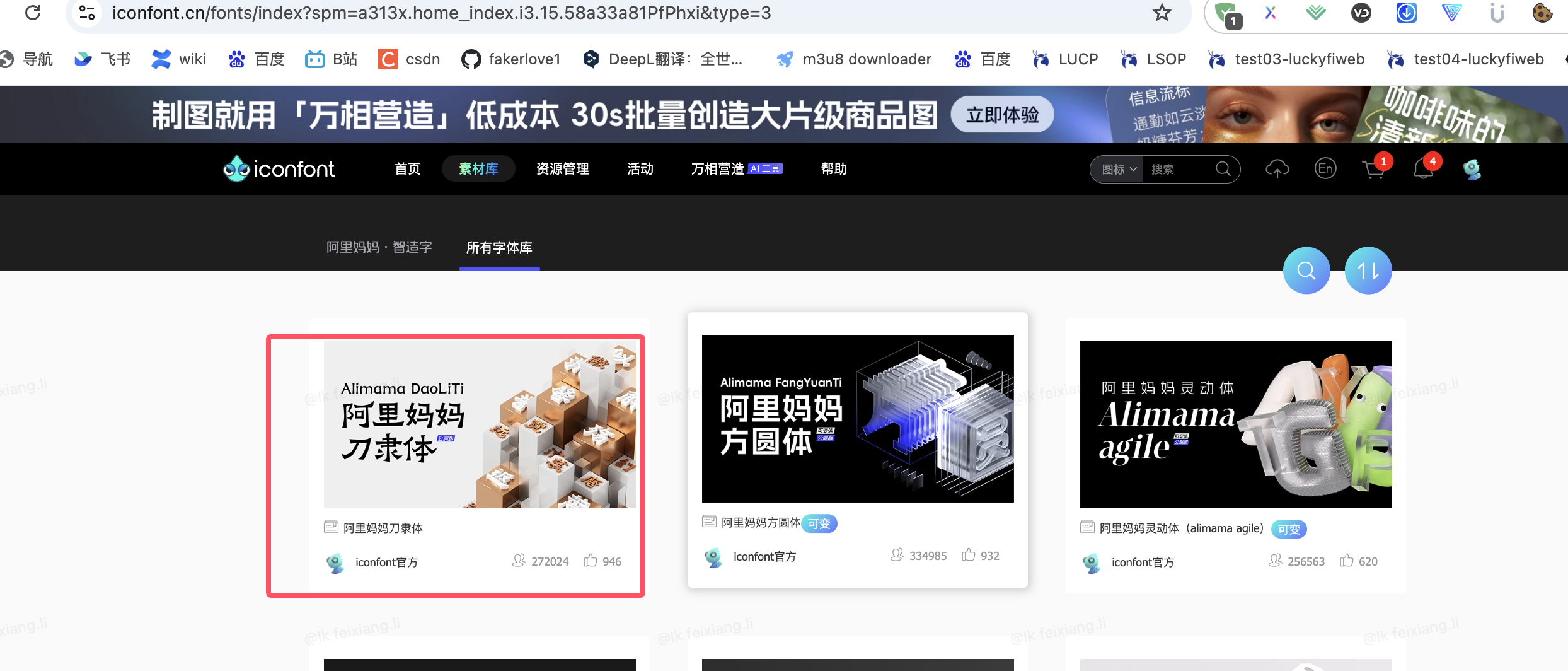
然后
下载完后,将这几个文件写好
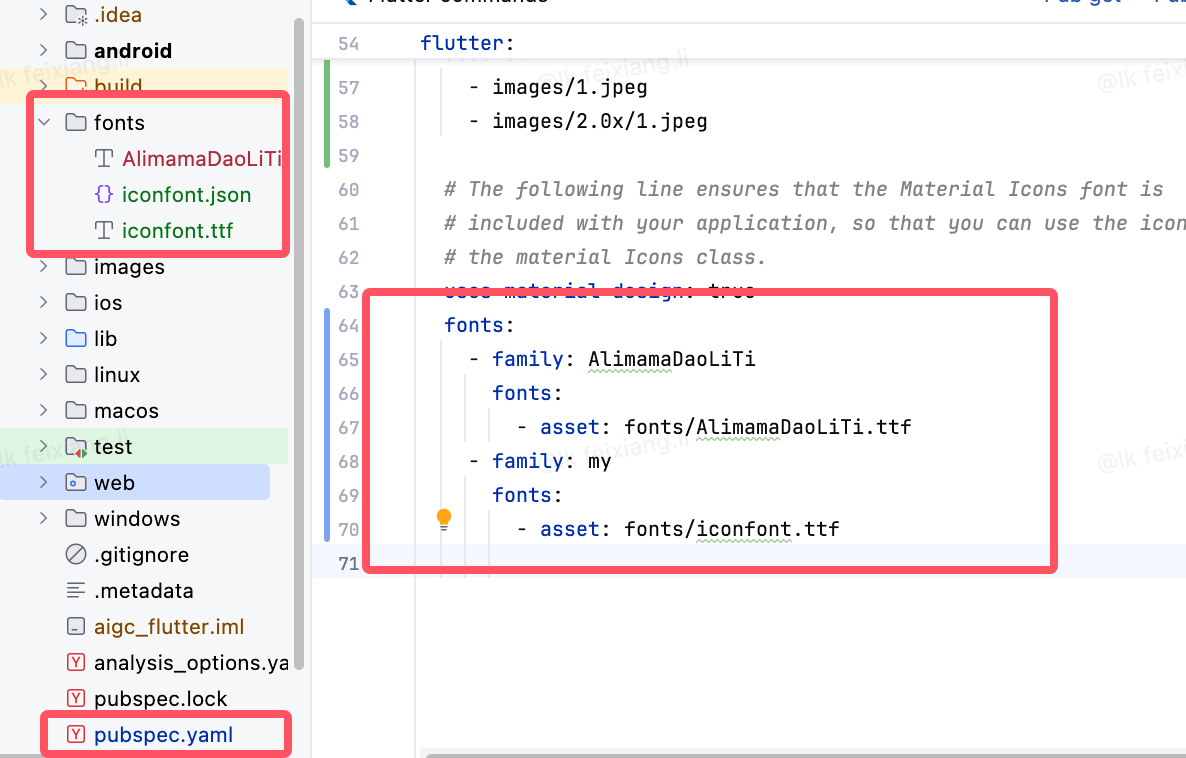
编写代码
import 'package:flutter/material.dart';

class MyIcons {
  static const IconData user = IconData(
    0xe52f, // unicode 值
    fontFamily: 'my', // 字体名称,与 pubspec.yaml 中定义的一致
  );

  static const IconData message = IconData(
    0xe61d,
    fontFamily: 'my',
  );

  static const IconData like = IconData(
    0xe61e,
    fontFamily: 'my',
  );
}
主文件中类
import 'package:flutter/material.dart';
import 'fonts.dart'; // 导入自定义图标

void main() {
  runApp(MaterialApp(
      home: Scaffold(
        appBar: AppBar(
          title: const Text(
            '自定义图标演示',
          ),
        ),
        body: MyApp(),
      )));
}

class MyApp extends StatelessWidget {
  const MyApp({Key? key}) : super(key: key);

  @override
  Widget build(BuildContext context) {
    return Center(
        child: Column(
      children: const [
        // 使用第一个自定义图标
        Icon(
          MyIcons.user,
          size: 40,
          color: Colors.blue,
        ),
        SizedBox(height: 10),
        Text(
          '用户',
          style: TextStyle(
            fontFamily: 'AlimamaDaoLiTi',
            fontSize: 20,
            color: Colors.blue,
          ),
        ),
        SizedBox(height: 20),
        // 使用第二个自定义图标
        Icon(
          MyIcons.message,
          size: 40,
          color: Colors.green,
        ),
        SizedBox(height: 10),
        Text(
          '消息',
          style: TextStyle(
            fontFamily: 'AlimamaDaoLiTi',
            fontSize: 20,
            color: Colors.green,
          ),
        ),
        SizedBox(height: 20),
        // 使用第三个自定义图标
        Icon(
          MyIcons.like,
          size: 40,
          color: Colors.red,
        ),
        SizedBox(height: 10),
        Text(
          '喜欢',
          style: TextStyle(
            fontFamily: 'AlimamaDaoLiTi',
            fontSize: 20,
            color: Colors.red,
          ),
        ),
      ],
    ));
  }
}
ListView
| 名称 | 类型 | 描述 |
|---|---|---|
| scrollDirection | Axis | Axis.horizontal水平列表Axis.vertical垂直列表 |
| padding | EdgeInsetsGeometry | 内边距 |
| resolve | bool | 组件反向排序 |
| children | List | 列表元素 |
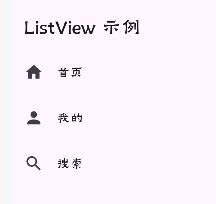
静态ListView
class ListViewMyApp extends StatelessWidget {
  const ListViewMyApp({Key? key}) : super(key: key);

  @override
  Widget build(BuildContext context) {
    return ListView(
        children: const <Widget>[
          ListTile(
            leading: Icon(Icons.home),
            title: Text('首页'),
          ),
          ListTile(
            leading: Icon(Icons.person),
            title: Text('我的'),
          ),
          ListTile(
            leading: Icon(Icons.search),
            title: Text('搜索'),
            trailing: Icon(Icons.arrow_forward),
          )
        ]
    );
  }
}
class ListViewDemo2 extends StatelessWidget {
  const ListViewDemo2({Key? key}) : super(key: key);

  @override
  Widget build(BuildContext context) {
    return ListView(
      padding: const EdgeInsets.all(16.0),
      children: <Widget>[
         ListTile(
          leading:const Icon(Icons.home),
          title: const Text('换新热潮节节攀升 消费市场焕发蓬勃生机'),
          subtitle: const Text('“非洲地区最现代化的铁路建设项目之一”(新时代中非合作)'),
          trailing:  Image.network("http://xiaowang.link/2.jpg"),
        ),
      ],
    );
  }
}
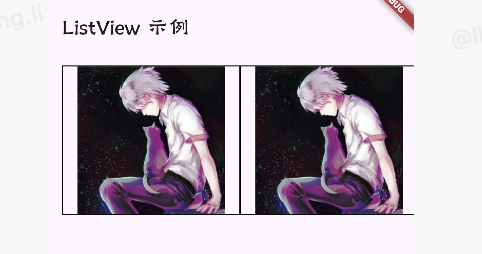
横向ListView
class ListViewDemo3 extends StatelessWidget {
  const ListViewDemo3({Key? key}) : super(key: key);

  @override
  Widget build(BuildContext context) {
    return SizedBox(
      height: 200,
      child:  ListView(
        padding: const EdgeInsets.all(16.0),
        scrollDirection: Axis.horizontal,
        children: <Widget>[
          Container(
            height: 120,
            width: 200,
            child: Image.network("http://xiaowang.link/2.jpg"),
            decoration: BoxDecoration(
              border: Border.all(
                color: Colors.black,
                width: 1.0,
              ),
            ),
          ),
          Container(
            height: 120,
            width: 200,
            child: Image.network("http://xiaowang.link/2.jpg"),
            decoration: BoxDecoration(
              border: Border.all(
                color: Colors.black,
                width: 1.0,
              ),
            ),

          ),
          Container(
            height: 120,
            width: 200,
            child: Image.network("http://xiaowang.link/2.jpg"),
            decoration: BoxDecoration(
              color: Colors.yellow,
            ),
          ),
        ],
      )
    );
  }
}
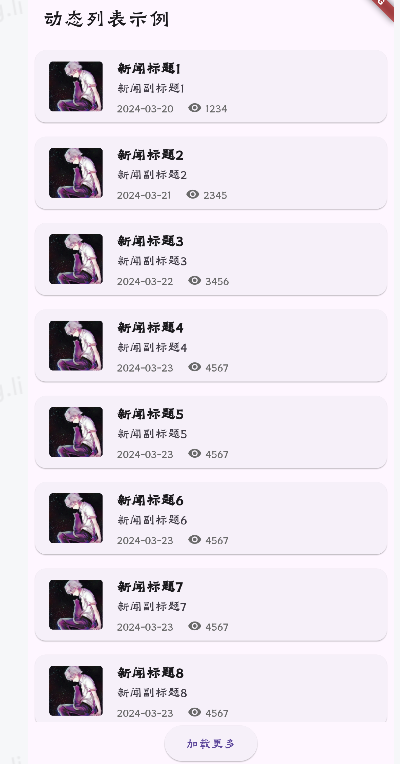
动态ListView
import 'package:flutter/material.dart';

void main() {
  runApp(MaterialApp(
      home: Scaffold(
        appBar: AppBar(
          title: const Text(
            '动态列表示例',
          ),
        ),
        body: const DynamicListView(), // 使用新的动态列表组件
      )));
}

// 定义列表项数据类
class ListItem {
  final IconData icon;
  final String title;
  final Color color;

  const ListItem(this.icon, this.title, this.color);
}

// 添加一个新的动态列表组件
class DynamicListView extends StatefulWidget {
  const DynamicListView({Key? key}) : super(key: key);

  @override
  State<DynamicListView> createState() => _DynamicListViewState();
}

class _DynamicListViewState extends State<DynamicListView> {
  // 模拟的动态数据
  final List<Map<String, dynamic>> _items = [
    {
      'title': '新闻标题1',
      'subtitle': '新闻副标题1',
      'imageUrl': 'http://xiaowang.link/2.jpg',
      'time': '2024-03-20',
      'views': 1234
    },
    {
      'title': '新闻标题2',
      'subtitle': '新闻副标题2',
      'imageUrl': 'http://xiaowang.link/2.jpg',
      'time': '2024-03-21',
      'views': 2345
    },
    {
      'title': '新闻标题3',
      'subtitle': '新闻副标题3',
      'imageUrl': 'http://xiaowang.link/2.jpg',
      'time': '2024-03-22',
      'views': 3456
    },
  ];

  // 加载更多数据的方法
  void _loadMoreData() {
    setState(() {
      // 模拟添加新数据
      _items.add({
        'title': '新闻标题${_items.length + 1}',
        'subtitle': '新闻副标题${_items.length + 1}',
        'imageUrl': 'http://xiaowang.link/2.jpg',
        'time': '2025-03-23',
        'views': 4567
      });
    });
  }

  @override
  Widget build(BuildContext context) {
    return Column(
      children: [
        Expanded(
          child: ListView.builder(
            itemCount: _items.length,
            itemBuilder: (context, index) {
              final item = _items[index];
              return Card(
                margin: const EdgeInsets.all(8.0),
                child: ListTile(
                  leading: ClipRRect(
                    borderRadius: BorderRadius.circular(4),
                    child: Image.network(
                      item['imageUrl'],
                      width: 60,
                      height: 60,
                      fit: BoxFit.cover,
                    ),
                  ),
                  title: Text(
                    item['title'],
                    style: const TextStyle(
                      fontSize: 16,
                      fontWeight: FontWeight.bold,
                    ),
                  ),
                  subtitle: Column(
                    crossAxisAlignment: CrossAxisAlignment.start,
                    children: [
                      Text(
                        item['subtitle'],
                        style: const TextStyle(fontSize: 14),
                      ),
                      const SizedBox(height: 4),
                      Row(
                        children: [
                          Text(
                            item['time'],
                            style: TextStyle(
                              fontSize: 12,
                              color: Colors.grey[600],
                            ),
                          ),
                          const SizedBox(width: 16),
                          Icon(
                            Icons.remove_red_eye,
                            size: 16,
                            color: Colors.grey[600],
                          ),
                          const SizedBox(width: 4),
                          Text(
                            '${item['views']}',
                            style: TextStyle(
                              fontSize: 12,
                              color: Colors.grey[600],
                            ),
                          ),
                        ],
                      ),
                    ],
                  ),
                  onTap: () {
                    ScaffoldMessenger.of(context).showSnackBar(
                      SnackBar(
                        content: Text('点击了${item['title']}'),
                        duration: const Duration(seconds: 1),
                      ),
                    );
                  },
                ),
              );
            },
          ),
        ),
        ElevatedButton(
          onPressed: _loadMoreData,
          child: const Text('加载更多'),
        ),
      ],
    );
  }
}
gridView
| 名称 | 属性 | |
|---|---|---|
| scrollDirection | Axis | 滚动方法 |
| padding | EdgeInsetsGeometry | 内边距 |
| resolve | bool | 组件反向排序 |
| crossAxisSpacing | double | 水平子Widget之间间 距 |
| mainAxisSpacing | double | 垂直子Widget之间间 距 |
| crossAxisCount | int 用在GridView.count | 一行的Widget数量 |
| maxCrossAxisExtent | double 用在GridView.extent | 横轴子元素的最大长 度 |
| childAspectRatio | double | 子Widget宽高比例 |
| children | [ ] | |
| gridDelegate | SliverGridDelegateWith FixedCrossAxisCount SliverGridDelegateWith MaxCrossAxisExtent | 控制布局主要用在 GridView.builder里 面 |
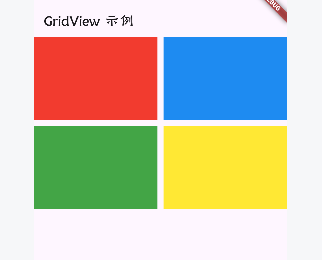
静态GridView
import 'package:flutter/material.dart';

void main() {
  runApp(MaterialApp(
      home: Scaffold(
        appBar: AppBar(
          title: const Text(
            'GridView 示例',
          ),
        ),
        body: const GridViewDemo(),
      )));
}


class GridViewDemo extends StatelessWidget{

  const GridViewDemo({Key? key}) : super(key: key);


  @override
  Widget build(BuildContext context) {
    return GridView.count(
        crossAxisCount: 2,// 列数
        mainAxisSpacing: 10,
        crossAxisSpacing: 10,
        childAspectRatio: 1.5,
        children: [
          Container(
            color: Colors.red,
          ),
          Container(
            color: Colors.blue,
          ),
          Container(
            color: Colors.green,
          ),
          Container(
            color: Colors.yellow,
          ),
        ]
      );
  }
}
GridView
import 'package:flutter/material.dart';

void main() {
  runApp(MaterialApp(
      home: Scaffold(
        appBar: AppBar(
          title: const Text(
            'GridView 示例',
          ),
        ),
        body: const GridViewDemo(),
      )));
}


class GridViewDemo extends StatelessWidget{

  const GridViewDemo({Key? key}) : super(key: key);


  @override
  Widget build(BuildContext context) {
    return GridView.extent(
      // GridView.extent构造函数内部使用了SliverGridDelegateWithMaxCrossAxisExtent,
      // 我们通过它可以 快速的创建横轴子元素为固定最大长度的的GridView。
        maxCrossAxisExtent: 150,// 列数
        mainAxisSpacing: 10,// 垂直子Widget之间间 距
        crossAxisSpacing: 10, // 水平子Widget之间间 距
        childAspectRatio: 1.5, // 子Widget宽高比
        children: [
          Container(
            color: Colors.red,
          ),
          Container(
            color: Colors.blue,
          ),
          Container(
            color: Colors.green,
          ),
          Container(
            color: Colors.yellow,
          ),
        ]
      );
  }
}
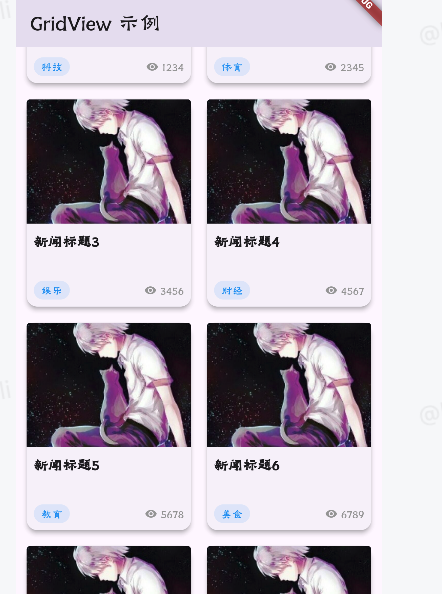
动态的GridView
import 'package:flutter/material.dart';

void main() {
  runApp(MaterialApp(
      home: Scaffold(
        appBar: AppBar(
          title: const Text(
            'GridView 示例',
          ),
        ),
        body: const GridViewDemo(),
      )));
}

class GridViewDemo extends StatefulWidget {
  const GridViewDemo({Key? key}) : super(key: key);

  @override
  State<GridViewDemo> createState() => _GridViewDemoState();
}

class _GridViewDemoState extends State<GridViewDemo> {
  // 模拟的网格数据
  final List<Map<String, dynamic>> _gridItems = [
    {
      'title': '新闻标题1',
      'imageUrl': 'http://xiaowang.link/2.jpg',
      'category': '科技',
      'views': 1234
    },
    {
      'title': '新闻标题2',
      'imageUrl': 'http://xiaowang.link/2.jpg',
      'category': '体育',
      'views': 2345
    },
    {
      'title': '新闻标题3',
      'imageUrl': 'http://xiaowang.link/2.jpg',
      'category': '娱乐',
      'views': 3456
    },
    {
      'title': '新闻标题4',
      'imageUrl': 'http://xiaowang.link/2.jpg',
      'category': '财经',
      'views': 4567
    },
    {
      'title': '新闻标题5',
      'imageUrl': 'http://xiaowang.link/2.jpg',
      'category': '教育',
      'views': 5678
    },
    {
      'title': '新闻标题6',
      'imageUrl': 'http://xiaowang.link/2.jpg',
      'category': '美食',
      'views': 6789
    },
  ];

  void _loadMoreData() {
    setState(() {
      _gridItems.add({
        'title': '新闻标题${_gridItems.length + 1}',
        'imageUrl': 'http://xiaowang.link/2.jpg',
        'category': '分类${_gridItems.length + 1}',
        'views': (_gridItems.length + 1) * 1000
      });
    });
  }

  @override
  Widget build(BuildContext context) {
    return Column(
      children: [
        Expanded(
          child: GridView.builder(
            padding: const EdgeInsets.all(8),
            gridDelegate: const SliverGridDelegateWithFixedCrossAxisCount(
              crossAxisCount: 2, // 每行显示2个
              mainAxisSpacing: 10, // 主轴间距
              crossAxisSpacing: 10, // 交叉轴间距
              childAspectRatio: 0.8, // 子项宽高比
            ),
            itemCount: _gridItems.length,
            itemBuilder: (context, index) {
              final item = _gridItems[index];
              return Card(
                elevation: 4,
                child: Column(
                  crossAxisAlignment: CrossAxisAlignment.start,
                  children: [
                    // 图片部分
                    Expanded(
                      flex: 3,
                      child: Container(
                        width: double.infinity,
                        decoration: BoxDecoration(
                          image: DecorationImage(
                            image: NetworkImage(item['imageUrl']),
                            fit: BoxFit.cover,
                          ),
                          borderRadius: const BorderRadius.only(
                            topLeft: Radius.circular(4),
                            topRight: Radius.circular(4),
                          ),
                        ),
                      ),
                    ),
                    // 文字内容部分
                    Expanded(
                      flex: 2,
                      child: Padding(
                        padding: const EdgeInsets.all(8.0),
                        child: Column(
                          crossAxisAlignment: CrossAxisAlignment.start,
                          mainAxisAlignment: MainAxisAlignment.spaceBetween,
                          children: [
                            Text(
                              item['title'],
                              style: const TextStyle(
                                fontSize: 16,
                                fontWeight: FontWeight.bold,
                              ),
                              maxLines: 2,
                              overflow: TextOverflow.ellipsis,
                            ),
                            Row(
                              mainAxisAlignment: MainAxisAlignment.spaceBetween,
                              children: [
                                Container(
                                  padding: const EdgeInsets.symmetric(
                                    horizontal: 8,
                                    vertical: 2,
                                  ),
                                  decoration: BoxDecoration(
                                    color: Colors.blue.withOpacity(0.1),
                                    borderRadius: BorderRadius.circular(12),
                                  ),
                                  child: Text(
                                    item['category'],
                                    style: const TextStyle(
                                      fontSize: 12,
                                      color: Colors.blue,
                                    ),
                                  ),
                                ),
                                Row(
                                  children: [
                                    const Icon(
                                      Icons.remove_red_eye,
                                      size: 14,
                                      color: Colors.grey,
                                    ),
                                    const SizedBox(width: 4),
                                    Text(
                                      '${item['views']}',
                                      style: const TextStyle(
                                        fontSize: 12,
                                        color: Colors.grey,
                                      ),
                                    ),
                                  ],
                                ),
                              ],
                            ),
                          ],
                        ),
                      ),
                    ),
                  ],
                ),
              );
            },
          ),
        ),
        ElevatedButton(
          onPressed: _loadMoreData,
          child: const Text('加载更多'),
        ),
      ],
    );
  }
}
页面布局
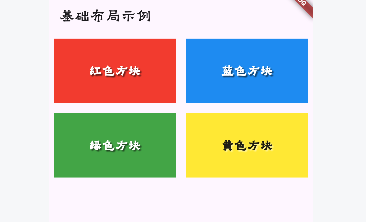
Padding,Row
| *属性* | *说明* |
|---|---|
| padding | padding值, EdgeInsetss设置填充的值 |
| child | 子组件 |
import 'package:flutter/material.dart';

void main() {
  runApp(MaterialApp(
      home: Scaffold(
        appBar: AppBar(
          title: const Text(
            '基础布局示例',
          ),
        ),
        body: const BasicLayoutDemo(),
      )));
}

class BasicLayoutDemo extends StatelessWidget {
  const BasicLayoutDemo({Key? key}) : super(key: key);

  @override
  Widget build(BuildContext context) {
    return Column(
      children: [
        Row(
          children: [
            Expanded(
              child: Padding(
                padding: const EdgeInsets.all(8.0),
                child: Container(
                  height: 100,
                  color: Colors.red,
                  child: const Center(
                    child: Text(
                      '红色方块',
                      style: TextStyle(
                        color: Colors.white,
                        fontSize: 20,
                        fontWeight: FontWeight.bold,
                        shadows: [
                          Shadow(
                            color: Colors.black54,
                            offset: Offset(2, 2),
                            blurRadius: 3,
                          ),
                        ],
                      ),
                    ),
                  ),
                ),
              ),
            ),
            Expanded(
              child: Padding(
                padding: const EdgeInsets.all(8.0),
                child: Container(
                  height: 100,
                  color: Colors.blue,
                  child: const Center(
                    child: Text(
                      '蓝色方块',
                      style: TextStyle(
                        color: Colors.white,
                        fontSize: 20,
                        fontWeight: FontWeight.bold,
                        shadows: [
                          Shadow(
                            color: Colors.black54,
                            offset: Offset(2, 2),
                            blurRadius: 3,
                          ),
                        ],
                      ),
                    ),
                  ),
                ),
              ),
            ),
          ],
        ),
        Row(
          children: [
            Expanded(
              child: Padding(
                padding: const EdgeInsets.all(8.0),
                child: Container(
                  height: 100,
                  color: Colors.green,
                  child: const Center(
                    child: Text(
                      '绿色方块',
                      style: TextStyle(
                        color: Colors.white,
                        fontSize: 20,
                        fontWeight: FontWeight.bold,
                        shadows: [
                          Shadow(
                            color: Colors.black54,
                            offset: Offset(2, 2),
                            blurRadius: 3,
                          ),
                        ],
                      ),
                    ),
                  ),
                ),
              ),
            ),
            Expanded(
              child: Padding(
                padding: const EdgeInsets.all(8.0),
                child: Container(
                  height: 100,
                  color: Colors.yellow,
                  child: const Center(
                    child: Text(
                      '黄色方块',
                      style: TextStyle(
                        color: Colors.black87,
                        fontSize: 20,
                        fontWeight: FontWeight.bold,
                        shadows: [
                          Shadow(
                            color: Colors.white54,
                            offset: Offset(2, 2),
                            blurRadius: 3,
                          ),
                        ],
                      ),
                    ),
                  ),
                ),
              ),
            ),
          ],
        ),
      ],
    );
  }
}
Row水平布局组件
| *属性* | *说明* |
|---|---|
| mainAxisAlignment | 主轴的排序方式 |
| crossAxisAlignment | 次轴的排序方式 |
| children | 组件子元素 |
Column垂直布局组件
| *属性* | *说明* |
|---|---|
| mainAxisAlignment | 主轴的排序方式 |
| crossAxisAlignment | 次轴的排序方式 |
| children | 组件子元素 |
import 'package:flutter/material.dart';

void main() {
  runApp(MaterialApp(
      home: Scaffold(
        appBar: AppBar(
          title: const Text(
            '垂直布局示例'
          ),
        ),
        body: const ColumnLayoutDemo(),
      )));
}

class ColumnLayoutDemo extends StatelessWidget {
  const ColumnLayoutDemo({Key? key}) : super(key: key);

  @override
  Widget build(BuildContext context) {
    return Padding(
      padding: const EdgeInsets.all(16.0),
      child: Column(
        crossAxisAlignment: CrossAxisAlignment.stretch, // 让子组件横向撑满
        children: [
          Container(
            height: 80,
            decoration: BoxDecoration(
              color: Colors.blue[200],
              borderRadius: BorderRadius.circular(8),
              boxShadow: const [
                BoxShadow(
                  color: Colors.black26,
                  offset: Offset(0, 2),
                  blurRadius: 4,
                ),
              ],
            ),
            child: const Center(
              child: Text(
                '第一行内容',
                style: TextStyle(
                  fontSize: 18,
                  color: Colors.white,
                  fontWeight: FontWeight.bold,
                ),
              ),
            ),
          ),
          const SizedBox(height: 16), // 间距
          Container(
            height: 120,
            decoration: BoxDecoration(
              color: Colors.green[300],
              borderRadius: BorderRadius.circular(8),
              boxShadow: const [
                BoxShadow(
                  color: Colors.black26,
                  offset: Offset(0, 2),
                  blurRadius: 4,
                ),
              ],
            ),
            child: const Center(
              child: Text(
                '第二行内容',
                style: TextStyle(
                  fontSize: 18,
                  color: Colors.white,
                  fontWeight: FontWeight.bold,
                ),
              ),
            ),
          ),
          const SizedBox(height: 16), // 间距
          Container(
            height: 100,
            decoration: BoxDecoration(
              color: Colors.orange[300],
              borderRadius: BorderRadius.circular(8),
              boxShadow: const [
                BoxShadow(
                  color: Colors.black26,
                  offset: Offset(0, 2),
                  blurRadius: 4,
                ),
              ],
            ),
            child: const Center(
              child: Text(
                '第三行内容',
                style: TextStyle(
                  fontSize: 18,
                  color: Colors.white,
                  fontWeight: FontWeight.bold,
                ),
              ),
            ),
          ),
        ],
      ),
    );
  }
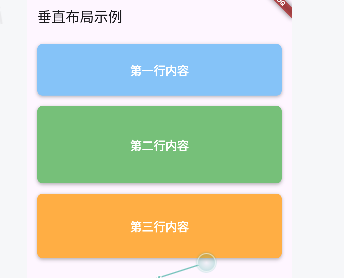
}
弹性布局Flex
import 'package:flutter/material.dart';

void main() {
  runApp(MaterialApp(
      home: Scaffold(
    appBar: AppBar(
      title: const Text('Flex组件示例'),
    ),
    body: const FlexDemo(),
  )));
}

class FlexDemo extends StatelessWidget {
  const FlexDemo({Key? key}) : super(key: key);

  @override
  Widget build(BuildContext context) {
    return Padding(
      padding: const EdgeInsets.all(16.0),
      child: Column(
        crossAxisAlignment: CrossAxisAlignment.start,
        children: [
          const Text(
            '不使用Flex的普通Row布局:',
            style: TextStyle(fontSize: 16, fontWeight: FontWeight.bold),
          ),
          const SizedBox(height: 10),
          Row(
            children: [
              Container(
                width: 80,
                height: 50,
                color: Colors.blue,
                child: const Center(
                  child: Text(
                    '固定宽度',
                    style: TextStyle(color: Colors.white),
                  ),
                ),
              ),
              const SizedBox(width: 10),
              Container(
                width: 120,
                height: 50,
                color: Colors.green,
                child: const Center(
                  child: Text(
                    '固定宽度',
                    style: TextStyle(color: Colors.white),
                  ),
                ),
              ),
            ],
          ),
          const SizedBox(height: 30),
          const Text(
            '使用Flex的水平布局:',
            style: TextStyle(fontSize: 16, fontWeight: FontWeight.bold),
          ),
          const SizedBox(height: 10),
          Flex(
            direction: Axis.horizontal,
            children: [
              Flexible(
                flex: 1,
                child: Container(
                  height: 50,
                  color: Colors.blue,
                  child: const Center(
                    child: Text(
                      'flex: 1',
                      style: TextStyle(color: Colors.white),
                    ),
                  ),
                ),
              ),
              const SizedBox(width: 10),
              Flexible(
                flex: 2,
                child: Container(
                  height: 50,
                  color: Colors.green,
                  child: const Center(
                    child: Text(
                      'flex: 2',
                      style: TextStyle(color: Colors.white),
                    ),
                  ),
                ),
              ),
            ],
          ),
          const SizedBox(height: 30),
          const Text(
            '使用Flex的垂直布局:',
            style: TextStyle(fontSize: 16, fontWeight: FontWeight.bold),
          ),
          const SizedBox(height: 10),
          Container(
            height: 200,
            color: Colors.grey[200],
            child: Flex(
              direction: Axis.vertical,
              children: [
                Flexible(
                  flex: 2,
                  child: Container(
                    color: Colors.orange,
                    child: const Center(
                      child: Text(
                        'flex: 2',
                        style: TextStyle(color: Colors.white),
                      ),
                    ),
                  ),
                ),
                const SizedBox(height: 10),
                Flexible(
                  flex: 1,
                  child: Container(
                    color: Colors.purple,
                    child: const Center(
                      child: Text(
                        'flex: 1',
                        style: TextStyle(color: Colors.white),
                      ),
                    ),
                  ),
                ),
              ],
            ),
          ),
        ],
      ),
    );
  }
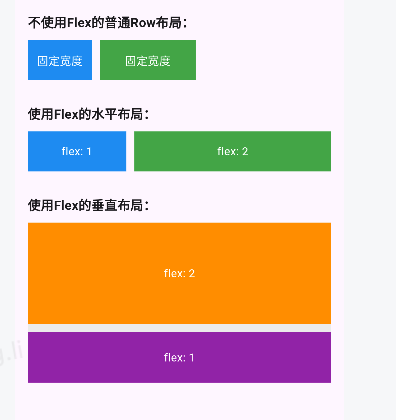
}
Expand组件
import 'package:flutter/material.dart';

void main() {
  runApp(MaterialApp(
      home: Scaffold(
    appBar: AppBar(
      title: const Text('Expanded组件示例'),
    ),
    body: const ExpandedDemo(),
  )));
}

class ExpandedDemo extends StatelessWidget {
  const ExpandedDemo({Key? key}) : super(key: key);

  @override
  Widget build(BuildContext context) {
    return Padding(
      padding: const EdgeInsets.all(16.0),
      child: Column(
        crossAxisAlignment: CrossAxisAlignment.start,
        children: [
          const Text(
            '不使用Expanded的效果:',
            style: TextStyle(fontSize: 16, fontWeight: FontWeight.bold),
          ),
          const SizedBox(height: 10),
          Row(
            children: [
              Container(
                width: 100,
                height: 50,
                color: Colors.blue,
                child: const Center(
                  child: Text(
                    '固定宽度',
                    style: TextStyle(color: Colors.white),
                  ),
                ),
              ),
              Container(
                width: 100,
                height: 50,
                color: Colors.green,
                child: const Center(
                  child: Text(
                    '固定宽度',
                    style: TextStyle(color: Colors.white),
                  ),
                ),
              ),
            ],
          ),
          const SizedBox(height: 30),
          const Text(
            '使用Expanded的效果:',
            style: TextStyle(fontSize: 16, fontWeight: FontWeight.bold),
          ),
          const SizedBox(height: 10),
          Row(
            children: [
              Expanded(
                flex: 1,
                child: Container(
                  height: 50,
                  color: Colors.blue,
                  child: const Center(
                    child: Text(
                      'flex: 1',
                      style: TextStyle(color: Colors.white),
                    ),
                  ),
                ),
              ),
              const SizedBox(width: 10),
              Expanded(
                flex: 2,
                child: Container(
                  height: 50,
                  color: Colors.green,
                  child: const Center(
                    child: Text(
                      'flex: 2',
                      style: TextStyle(color: Colors.white),
                    ),
                  ),
                ),
              ),
            ],
          ),
          const SizedBox(height: 20),
          Row(
            children: [
              Container(
                width: 100,
                height: 50,
                color: Colors.orange,
                child: const Center(
                  child: Text(
                    '固定宽度',
                    style: TextStyle(color: Colors.white),
                  ),
                ),
              ),
              const SizedBox(width: 10),
              Expanded(
                child: Container(
                  height: 50,
                  color: Colors.purple,
                  child: const Center(
                    child: Text(
                      '自适应宽度',
                      style: TextStyle(color: Colors.white),
                    ),
                  ),
                ),
              ),
            ],
          ),
        ],
      ),
    );
  }
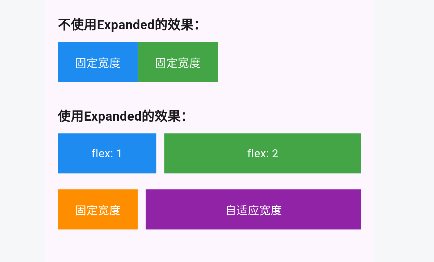
}
Stack和Position
import 'package:flutter/material.dart';

void main() {
  runApp(MaterialApp(
      home: Scaffold(
    appBar: AppBar(
      title: const Text('Stack和Positioned示例'),
    ),
    body: const StackDemo(),
  )));
}

class StackDemo extends StatelessWidget {
  const StackDemo({Key? key}) : super(key: key);

  @override
  Widget build(BuildContext context) {
    return Padding(
      padding: const EdgeInsets.all(16.0),
      child: Column(
        crossAxisAlignment: CrossAxisAlignment.start,
        children: [
          const Text(
            '不使用Stack的普通布局:',
            style: TextStyle(fontSize: 16, fontWeight: FontWeight.bold),
          ),
          const SizedBox(height: 10),
          Container(
            width: double.infinity,
            height: 150,
            color: Colors.grey[200],
            child: Column(
              mainAxisAlignment: MainAxisAlignment.center,
              children: [
                Container(
                  width: 100,
                  height: 100,
                  color: Colors.blue,
                  child: const Center(
                    child: Text(
                      '普通布局',
                      style: TextStyle(color: Colors.white),
                    ),
                  ),
                ),
              ],
            ),
          ),
          const SizedBox(height: 30),
          const Text(
            '使用Stack的层叠布局:',
            style: TextStyle(fontSize: 16, fontWeight: FontWeight.bold),
          ),
          const SizedBox(height: 10),
          Container(
            width: double.infinity,
            height: 150,
            color: Colors.grey[200],
            child: Stack(
              children: [
                Container(
                  width: 100,
                  height: 100,
                  color: Colors.blue,
                  child: const Center(
                    child: Text(
                      '底层',
                      style: TextStyle(color: Colors.white),
                    ),
                  ),
                ),
                Positioned(
                  left: 50,
                  top: 50,
                  child: Container(
                    width: 100,
                    height: 100,
                    color: Colors.green.withOpacity(0.8),
                    child: const Center(
                      child: Text(
                        '层叠1',
                        style: TextStyle(color: Colors.white),
                      ),
                    ),
                  ),
                ),
                Positioned(
                  left: 100,
                  top: 20,
                  child: Container(
                    width: 80,
                    height: 80,
                    color: Colors.red.withOpacity(0.8),
                    child: const Center(
                      child: Text(
                        '层叠2',
                        style: TextStyle(color: Colors.white),
                      ),
                    ),
                  ),
                ),
              ],
            ),
          ),
          const SizedBox(height: 30),
          const Text(
            '使用Stack实现定位布局:',
            style: TextStyle(fontSize: 16, fontWeight: FontWeight.bold),
          ),
          const SizedBox(height: 10),
          Container(
            width: double.infinity,
            height: 150,
            color: Colors.grey[200],
            child: Stack(
              children: [
                Positioned.fill(
                  child: Container(
                    color: Colors.blue[100],
                    child: const Center(
                      child: Text('背景层'),
                    ),
                  ),
                ),
                Positioned(
                  right: 10,
                  top: 10,
                  child: Container(
                    padding: const EdgeInsets.all(8),
                    color: Colors.red,
                    child: const Text(
                      '右上角',
                      style: TextStyle(color: Colors.white),
                    ),
                  ),
                ),
                Positioned(
                  left: 10,
                  bottom: 10,
                  child: Container(
                    padding: const EdgeInsets.all(8),
                    color: Colors.green,
                    child: const Text(
                      '左下角',
                      style: TextStyle(color: Colors.white),
                    ),
                  ),
                ),
              ],
            ),
          ),
        ],
      ),
    );
  }
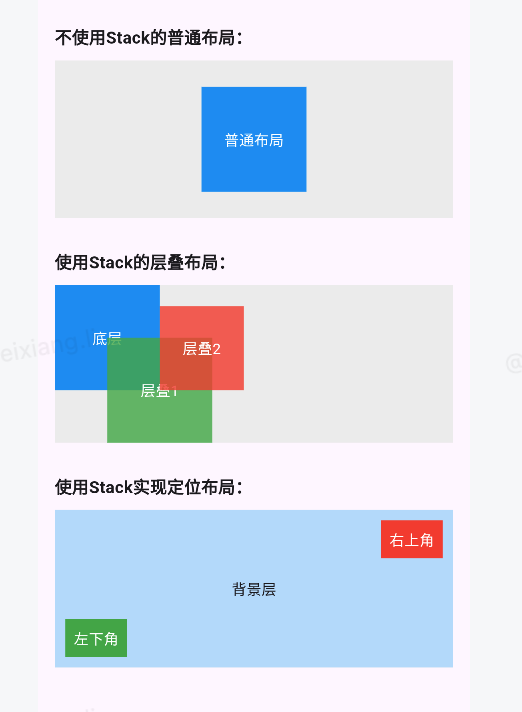
}
Align
Align 组件可以调整子组件的位置 , Stack组件中结合Align组件也可以控制每个子元素的显示位置
| 属性 | 说明 |
|---|---|
| alignment | 配置所有子元素的显示位置 |
| child | 子组件 |
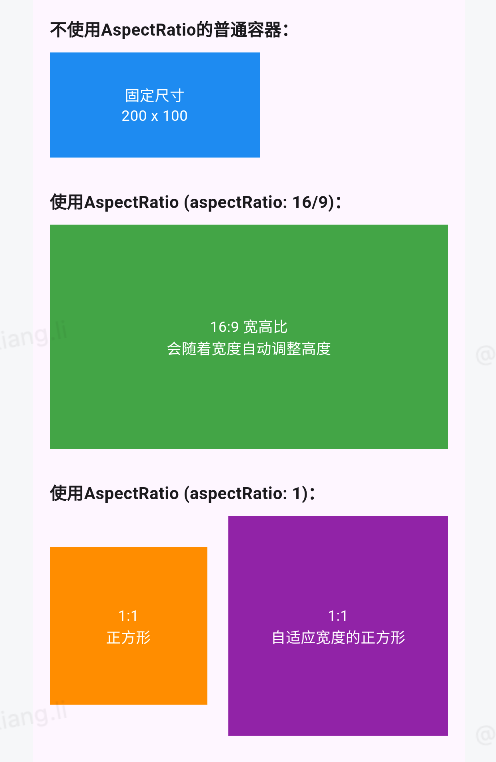
AspectRatio
AspectRatio的作用是根据设置调整子元素child的宽高比。
AspectRatio首先会在布局限制条件允许的范围内尽可能的扩展, widget的高度是由宽度和比率决定 的,类似于BoxFit中的contain,按照固定比率去尽量占满区域。
如果在满足所有限制条件过后无法找到一个可行的尺寸, AspectRatio最终将会去优先适应布局限制条 件,而忽略所设置的比率。
| *属性* | *说明* |
|---|---|
| aspectRatio | 宽高比,最终可能不会根据这个值去布局,具体则要看综合因素,外层是否允许 按照这种比率进行布局,这只是一个参考值 |
| child | 子组件 |
import 'package:flutter/material.dart';

void main() {
  runApp(MaterialApp(
      home: Scaffold(
    appBar: AppBar(
      title: const Text('AspectRatio示例'),
    ),
    body: const AspectRatioDemo(),
  )));
}

class AspectRatioDemo extends StatelessWidget {
  const AspectRatioDemo({Key? key}) : super(key: key);

  @override
  Widget build(BuildContext context) {
    return Padding(
      padding: const EdgeInsets.all(16.0),
      child: Column(
        crossAxisAlignment: CrossAxisAlignment.start,
        children: [
          const Text(
            '不使用AspectRatio的普通容器:',
            style: TextStyle(fontSize: 16, fontWeight: FontWeight.bold),
          ),
          const SizedBox(height: 10),
          Container(
            width: 200,
            height: 100,
            color: Colors.blue,
            child: const Center(
              child: Text(
                '固定尺寸\n200 x 100',
                textAlign: TextAlign.center,
                style: TextStyle(color: Colors.white),
              ),
            ),
          ),
          const SizedBox(height: 30),
          const Text(
            '使用AspectRatio (aspectRatio: 16/9):',
            style: TextStyle(fontSize: 16, fontWeight: FontWeight.bold),
          ),
          const SizedBox(height: 10),
          Container(
            width: double.infinity,
            color: Colors.grey[200],
            child: AspectRatio(
              aspectRatio: 16 / 9, // 16:9 宽高比
              child: Container(
                color: Colors.green,
                child: const Center(
                  child: Text(
                    '16:9 宽高比\n会随着宽度自动调整高度',
                    textAlign: TextAlign.center,
                    style: TextStyle(color: Colors.white),
                  ),
                ),
              ),
            ),
          ),
          const SizedBox(height: 30),
          const Text(
            '使用AspectRatio (aspectRatio: 1):',
            style: TextStyle(fontSize: 16, fontWeight: FontWeight.bold),
          ),
          const SizedBox(height: 10),
          Row(
            children: [
              Container(
                width: 150,
                color: Colors.grey[200],
                child: AspectRatio(
                  aspectRatio: 1, // 1:1 正方形
                  child: Container(
                    color: Colors.orange,
                    child: const Center(
                      child: Text(
                        '1:1\n正方形',
                        textAlign: TextAlign.center,
                        style: TextStyle(color: Colors.white),
                      ),
                    ),
                  ),
                ),
              ),
              const SizedBox(width: 20),
              Expanded(
                child: Container(
                  color: Colors.grey[200],
                  child: AspectRatio(
                    aspectRatio: 1, // 1:1 正方形
                    child: Container(
                      color: Colors.purple,
                      child: const Center(
                        child: Text(
                          '1:1\n自适应宽度的正方形',
                          textAlign: TextAlign.center,
                          style: TextStyle(color: Colors.white),
                        ),
                      ),
                    ),
                  ),
                ),
              ),
            ],
          ),
        ],
      ),
    );
  }
}
Card
Card是卡片组件块,内容可以由大多数类型的Widget构成, Card具有圆角和阴影,这让它看起来有立 体感
| *属性* | *说明* |
|---|---|
| margin | 外边距 |
| child | 子组件 |
| elevation | 阴影值的深度 |
| color | 背景颜色 |
| shadowColor | 阴影颜色 |
| margin | 外边距 |
| clipBehavior | clipBehavior 内容溢出的剪切方式 Clip.none不剪切 Clip.hardEdge裁剪但不应 用抗锯齿 Clip.antiAlias裁剪而且抗锯齿 Clip.antiAliasWithSaveLayer带有抗锯 齿的剪辑,并在剪辑之后立即保存saveLayer |
| Shape | Card的阴影效果,默认的阴影效果为圆角的长方形边。 shape: const RoundedRectangleBorder(borderRadius: BorderRadius.all(Radius.circular(10)) ), |
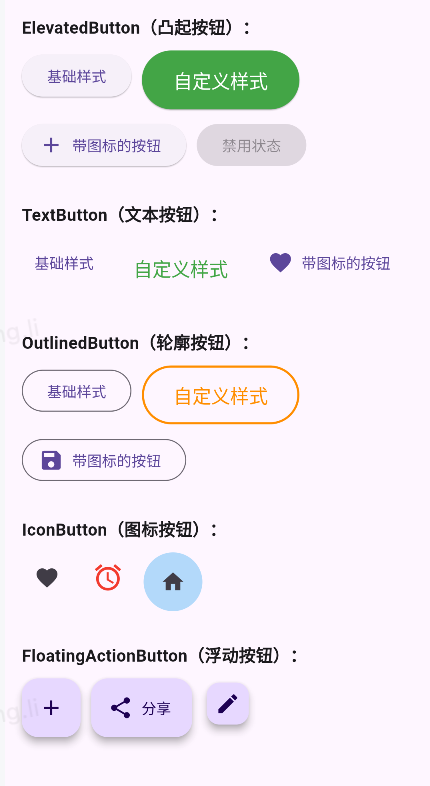
按钮
ElevatedButton
文本按钮TextButton
边框按钮OutlinedButton
图标按钮IconButton
import 'package:flutter/material.dart';

void main() {
  runApp(MaterialApp(
      home: Scaffold(
    appBar: AppBar(
      title: const Text('Flutter按钮示例'),
    ),
    body: const ButtonsDemo(),
  )));
}

class ButtonsDemo extends StatelessWidget {
  const ButtonsDemo({Key? key}) : super(key: key);

  @override
  Widget build(BuildContext context) {
    return SingleChildScrollView(
      padding: const EdgeInsets.all(16.0),
      child: Column(
        crossAxisAlignment: CrossAxisAlignment.start,
        children: [
          _buildSection('ElevatedButton(凸起按钮):', [
            ElevatedButton(
              onPressed: () {},
              child: const Text('基础样式'),
            ),
            ElevatedButton(
              onPressed: () {},
              style: ElevatedButton.styleFrom(
                backgroundColor: Colors.green,
                foregroundColor: Colors.white,
                padding:
                    const EdgeInsets.symmetric(horizontal: 30, vertical: 15),
                textStyle: const TextStyle(fontSize: 18),
              ),
              child: const Text('自定义样式'),
            ),
            ElevatedButton.icon(
              onPressed: () {},
              icon: const Icon(Icons.add),
              label: const Text('带图标的按钮'),
            ),
            ElevatedButton(
              onPressed: null, // null 表示按钮禁用
              child: const Text('禁用状态'),
            ),
          ]),
          _buildSection('TextButton(文本按钮):', [
            TextButton(
              onPressed: () {},
              child: const Text('基础样式'),
            ),
            TextButton(
              onPressed: () {},
              style: TextButton.styleFrom(
                foregroundColor: Colors.green,
                textStyle: const TextStyle(fontSize: 18),
                padding: const EdgeInsets.all(16),
              ),
              child: const Text('自定义样式'),
            ),
            TextButton.icon(
              onPressed: () {},
              icon: const Icon(Icons.favorite),
              label: const Text('带图标的按钮'),
            ),
          ]),
          _buildSection('OutlinedButton(轮廓按钮):', [
            OutlinedButton(
              onPressed: () {},
              child: const Text('基础样式'),
            ),
            OutlinedButton(
              onPressed: () {},
              style: OutlinedButton.styleFrom(
                foregroundColor: Colors.orange,
                side: const BorderSide(color: Colors.orange, width: 2),
                padding:
                    const EdgeInsets.symmetric(horizontal: 30, vertical: 15),
                textStyle: const TextStyle(fontSize: 18),
              ),
              child: const Text('自定义样式'),
            ),
            OutlinedButton.icon(
              onPressed: () {},
              icon: const Icon(Icons.save),
              label: const Text('带图标的按钮'),
            ),
          ]),
          _buildSection('IconButton(图标按钮):', [
            IconButton(
              onPressed: () {},
              icon: const Icon(Icons.favorite),
            ),
            IconButton(
              onPressed: () {},
              icon: const Icon(Icons.alarm),
              color: Colors.red,
              iconSize: 30,
              tooltip: '设置提示文本',
            ),
            IconButton(
              onPressed: () {},
              style: IconButton.styleFrom(
                backgroundColor: Colors.blue[100],
                padding: const EdgeInsets.all(16),
              ),
              icon: const Icon(Icons.home),
            ),
          ]),
          _buildSection('FloatingActionButton(浮动按钮):', [
            FloatingActionButton(
              onPressed: () {},
              child: const Icon(Icons.add),
            ),
            FloatingActionButton.extended(
              onPressed: () {},
              icon: const Icon(Icons.share),
              label: const Text('分享'),
            ),
            FloatingActionButton.small(
              onPressed: () {},
              child: const Icon(Icons.edit),
            ),
          ]),
        ],
      ),
    );
  }

  Widget _buildSection(String title, List<Widget> buttons) {
    return Column(
      crossAxisAlignment: CrossAxisAlignment.start,
      children: [
        Text(
          title,
          style: const TextStyle(fontSize: 16, fontWeight: FontWeight.bold),
        ),
        const SizedBox(height: 10),
        Wrap(
          spacing: 10,
          runSpacing: 10,
          children: buttons,
        ),
        const SizedBox(height: 30),
      ],
    );
  }
}
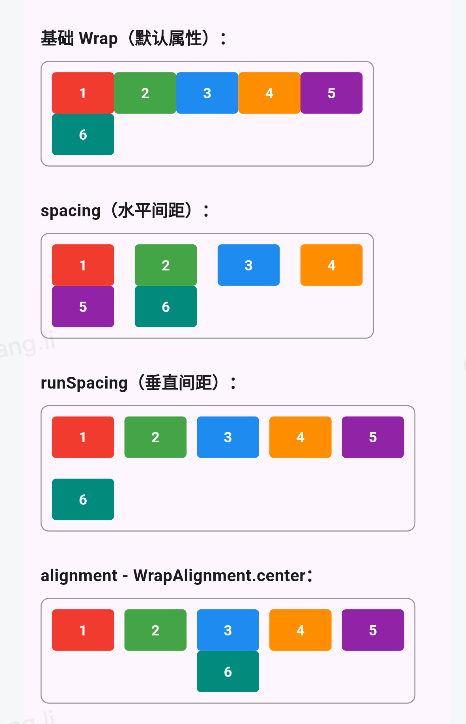
Wrap组件
Wrap可以实现流布局,单行的Wrap跟Row表现几乎一致,单列的Wrap则跟Column表现几乎一致。但 Row与Column都是单行单列的, Wrap则突破了这个限制, mainAxis上空间不足时,则向crossAxis上 去扩展显示。
| 属性 | 说明 |
|---|---|
| direction | 主轴的方向,默认水平 |
| alignment | 主轴的对其方式 |
| spacing | 主轴方向上的间距 |
| textDirection | 文本方向 |
| verticalDirection | 定义了children摆放顺序,默认是down ,见Flex相关属性介绍。 |
| runAlignment | run的对齐方式。 run可以理解为新的行或者列,如果是水平方向布局的话, run可以理解为新的一行 |
| runSpacing | run的间距 |
import 'package:flutter/material.dart';

void main() {
  runApp(MaterialApp(
      home: Scaffold(
    appBar: AppBar(
      title: const Text('Wrap 组件示例'),
    ),
    body: const WrapDemo(),
  )));
}

class WrapDemo extends StatelessWidget {
  const WrapDemo({Key? key}) : super(key: key);

  @override
  Widget build(BuildContext context) {
    return SingleChildScrollView(
      padding: const EdgeInsets.all(16.0),
      child: Column(
        crossAxisAlignment: CrossAxisAlignment.start,
        children: [
          _buildSection(
            '基础 Wrap(默认属性):',
            Wrap(
              children: _buildExampleBoxes(),
            ),
          ),
          _buildSection(
            'spacing(水平间距):',
            Wrap(
              spacing: 20, // 水平间距
              children: _buildExampleBoxes(),
            ),
          ),
          _buildSection(
            'runSpacing(垂直间距):',
            Wrap(
              spacing: 10,
              runSpacing: 20, // 垂直间距
              children: _buildExampleBoxes(),
            ),
          ),
          _buildSection(
            'alignment - WrapAlignment.center:',
            Wrap(
              spacing: 10,
              alignment: WrapAlignment.center, // 主轴对齐方式
              children: _buildExampleBoxes(),
            ),
          ),
          _buildSection(
            'alignment - WrapAlignment.end:',
            Wrap(
              spacing: 10,
              alignment: WrapAlignment.end,
              children: _buildExampleBoxes(),
            ),
          ),
          _buildSection(
            'alignment - WrapAlignment.spaceBetween:',
            Wrap(
              spacing: 10,
              alignment: WrapAlignment.spaceBetween,
              children: _buildExampleBoxes(),
            ),
          ),
          _buildSection(
            'alignment - WrapAlignment.spaceAround:',
            Wrap(
              spacing: 10,
              alignment: WrapAlignment.spaceAround,
              children: _buildExampleBoxes(),
            ),
          ),
          _buildSection(
            'alignment - WrapAlignment.spaceEvenly:',
            Wrap(
              spacing: 10,
              alignment: WrapAlignment.spaceEvenly,
              children: _buildExampleBoxes(),
            ),
          ),
          _buildSection(
            'crossAxisAlignment - WrapCrossAlignment.start:',
            Wrap(
              spacing: 10,
              runSpacing: 10,
              crossAxisAlignment: WrapCrossAlignment.start,
              children: _buildExampleBoxes(withDifferentHeights: true),
            ),
          ),
          _buildSection(
            'crossAxisAlignment - WrapCrossAlignment.center:',
            Wrap(
              spacing: 10,
              runSpacing: 10,
              crossAxisAlignment: WrapCrossAlignment.center,
              children: _buildExampleBoxes(withDifferentHeights: true),
            ),
          ),
          _buildSection(
            'crossAxisAlignment - WrapCrossAlignment.end:',
            Wrap(
              spacing: 10,
              runSpacing: 10,
              crossAxisAlignment: WrapCrossAlignment.end,
              children: _buildExampleBoxes(withDifferentHeights: true),
            ),
          ),
          _buildSection(
            'direction - Axis.vertical:',
            Container(
              height: 200,
              child: Wrap(
                direction: Axis.vertical,
                spacing: 10,
                runSpacing: 10,
                children: _buildExampleBoxes(count: 8),
              ),
            ),
          ),
          _buildSection(
            'verticalDirection - VerticalDirection.up:',
            Container(
              height: 150,
              child: Wrap(
                direction: Axis.vertical,
                spacing: 10,
                runSpacing: 10,
                verticalDirection: VerticalDirection.up,
                children: _buildExampleBoxes(count: 8),
              ),
            ),
          ),
          _buildSection(
            'textDirection - TextDirection.rtl:',
            Wrap(
              spacing: 10,
              textDirection: TextDirection.rtl,
              children: _buildExampleBoxes(),
            ),
          ),
        ],
      ),
    );
  }

  Widget _buildSection(String title, Widget content) {
    return Column(
      crossAxisAlignment: CrossAxisAlignment.start,
      children: [
        Text(
          title,
          style: const TextStyle(fontSize: 16, fontWeight: FontWeight.bold),
        ),
        const SizedBox(height: 10),
        Container(
          padding: const EdgeInsets.all(10),
          decoration: BoxDecoration(
            border: Border.all(color: Colors.grey),
            borderRadius: BorderRadius.circular(8),
          ),
          child: content,
        ),
        const SizedBox(height: 30),
      ],
    );
  }

  List<Widget> _buildExampleBoxes(
      {int count = 6, bool withDifferentHeights = false}) {
    final colors = [
      Colors.red,
      Colors.green,
      Colors.blue,
      Colors.orange,
      Colors.purple,
      Colors.teal,
    ];

    return List.generate(count, (index) {
      double height = withDifferentHeights
          ? (index % 3 == 0
              ? 30.0
              : index % 3 == 1
                  ? 50.0
                  : 70.0)
          : 40.0;

      return Container(
        width: 60,
        height: height,
        alignment: Alignment.center,
        decoration: BoxDecoration(
          color: colors[index % colors.length],
          borderRadius: BorderRadius.circular(4),
        ),
        child: Text(
          '${index + 1}',
          style:
              const TextStyle(color: Colors.white, fontWeight: FontWeight.bold),
        ),
      );
    });
  }
}
StatefulWidget
import 'package:flutter/material.dart';

void main() {
  runApp(MaterialApp(
      home: Scaffold(
    appBar: AppBar(
      title: const Text('Flutter按钮示例'),
    ),
    body:  MyApp(),
  )));
}

class MyApp extends StatelessWidget {
  int count = 0;

  void onPressed() {
    count++;
    print(count);
  }

  @override
  Widget build(BuildContext context) {
    return Center(
      child: Column(
        children: [
          Text("${count}",style: TextStyle(fontSize: 30),),
          SizedBox(
            height: 20,
          ),
          ElevatedButton(onPressed: onPressed, child: const Text("增加"))
        ],
      ),
    );
  }
}
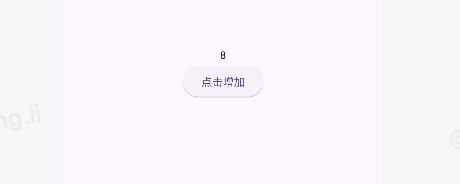
后台上的值确实发生的变动,但是页面没有跟着刷新
import 'dart:ffi';

import 'package:flutter/material.dart';

void main() {
  runApp(MaterialApp(
      home: Scaffold(
    appBar: AppBar(
      title: const Text('Flutter按钮示例'),
    ),
    body: CountDemo(),
  )));
}

class CountDemo extends StatefulWidget {
  const CountDemo({Key? key}) : super(key: key);

  @override
  State<CountDemo> createState() => _CountDemoState();
}

class _CountDemoState extends State<CountDemo> {
  int _count = 0;

  @override
  Widget build(BuildContext context) {
    return Center(
        child: Column(mainAxisAlignment: MainAxisAlignment.center, children: [
      Text('$_count'),
      ElevatedButton(
          onPressed: () {
            setState(() {
              _count++;
            });
          },
          child: const Text('点击增加')),
    ]));
  }
}
import 'dart:ffi';

import 'package:flutter/material.dart';

void main() {
  runApp(MaterialApp(
      home: Scaffold(
    appBar: AppBar(
      title: const Text('Flutter按钮示例'),
    ),
    body: const CountDemo(),
  )));
}

class CountDemo extends StatefulWidget {
  const CountDemo({Key? key}) : super(key: key);

  @override
  State<CountDemo> createState() => _CountDemoState();
}

// 定义列表项数据类
class ListItem {
  final IconData icon;
  final String title;
  final Color color;

  const ListItem(this.icon, this.title, this.color);
}

class _CountDemoState extends State<CountDemo> {
  final List<ListItem> items = [];

  @override
  void initState() {
    super.initState();
    // 初始化放在 initState 中只执行一次
    _init();
  }

  void _init() {
    items.add(const ListItem(Icons.home, 'Home', Colors.blue));
    items.add(const ListItem(Icons.settings, 'Settings', Colors.red));
    items.add(const ListItem(Icons.person, 'Profile', Colors.green));
  }

  void _loadData() {
    setState(() {
      items.add(ListItem(Icons.home, "标题${items.length + 1}", Colors.blue));
    });
  }

  @override
  Widget build(BuildContext context) {
    return Column(children: [
      // 给 ListView 一个固定或弹性的高度
      Expanded(
        child: ListView.builder(
            itemCount: items.length,
            itemBuilder: (context, index) {
              return ListTile(
                leading: Icon(
                  items[index].icon,
                  color: items[index].color,
                  size: 30,
                ),
                title: Text(
                  items[index].title,
                ),
              );
            }),
      ),
      Padding(
        padding: const EdgeInsets.all(16.0),
        child: ElevatedButton(onPressed: _loadData, child: const Text('点击增加')),
      ),
    ]);
  }
}
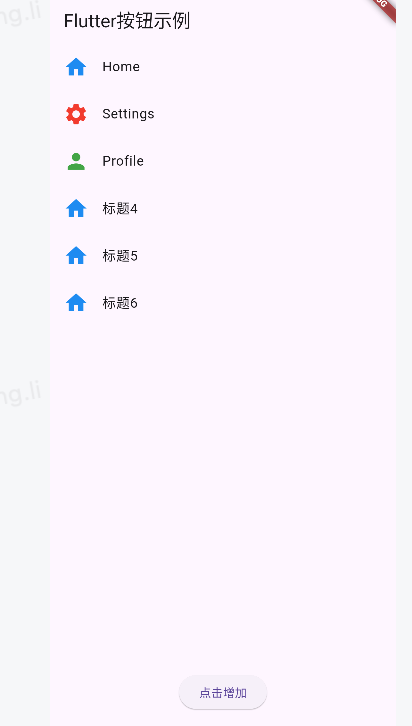
ListView.builder父元素必须得有明确的高度,不然会报错
BottomNavigationBar
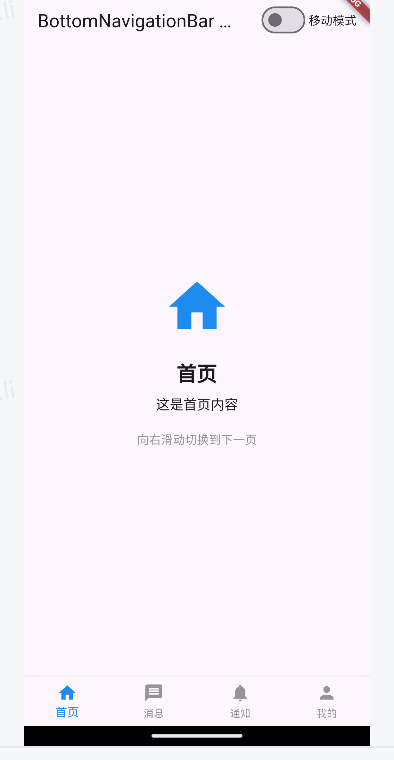
BottomNavigationBar 是底部导航条,可以让我们定义底部Tab切换, bottomNavigationBar是 Scaffold组件的参数。
| *属性名* | *说明* |
|---|---|
| items | List 底部导航条按钮集合 |
| iconSize | icon |
| currentIndex | 默认选中第几个 |
| onTap | 选中变化回调函数 |
| fixedColor | 选中的颜色 |
| type | BottomNavigationBarType.fixed BottomNavigationBarType.shifting |
import 'dart:ffi';

import 'package:flutter/material.dart';

void main() {
  runApp(const MyApp());
}

class MyApp extends StatelessWidget {
  const MyApp({Key? key}) : super(key: key);

  @override
  Widget build(BuildContext context) {
    return MaterialApp(
      title: 'BottomNavigationBar 示例',
      theme: ThemeData(
        primarySwatch: Colors.blue,
        visualDensity: VisualDensity.adaptivePlatformDensity,
      ),
      home: const BottomNavDemo(),
    );
  }
}

class BottomNavDemo extends StatefulWidget {
  const BottomNavDemo({Key? key}) : super(key: key);

  @override
  State<BottomNavDemo> createState() => _BottomNavDemoState();
}

class _BottomNavDemoState extends State<BottomNavDemo> {
  // 当前选中的索引
  int _currentIndex = 0;

  // 控制是否使用移动模式(shifting)
  bool _isShifting = false;

  // 页面控制器
  late PageController _pageController;

  // 导航页面
  final List<Widget> _pages = [
    const HomePage(),
    const MessagePage(),
    const NotificationPage(),
    const ProfilePage(),
  ];

  @override
  void initState() {
    super.initState();
    // 初始化PageController,设置初始页面为当前选中索引
    _pageController = PageController(initialPage: _currentIndex);
  }

  @override
  void dispose() {
    // 释放PageController资源
    _pageController.dispose();
    super.dispose();
  }

  @override
  Widget build(BuildContext context) {
    return Scaffold(
      appBar: AppBar(
        title: const Text('BottomNavigationBar 示例'),
        actions: [
          // 添加一个开关来切换导航栏模式
          Switch(
            value: _isShifting,
            onChanged: (value) {
              setState(() {
                _isShifting = value;
              });
            },
          ),
          const Padding(
            padding: EdgeInsets.only(right: 16.0),
            child: Center(
              child: Text('移动模式'),
            ),
          ),
        ],
      ),
      // 使用PageView替换原来的直接显示页面的方式
      body: PageView(
        controller: _pageController,
        // 滑动改变页面时更新当前索引
        onPageChanged: (index) {
          setState(() {
            _currentIndex = index;
          });
        },
        // 添加页面
        children: _pages,
      ),
      bottomNavigationBar: BottomNavigationBar(
        // 当前选中的索引
        currentIndex: _currentIndex,

        // 切换页面的回调
        onTap: (index) {
          setState(() {
            _currentIndex = index;
            // 使用动画切换到选中的页面
            _pageController.animateToPage(
              index,
              duration: const Duration(milliseconds: 300),
              curve: Curves.easeInOut,
            );
          });
        },

        // 设置导航栏类型(固定 fixed 或移动 shifting)
        type: _isShifting
            ? BottomNavigationBarType.shifting
            : BottomNavigationBarType.fixed,

        // 未选中时的颜色
        unselectedItemColor: Colors.grey,

        // 选中时的颜色
        selectedItemColor: _isShifting ? Colors.white : Colors.blue,

        // 选中项文本大小
        selectedFontSize: 14,

        // 未选中项文本大小
        unselectedFontSize: 12,

        // 图标与文本间距
        iconSize: 24,

        // 项目标签是否显示
        showUnselectedLabels: true,

        // 导航项
        items: [
          BottomNavigationBarItem(
            icon: const Icon(Icons.home),
            label: '首页',
            backgroundColor: _isShifting ? Colors.blue : null,
          ),
          BottomNavigationBarItem(
            icon: const Icon(Icons.message),
            label: '消息',
            backgroundColor: _isShifting ? Colors.orange : null,
          ),
          BottomNavigationBarItem(
            icon: const Icon(Icons.notifications),
            label: '通知',
            backgroundColor: _isShifting ? Colors.red : null,
          ),
          BottomNavigationBarItem(
            icon: const Icon(Icons.person),
            label: '我的',
            backgroundColor: _isShifting ? Colors.green : null,
          ),
        ],
      ),
    );
  }
}

// 示例页面 - 首页
class HomePage extends StatelessWidget {
  const HomePage({Key? key}) : super(key: key);

  @override
  Widget build(BuildContext context) {
    return Center(
      child: Column(
        mainAxisAlignment: MainAxisAlignment.center,
        children: [
          Icon(Icons.home, size: 80, color: Colors.blue),
          const SizedBox(height: 20),
          const Text(
            '首页',
            style: TextStyle(fontSize: 24, fontWeight: FontWeight.bold),
          ),
          const SizedBox(height: 10),
          const Text('这是首页内容', style: TextStyle(fontSize: 16)),
          const SizedBox(height: 20),
          const Text('向右滑动切换到下一页',
              style: TextStyle(fontSize: 14, color: Colors.grey)),
        ],
      ),
    );
  }
}

// 示例页面 - 消息
class MessagePage extends StatelessWidget {
  const MessagePage({Key? key}) : super(key: key);

  @override
  Widget build(BuildContext context) {
    return Center(
      child: Column(
        mainAxisAlignment: MainAxisAlignment.center,
        children: [
          Icon(Icons.message, size: 80, color: Colors.orange),
          const SizedBox(height: 20),
          const Text(
            '消息',
            style: TextStyle(fontSize: 24, fontWeight: FontWeight.bold),
          ),
          const SizedBox(height: 10),
          const Text('这里是您的消息列表', style: TextStyle(fontSize: 16)),
          const SizedBox(height: 20),
          const Text('左右滑动可切换页面',
              style: TextStyle(fontSize: 14, color: Colors.grey)),
        ],
      ),
    );
  }
}

// 示例页面 - 通知
class NotificationPage extends StatelessWidget {
  const NotificationPage({Key? key}) : super(key: key);

  @override
  Widget build(BuildContext context) {
    return Center(
      child: Column(
        mainAxisAlignment: MainAxisAlignment.center,
        children: [
          Icon(Icons.notifications, size: 80, color: Colors.red),
          const SizedBox(height: 20),
          const Text(
            '通知',
            style: TextStyle(fontSize: 24, fontWeight: FontWeight.bold),
          ),
          const SizedBox(height: 10),
          const Text('您有3条未读通知', style: TextStyle(fontSize: 16)),
          const SizedBox(height: 20),
          const Text('左右滑动可切换页面',
              style: TextStyle(fontSize: 14, color: Colors.grey)),
        ],
      ),
    );
  }
}

// 示例页面 - 我的
class ProfilePage extends StatelessWidget {
  const ProfilePage({Key? key}) : super(key: key);

  @override
  Widget build(BuildContext context) {
    return Center(
      child: Column(
        mainAxisAlignment: MainAxisAlignment.center,
        children: [
          Icon(Icons.person, size: 80, color: Colors.green),
          const SizedBox(height: 20),
          const Text(
            '个人资料',
            style: TextStyle(fontSize: 24, fontWeight: FontWeight.bold),
          ),
          const SizedBox(height: 10),
          const Text('个人信息设置', style: TextStyle(fontSize: 16)),
          const SizedBox(height: 20),
          const Text('向左滑动切换到上一页',
              style: TextStyle(fontSize: 14, color: Colors.grey)),
        ],
      ),
    );
  }
}
FloatingActionButton
import 'dart:ffi';

import 'package:flutter/material.dart';

void main() {
  runApp(const MyApp());
}

class MyApp extends StatelessWidget {
  const MyApp({Key? key}) : super(key: key);

  @override
  Widget build(BuildContext context) {
    return MaterialApp(
      title: 'BottomNavigationBar 示例',
      theme: ThemeData(
        primarySwatch: Colors.blue,
        visualDensity: VisualDensity.adaptivePlatformDensity,
      ),
      home: const BottomNavDemo(),
    );
  }
}

class BottomNavDemo extends StatefulWidget {
  const BottomNavDemo({Key? key}) : super(key: key);

  @override
  State<BottomNavDemo> createState() => _BottomNavDemoState();
}

class _BottomNavDemoState extends State<BottomNavDemo> {
  // 当前选中的索引
  int _currentIndex = 0;

  // 控制是否使用移动模式(shifting)
  bool _isShifting = false;

  // 页面控制器
  late PageController _pageController;

  // 导航页面
  final List<Widget> _pages = [
    const HomePage(),
    const MessagePage(),
    const NotificationPage(),
    const ProfilePage(),
  ];

  @override
  void initState() {
    super.initState();
    // 初始化PageController,设置初始页面为当前选中索引
    _pageController = PageController(initialPage: _currentIndex);
  }

  @override
  void dispose() {
    // 释放PageController资源
    _pageController.dispose();
    super.dispose();
  }

  @override
  Widget build(BuildContext context) {
    return Scaffold(
      appBar: AppBar(
        title: const Text('BottomNavigationBar 示例'),
        actions: [
          // 添加一个开关来切换导航栏模式
          Switch(
            value: _isShifting,
            onChanged: (value) {
              setState(() {
                _isShifting = value;
              });
            },
          ),
          const Padding(
            padding: EdgeInsets.only(right: 16.0),
            child: Center(
              child: Text('移动模式'),
            ),
          ),
        ],
      ),
      // 使用PageView替换原来的直接显示页面的方式
      body: PageView(
        controller: _pageController,
        // 滑动改变页面时更新当前索引
        onPageChanged: (index) {
          setState(() {
            _currentIndex = index;
          });
        },
        // 添加页面
        children: _pages,
      ),
      // 添加浮动按钮
      floatingActionButton: FloatingActionButton(
        onPressed: () {
          ScaffoldMessenger.of(context).showSnackBar(
            const SnackBar(content: Text('您点击了浮动按钮')),
          );
        },
        backgroundColor: Colors.orange,
        child: const CircleAvatar(
          backgroundColor: Colors.white,
          radius: 15,
          child: Icon(
            Icons.add,
            size: 24,
            color: Colors.orange,
          ),
        ),
      ),
      // 设置浮动按钮位置
      floatingActionButtonLocation: FloatingActionButtonLocation.centerDocked,
      // 底部导航栏
      bottomNavigationBar: BottomNavigationBar(
        // 当前选中的索引
        currentIndex: _currentIndex,

        // 切换页面的回调
        onTap: (index) {
          setState(() {
            _currentIndex = index;
            // 使用动画切换到选中的页面
            _pageController.animateToPage(
              index,
              duration: const Duration(milliseconds: 300),
              curve: Curves.easeInOut,
            );
          });
        },

        // 设置导航栏类型(固定 fixed 或移动 shifting)
        type: _isShifting
            ? BottomNavigationBarType.shifting
            : BottomNavigationBarType.fixed,

        // 未选中时的颜色
        unselectedItemColor: Colors.grey,

        // 选中时的颜色
        selectedItemColor: _isShifting ? Colors.white : Colors.blue,

        // 选中项文本大小
        selectedFontSize: 14,

        // 未选中项文本大小
        unselectedFontSize: 12,

        // 图标与文本间距
        iconSize: 24,

        // 项目标签是否显示
        showUnselectedLabels: true,

        // 导航项
        items: [
          BottomNavigationBarItem(
            icon: const Icon(Icons.home),
            label: '首页',
            backgroundColor: _isShifting ? Colors.blue : null,
          ),
          BottomNavigationBarItem(
            icon: const Icon(Icons.message),
            label: '消息',
            backgroundColor: _isShifting ? Colors.orange : null,
          ),
          BottomNavigationBarItem(
            icon: const Icon(Icons.message),
            label: '发布',
            backgroundColor: _isShifting ? Colors.orange : null,
          ),
          BottomNavigationBarItem(
            icon: const Icon(Icons.notifications),
            label: '通知',
            backgroundColor: _isShifting ? Colors.red : null,
          ),
          BottomNavigationBarItem(
            icon: const Icon(Icons.person),
            label: '我的',
            backgroundColor: _isShifting ? Colors.green : null,
          ),
        ],
      ),
    );
  }
}

// 示例页面 - 首页
class HomePage extends StatelessWidget {
  const HomePage({Key? key}) : super(key: key);

  @override
  Widget build(BuildContext context) {
    return Center(
      child: Column(
        mainAxisAlignment: MainAxisAlignment.center,
        children: [
          Icon(Icons.home, size: 80, color: Colors.blue),
          const SizedBox(height: 20),
          const Text(
            '首页',
            style: TextStyle(fontSize: 24, fontWeight: FontWeight.bold),
          ),
          const SizedBox(height: 10),
          const Text('这是首页内容', style: TextStyle(fontSize: 16)),
          const SizedBox(height: 20),
          const Text('向右滑动切换到下一页',
              style: TextStyle(fontSize: 14, color: Colors.grey)),
        ],
      ),
    );
  }
}

// 示例页面 - 消息
class MessagePage extends StatelessWidget {
  const MessagePage({Key? key}) : super(key: key);

  @override
  Widget build(BuildContext context) {
    return Center(
      child: Column(
        mainAxisAlignment: MainAxisAlignment.center,
        children: [
          Icon(Icons.message, size: 80, color: Colors.orange),
          const SizedBox(height: 20),
          const Text(
            '消息',
            style: TextStyle(fontSize: 24, fontWeight: FontWeight.bold),
          ),
          const SizedBox(height: 10),
          const Text('这里是您的消息列表', style: TextStyle(fontSize: 16)),
          const SizedBox(height: 20),
          const Text('左右滑动可切换页面',
              style: TextStyle(fontSize: 14, color: Colors.grey)),
        ],
      ),
    );
  }
}

// 示例页面 - 通知
class NotificationPage extends StatelessWidget {
  const NotificationPage({Key? key}) : super(key: key);

  @override
  Widget build(BuildContext context) {
    return Center(
      child: Column(
        mainAxisAlignment: MainAxisAlignment.center,
        children: [
          Icon(Icons.notifications, size: 80, color: Colors.red),
          const SizedBox(height: 20),
          const Text(
            '通知',
            style: TextStyle(fontSize: 24, fontWeight: FontWeight.bold),
          ),
          const SizedBox(height: 10),
          const Text('您有3条未读通知', style: TextStyle(fontSize: 16)),
          const SizedBox(height: 20),
          const Text('左右滑动可切换页面',
              style: TextStyle(fontSize: 14, color: Colors.grey)),
        ],
      ),
    );
  }
}

// 示例页面 - 我的
class ProfilePage extends StatelessWidget {
  const ProfilePage({Key? key}) : super(key: key);

  @override
  Widget build(BuildContext context) {
    return Center(
      child: Column(
        mainAxisAlignment: MainAxisAlignment.center,
        children: [
          Icon(Icons.person, size: 80, color: Colors.green),
          const SizedBox(height: 20),
          const Text(
            '个人资料',
            style: TextStyle(fontSize: 24, fontWeight: FontWeight.bold),
          ),
          const SizedBox(height: 10),
          const Text('个人信息设置', style: TextStyle(fontSize: 16)),
          const SizedBox(height: 20),
          const Text('向左滑动切换到上一页',
              style: TextStyle(fontSize: 14, color: Colors.grey)),
        ],
      ),
    );
  }
}
Drawer
import 'dart:ffi';
import 'package:flutter/material.dart';
void main() {
runApp(const MyApp());
}
class MyApp extends StatelessWidget {
const MyApp({Key? key}) : super(key: key);
@override
Widget build(BuildContext context) {
return MaterialApp(
title: 'Drawer 示例',
theme: ThemeData(
primarySwatch: Colors.blue,
visualDensity: VisualDensity.adaptivePlatformDensity,
),
home: const DrawerDemo(),
);
}
}
class DrawerDemo extends StatefulWidget {
const DrawerDemo({Key? key}) : super(key: key);
@override
State<DrawerDemo> createState() => _DrawerDemoState();
}
class _DrawerDemoState extends State<DrawerDemo> {
// 当前选中的菜单项
int _selectedIndex = 0;
// 控制抽屉菜单的Key
final GlobalKey<ScaffoldState> _scaffoldKey = GlobalKey<ScaffoldState>();
// 是否启用手势
bool _enableGesture = true;
// 当前抽屉样式
DrawerStyle _currentStyle = DrawerStyle.basic;
@override
Widget build(BuildContext context) {
return Scaffold(
key: _scaffoldKey,
appBar: AppBar(
title: const Text('Drawer 抽屉菜单示例'),
// 显示菜单按钮,点击打开抽屉
leading: IconButton(
icon: const Icon(Icons.menu),
onPressed: () {
_scaffoldKey.currentState?.openDrawer();
},
),
actions: [
// 切换抽屉样式
IconButton(
icon: const Icon(Icons.style),
onPressed: _changeDrawerStyle,
tooltip: '切换抽屉样式',
),
// 切换手势开关
IconButton(
icon: Icon(_enableGesture ? Icons.swipe : Icons.swipe_left),
onPressed: () {
setState(() {
_enableGesture = !_enableGesture;
});
},
tooltip: '${_enableGesture ? '禁用' : '启用'}滑动手势',
),
],
),
// 左侧抽屉菜单
drawer: Drawer(
// 抽屉宽度
width: 280,
// 是否启用手势打开抽屉
semanticLabel: '导航菜单',
// 背景颜色
backgroundColor: Colors.white,
// 阴影高度
elevation: 16.0,
// 抽屉内容
child: _buildDrawerContent(),
),
// 右侧抽屉菜单
endDrawer: Drawer(
child: ListView(
padding: EdgeInsets.zero,
children: [
const DrawerHeader(
decoration: BoxDecoration(
color: Colors.orangeAccent,
),
child: Text(
'右侧抽屉菜单',
style: TextStyle(
color: Colors.white,
fontSize: 24,
),
),
),
ListTile(
leading: const Icon(Icons.notification_important),
title: const Text('通知设置'),
onTap: () {
Navigator.pop(context);
},
),
ListTile(
leading: const Icon(Icons.settings),
title: const Text('应用设置'),
onTap: () {
Navigator.pop(context);
},
),
],
),
),
// 拖动手势设置
drawerEnableOpenDragGesture: _enableGesture,
endDrawerEnableOpenDragGesture: _enableGesture,
// 正文内容
body: Center(
child: Column(
mainAxisAlignment: MainAxisAlignment.center,
children: [
Text(
'当前选中: ${_getSelectedTitle()}',
style: Theme.of(context).textTheme.headlineLarge,
),
const SizedBox(height: 20),
ElevatedButton(
onPressed: () {
_scaffoldKey.currentState?.openDrawer();
},
child: const Text('打开左侧抽屉'),
),
const SizedBox(height: 10),
ElevatedButton(
onPressed: () {
_scaffoldKey.currentState?.openEndDrawer();
},
child: const Text('打开右侧抽屉'),
),
const SizedBox(height: 30),
Text(
'当前抽屉样式: ${_getStyleName()}',
style: Theme.of(context).textTheme.titleLarge,
),
const SizedBox(height: 10),
Text(
'滑动手势: ${_enableGesture ? '启用' : '禁用'}',
style: Theme.of(context).textTheme.titleMedium,
),
],
),
),
);
}
// 构建抽屉内容
Widget _buildDrawerContent() {
switch (_currentStyle) {
case DrawerStyle.basic:
return _buildBasicDrawer();
case DrawerStyle.userAccount:
return _buildUserAccountDrawer();
case DrawerStyle.custom:
return _buildCustomDrawer();
default:
return _buildBasicDrawer();
}
}
// 基本抽屉样式
Widget _buildBasicDrawer() {
return ListView(
// 取消内边距
padding: EdgeInsets.zero,
children: [
// 抽屉头部
const DrawerHeader(
decoration: BoxDecoration(
color: Colors.blue,
),
child: Text(
'基本抽屉菜单',
style: TextStyle(
color: Colors.white,
fontSize: 24,
),
),
),
// 菜单项
ListTile(
leading: const Icon(Icons.home),
title: const Text('首页'),
selected: _selectedIndex == 0,
onTap: () {
_selectItem(0);
},
),
ListTile(
leading: const Icon(Icons.person),
title: const Text('个人中心'),
selected: _selectedIndex == 1,
onTap: () {
_selectItem(1);
},
),
// 分割线
const Divider(),
ListTile(
leading: const Icon(Icons.settings),
title: const Text('设置'),
selected: _selectedIndex == 2,
onTap: () {
_selectItem(2);
},
),
ListTile(
leading: const Icon(Icons.help),
title: const Text('帮助与反馈'),
selected: _selectedIndex == 3,
onTap: () {
_selectItem(3);
},
),
],
);
}
// 用户账户抽屉样式
Widget _buildUserAccountDrawer() {
return ListView(
padding: EdgeInsets.zero,
children: [
// 用户账户头部
const UserAccountsDrawerHeader(
// 用户头像
currentAccountPicture: CircleAvatar(
backgroundImage:
NetworkImage('https://randomuser.me/api/portraits/men/78.jpg'),
),
// 其他头像
otherAccountsPictures: [
CircleAvatar(
backgroundImage: NetworkImage(
'https://randomuser.me/api/portraits/women/76.jpg'),
),
],
// 账户名称
accountName: Text('张三'),
// 账户邮箱
accountEmail: Text('zhangsan@example.com'),
// 装饰
decoration: BoxDecoration(
color: Colors.deepPurple,
image: DecorationImage(
image: NetworkImage(
'https://images.unsplash.com/photo-1557682250-33bd709cbe85'),
fit: BoxFit.cover,
),
),
),
ListTile(
leading: const Icon(Icons.home),
title: const Text('首页'),
selected: _selectedIndex == 0,
onTap: () {
_selectItem(0);
},
),
ListTile(
leading: const Icon(Icons.person),
title: const Text('个人中心'),
selected: _selectedIndex == 1,
onTap: () {
_selectItem(1);
},
),
ExpansionTile(
leading: const Icon(Icons.work),
title: const Text('我的工作'),
children: [
ListTile(
leading: const Icon(Icons.card_travel),
title: const Text('项目管理'),
selected: _selectedIndex == 4,
onTap: () {
_selectItem(4);
},
),
ListTile(
leading: const Icon(Icons.timeline),
title: const Text('工作报告'),
selected: _selectedIndex == 5,
onTap: () {
_selectItem(5);
},
),
],
),
const Divider(),
ListTile(
leading: const Icon(Icons.settings),
title: const Text('设置'),
selected: _selectedIndex == 2,
onTap: () {
_selectItem(2);
},
),
ListTile(
leading: const Icon(Icons.exit_to_app),
title: const Text('退出登录'),
onTap: () {
// 关闭抽屉
Navigator.pop(context);
// 显示退出提示
ScaffoldMessenger.of(context).showSnackBar(
const SnackBar(content: Text('退出登录')),
);
},
),
],
);
}
// 自定义抽屉样式
Widget _buildCustomDrawer() {
return Column(
children: [
// 自定义头部区域
Container(
height: 200,
width: double.infinity,
decoration: const BoxDecoration(
gradient: LinearGradient(
colors: [Colors.teal, Colors.cyan],
begin: Alignment.topCenter,
end: Alignment.bottomCenter,
),
),
child: Column(
mainAxisAlignment: MainAxisAlignment.center,
children: [
Container(
decoration: BoxDecoration(
shape: BoxShape.circle,
border: Border.all(color: Colors.white, width: 2),
),
child: const CircleAvatar(
radius: 50,
backgroundImage: NetworkImage(
'https://randomuser.me/api/portraits/men/78.jpg'),
),
),
const SizedBox(height: 10),
const Text(
'李四',
style: TextStyle(
color: Colors.white,
fontSize: 20,
fontWeight: FontWeight.bold,
),
),
const Text(
'lisi@example.com',
style: TextStyle(
color: Colors.white70,
fontSize: 14,
),
),
],
),
),
// 菜单项
Expanded(
child: Container(
color: Colors.grey[100],
child: ListView(
padding: const EdgeInsets.all(8.0),
children: [
_buildCustomMenuItem(0, Icons.home, '首页'),
_buildCustomMenuItem(1, Icons.person, '个人中心'),
_buildCustomMenuItem(2, Icons.settings, '设置'),
_buildCustomMenuItem(3, Icons.notifications, '通知中心'),
const SizedBox(height: 20),
const Padding(
padding: EdgeInsets.symmetric(horizontal: 16),
child: Text(
'其他功能',
style: TextStyle(
color: Colors.grey,
fontWeight: FontWeight.bold,
),
),
),
_buildCustomMenuItem(6, Icons.favorite, '我的收藏'),
_buildCustomMenuItem(7, Icons.wallet, '我的钱包'),
],
),
),
),
// 底部区域
Container(
padding: const EdgeInsets.symmetric(vertical: 16),
decoration: BoxDecoration(
color: Colors.white,
boxShadow: [
BoxShadow(
color: Colors.grey.withOpacity(0.3),
blurRadius: 5,
offset: const Offset(0, -3),
),
],
),
child: Row(
mainAxisAlignment: MainAxisAlignment.spaceEvenly,
children: [
IconButton(
icon: const Icon(Icons.settings),
onPressed: () {
_selectItem(2);
},
),
IconButton(
icon: const Icon(Icons.info),
onPressed: () {
Navigator.pop(context);
ScaffoldMessenger.of(context).showSnackBar(
const SnackBar(content: Text('关于应用')),
);
},
),
IconButton(
icon: const Icon(Icons.exit_to_app),
onPressed: () {
Navigator.pop(context);
ScaffoldMessenger.of(context).showSnackBar(
const SnackBar(content: Text('退出登录')),
);
},
),
],
),
),
],
);
}
// 自定义菜单项
Widget _buildCustomMenuItem(int index, IconData icon, String title) {
final bool isSelected = _selectedIndex == index;
return Card(
elevation: isSelected ? 2 : 0,
margin: const EdgeInsets.symmetric(vertical: 4, horizontal: 8),
color: isSelected ? Colors.teal.shade50 : Colors.white,
child: ListTile(
leading: Icon(
icon,
color: isSelected ? Colors.teal : Colors.grey[700],
),
title: Text(
title,
style: TextStyle(
fontWeight: isSelected ? FontWeight.bold : FontWeight.normal,
color: isSelected ? Colors.teal : Colors.black,
),
),
trailing: isSelected
? const Icon(
Icons.check_circle,
color: Colors.teal,
)
: null,
onTap: () {
_selectItem(index);
},
),
);
}
// 选择菜单项
void _selectItem(int index) {
setState(() {
_selectedIndex = index;
});
// 关闭抽屉
Navigator.pop(context);
}
// 获取选中的标题
String _getSelectedTitle() {
switch (_selectedIndex) {
case 0:
return '首页';
case 1:
return '个人中心';
case 2:
return '设置';
case 3:
return '帮助与反馈';
case 4:
return '项目管理';
case 5:
return '工作报告';
case 6:
return '我的收藏';
case 7:
return '我的钱包';
default:
return '首页';
}
}
// 切换抽屉样式
void _changeDrawerStyle() {
setState(() {
switch (_currentStyle) {
case DrawerStyle.basic:
_currentStyle = DrawerStyle.userAccount;
break;
case DrawerStyle.userAccount:
_currentStyle = DrawerStyle.custom;
break;
case DrawerStyle.custom:
_currentStyle = DrawerStyle.basic;
break;
}
});
}
// 获取样式名称
String _getStyleName() {
switch (_currentStyle) {
case DrawerStyle.basic:
return '基本样式';
case DrawerStyle.userAccount:
return '用户账户样式';
case DrawerStyle.custom:
return '自定义样式';
default:
return '';
}
}
}
// 抽屉样式枚举
enum DrawerStyle {
basic,
userAccount,
custom,
}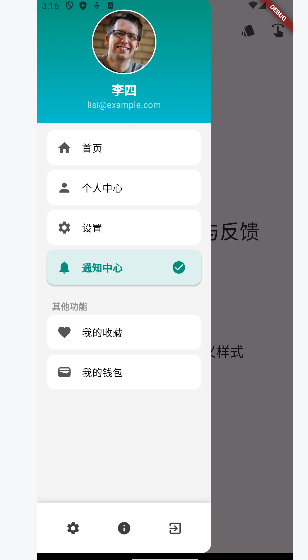
AppBar TabBar TabBarView
AppBar
| *属性* | 描述 |
|---|---|
| leading | 在标题前面显示的一个控件,在首页通常显示应用的 logo;在其他界面通 常显示为返回按钮 |
| title | 标题,通常显示为当前界面的标题文字,可以放组件 |
| actions | 通常使用 IconButton 来表示,可以放按钮组 |
| bottom | 通常放tabBar,标题下面显示一个 Tab 导航栏 |
| backgroundColor | 导航背景颜色 |
| iconTheme | 图标样式 |
| centerTitle | 标题是否居中显示 |
import 'package:flutter/material.dart';
void main() {
runApp(const MyApp());
}
class MyApp extends StatelessWidget {
const MyApp({Key? key}) : super(key: key);
@override
Widget build(BuildContext context) {
return MaterialApp(
title: 'TabBar 示例',
theme: ThemeData(
primarySwatch: Colors.blue,
visualDensity: VisualDensity.adaptivePlatformDensity,
),
home: const TabBarDemo(),
);
}
}
class TabBarDemo extends StatefulWidget {
const TabBarDemo({Key? key}) : super(key: key);
@override
State<TabBarDemo> createState() => _TabBarDemoState();
}
class _TabBarDemoState extends State<TabBarDemo> with TickerProviderStateMixin {
// TabController控制器
late TabController _tabController;
// 标签页数据
final List<TabItem> _tabs = [
TabItem(title: '首页', icon: Icons.home),
TabItem(title: '消息', icon: Icons.message),
TabItem(title: '联系人', icon: Icons.contacts),
TabItem(title: '发现', icon: Icons.explore),
TabItem(title: '我的', icon: Icons.person),
];
// 当前页面索引
int _currentIndex = 0;
// 自定义标签样式
bool _isScrollable = true;
bool _showIcons = true;
Color _indicatorColor = Colors.red;
TabBarIndicatorSize _indicatorSize = TabBarIndicatorSize.label;
double _indicatorWeight = 3.0;
@override
void initState() {
super.initState();
// 初始化TabController
_tabController = TabController(
length: _tabs.length,
vsync: this,
initialIndex: _currentIndex,
);
// 监听标签页切换
_tabController.addListener(() {
if (_tabController.indexIsChanging) {
setState(() {
_currentIndex = _tabController.index;
});
}
});
}
@override
void dispose() {
// 释放控制器资源
_tabController.dispose();
super.dispose();
}
@override
Widget build(BuildContext context) {
return Scaffold(
appBar: AppBar(
title: const Text('TabBar 顶部滑动导航'),
actions: [
// 样式切换按钮
IconButton(
icon: const Icon(Icons.settings),
onPressed: _showStyleOptions,
tooltip: '自定义TabBar样式',
),
],
// 在AppBar底部添加TabBar
bottom: TabBar(
controller: _tabController,
// 是否可滚动
isScrollable: _isScrollable,
// 指示器颜色
indicatorColor: _indicatorColor,
// 指示器高度
indicatorWeight: _indicatorWeight,
// 指示器大小
indicatorSize: _indicatorSize,
// 标签样式
labelColor: Colors.black,
unselectedLabelColor: Colors.black12,
labelStyle: const TextStyle(fontWeight: FontWeight.bold),
unselectedLabelStyle: const TextStyle(fontWeight: FontWeight.normal),
// 标签动画持续时间
tabAlignment: _isScrollable ? TabAlignment.start : TabAlignment.fill,
// 构建Tab标签
tabs: _buildTabs(),
),
),
// TabBarView用于展示对应标签页的内容
body: TabBarView(
controller: _tabController,
// 构建页面内容
children: _buildTabContents(),
),
// 底部控制按钮
floatingActionButton: FloatingActionButton(
onPressed: () {
// 切换到下一个标签页
final int nextIndex = (_currentIndex + 1) % _tabs.length;
_tabController.animateTo(nextIndex);
},
child: const Icon(Icons.navigate_next),
tooltip: '下一个标签页',
),
);
}
// 构建标签项
List<Widget> _buildTabs() {
return _tabs.map((tab) {
if (_showIcons) {
return Tab(
icon: Icon(tab.icon),
text: tab.title,
);
} else {
return Tab(text: tab.title);
}
}).toList();
}
// 构建标签页内容
List<Widget> _buildTabContents() {
return _tabs.map((tab) {
return TabContentPage(
title: tab.title,
icon: tab.icon,
index: _tabs.indexOf(tab),
);
}).toList();
}
// 显示样式设置对话框
void _showStyleOptions() {
showModalBottomSheet(
context: context,
builder: (BuildContext context) {
return StatefulBuilder(
builder: (context, setModalState) {
return Container(
padding: const EdgeInsets.all(16),
child: Column(
mainAxisSize: MainAxisSize.min,
crossAxisAlignment: CrossAxisAlignment.start,
children: [
const Text(
'TabBar 样式设置',
style: TextStyle(
fontSize: 18,
fontWeight: FontWeight.bold,
),
),
const SizedBox(height: 16),
// 可滚动开关
SwitchListTile(
title: const Text('可滚动标签'),
subtitle: const Text('启用后标签可以水平滚动'),
value: _isScrollable,
onChanged: (value) {
setModalState(() {
_isScrollable = value;
});
setState(() {
_isScrollable = value;
});
},
),
// 显示图标开关
SwitchListTile(
title: const Text('显示图标'),
subtitle: const Text('在标签上显示图标'),
value: _showIcons,
onChanged: (value) {
setModalState(() {
_showIcons = value;
});
setState(() {
_showIcons = value;
});
},
),
// 指示器宽度设置
ListTile(
title: const Text('指示器大小'),
subtitle: const Text('标签宽度或内容宽度'),
trailing: DropdownButton<TabBarIndicatorSize>(
value: _indicatorSize,
onChanged: (TabBarIndicatorSize? value) {
if (value != null) {
setModalState(() {
_indicatorSize = value;
});
setState(() {
_indicatorSize = value;
});
}
},
items: const [
DropdownMenuItem(
value: TabBarIndicatorSize.label,
child: Text('标签内容宽度'),
),
DropdownMenuItem(
value: TabBarIndicatorSize.tab,
child: Text('整个标签宽度'),
),
],
),
),
// 指示器颜色选择
ListTile(
title: const Text('指示器颜色'),
trailing: Row(
mainAxisSize: MainAxisSize.min,
children: [
_buildColorOption(Colors.red),
_buildColorOption(Colors.blue),
_buildColorOption(Colors.green),
_buildColorOption(Colors.orange),
],
),
),
// 指示器高度滑块
ListTile(
title:
Text('指示器高度: ${_indicatorWeight.toStringAsFixed(1)}'),
subtitle: Slider(
value: _indicatorWeight,
min: 1.0,
max: 6.0,
divisions: 10,
onChanged: (value) {
setModalState(() {
_indicatorWeight = value;
});
setState(() {
_indicatorWeight = value;
});
},
),
),
],
),
);
},
);
},
);
}
// 构建颜色选择按钮
Widget _buildColorOption(Color color) {
return GestureDetector(
onTap: () {
setState(() {
_indicatorColor = color;
});
Navigator.pop(context);
},
child: Container(
margin: const EdgeInsets.symmetric(horizontal: 4),
width: 30,
height: 30,
decoration: BoxDecoration(
color: color,
shape: BoxShape.circle,
border: Border.all(
color: _indicatorColor == color ? Colors.white : Colors.grey,
width: _indicatorColor == color ? 2 : 1,
),
),
),
);
}
}
// 标签页内容
class TabContentPage extends StatelessWidget {
final String title;
final IconData icon;
final int index;
const TabContentPage({
Key? key,
required this.title,
required this.icon,
required this.index,
}) : super(key: key);
@override
Widget build(BuildContext context) {
// 根据索引生成不同的布局
switch (index) {
case 0:
return _buildHomePage();
case 1:
return _buildMessagesPage();
case 2:
return _buildContactsPage();
case 3:
return _buildExplorePage();
case 4:
return _buildProfilePage();
default:
return _buildDefaultPage();
}
}
// 首页内容
Widget _buildHomePage() {
return CustomScrollView(
slivers: [
SliverPadding(
padding: const EdgeInsets.all(16),
sliver: SliverGrid(
gridDelegate: const SliverGridDelegateWithFixedCrossAxisCount(
crossAxisCount: 2,
mainAxisSpacing: 10,
crossAxisSpacing: 10,
childAspectRatio: 1.5,
),
delegate: SliverChildBuilderDelegate(
(context, index) {
return Card(
color: Colors.blue[(index % 3 + 1) * 100],
child: Center(
child: Text(
'内容项 ${index + 1}',
style: const TextStyle(
color: Colors.white,
fontWeight: FontWeight.bold,
),
),
),
);
},
childCount: 6,
),
),
),
SliverList(
delegate: SliverChildBuilderDelegate(
(context, index) {
return ListTile(
leading: const Icon(Icons.article),
title: Text('新闻标题 ${index + 1}'),
subtitle: Text('新闻简介内容 ${index + 1}'),
trailing: const Icon(Icons.arrow_forward_ios, size: 16),
);
},
childCount: 10,
),
),
],
);
}
// 消息页面
Widget _buildMessagesPage() {
return ListView.builder(
itemCount: 15,
itemBuilder: (context, index) {
return ListTile(
leading: CircleAvatar(
backgroundColor: Colors.green[200],
child: Text('${(index + 1) % 10}'),
),
title: Text('消息 ${index + 1}'),
subtitle: Text('这是一条消息内容示例 ${index + 1}'),
trailing: Text(
'${(index * 5) % 24}:${(index * 7) % 60 < 10 ? '0' : ''}${(index * 7) % 60}'),
);
},
);
}
// 联系人页面
Widget _buildContactsPage() {
// 分组的联系人
final Map<String, List<String>> groupedContacts = {
'A': ['阿里', '艾伦', '安妮'],
'B': ['白云', '鲍勃', '本杰明'],
'C': ['陈明', '崔健', '蔡依林'],
'D': ['戴维', '杜甫', '邓丽君'],
};
return ListView.builder(
itemCount: groupedContacts.length,
itemBuilder: (context, index) {
String key = groupedContacts.keys.elementAt(index);
List<String> contacts = groupedContacts[key]!;
return Column(
crossAxisAlignment: CrossAxisAlignment.start,
children: [
// 分组标题
Container(
padding: const EdgeInsets.only(left: 16, top: 8, bottom: 8),
color: Colors.grey[200],
child: Text(
key,
style: const TextStyle(
fontWeight: FontWeight.bold,
color: Colors.blue,
),
),
),
// 分组内容
...contacts.map((name) {
return ListTile(
leading: CircleAvatar(
child: Text(name.substring(0, 1)),
),
title: Text(name),
trailing: const Icon(Icons.call),
);
}).toList(),
],
);
},
);
}
// 发现页面
Widget _buildExplorePage() {
return GridView.builder(
padding: const EdgeInsets.all(16),
gridDelegate: const SliverGridDelegateWithFixedCrossAxisCount(
crossAxisCount: 2,
mainAxisSpacing: 16,
crossAxisSpacing: 16,
childAspectRatio: 0.8,
),
itemCount: 10,
itemBuilder: (context, index) {
return Card(
elevation: 3,
shape: RoundedRectangleBorder(
borderRadius: BorderRadius.circular(12),
),
clipBehavior: Clip.antiAlias,
child: Column(
crossAxisAlignment: CrossAxisAlignment.start,
children: [
// 图片
Container(
height: 120,
color: Colors.purple[(index % 3 + 1) * 100],
child: Center(
child: Icon(
[Icons.image, Icons.landscape, Icons.camera][index % 3],
size: 40,
color: Colors.white,
),
),
),
// 内容
Padding(
padding: const EdgeInsets.all(8.0),
child: Column(
crossAxisAlignment: CrossAxisAlignment.start,
children: [
Text(
'发现项目 ${index + 1}',
style: const TextStyle(
fontWeight: FontWeight.bold,
fontSize: 16,
),
),
const SizedBox(height: 4),
Text(
'这是一个简短的描述内容 ${index + 1}',
style: TextStyle(
color: Colors.grey[600],
fontSize: 12,
),
),
],
),
),
],
),
);
},
);
}
// 个人中心页面
Widget _buildProfilePage() {
return SingleChildScrollView(
child: Column(
children: [
// 头部个人信息
Container(
padding: const EdgeInsets.all(20),
decoration: BoxDecoration(
gradient: LinearGradient(
colors: [Colors.blue[700]!, Colors.blue[500]!],
begin: Alignment.topCenter,
end: Alignment.bottomCenter,
),
),
child: Column(
children: const [
CircleAvatar(
radius: 50,
backgroundImage: NetworkImage(
'https://randomuser.me/api/portraits/men/32.jpg',
),
),
SizedBox(height: 10),
Text(
'张三',
style: TextStyle(
color: Colors.white,
fontSize: 22,
fontWeight: FontWeight.bold,
),
),
Text(
'高级开发工程师',
style: TextStyle(
color: Colors.white70,
fontSize: 16,
),
),
],
),
),
// 统计信息
Padding(
padding: const EdgeInsets.symmetric(vertical: 16),
child: Row(
mainAxisAlignment: MainAxisAlignment.spaceEvenly,
children: [
_buildStatItem('关注', '128'),
_buildStatItem('粉丝', '256'),
_buildStatItem('点赞', '1024'),
],
),
),
const Divider(),
// 菜单列表
_buildProfileMenuItem(Icons.bookmark, '我的收藏'),
_buildProfileMenuItem(Icons.history, '浏览历史'),
_buildProfileMenuItem(Icons.wallet, '我的钱包'),
const Divider(),
_buildProfileMenuItem(Icons.settings, '设置'),
_buildProfileMenuItem(Icons.help, '帮助与反馈'),
const SizedBox(height: 20),
],
),
);
}
// 个人中心统计项
Widget _buildStatItem(String title, String count) {
return Column(
children: [
Text(
count,
style: const TextStyle(
fontSize: 20,
fontWeight: FontWeight.bold,
),
),
Text(
title,
style: TextStyle(
color: Colors.grey[600],
),
),
],
);
}
// 个人中心菜单项
Widget _buildProfileMenuItem(IconData icon, String title) {
return ListTile(
leading: Icon(icon),
title: Text(title),
trailing: const Icon(Icons.arrow_forward_ios, size: 16),
);
}
// 默认页面
Widget _buildDefaultPage() {
return Center(
child: Column(
mainAxisAlignment: MainAxisAlignment.center,
children: [
Icon(
icon,
size: 80,
color: Colors.blue[300],
),
const SizedBox(height: 16),
Text(
title,
style: const TextStyle(
fontSize: 24,
fontWeight: FontWeight.bold,
),
),
const SizedBox(height: 16),
Text(
'这是 $title 页面的内容',
style: const TextStyle(fontSize: 16),
),
],
),
);
}
}
// 标签数据类
class TabItem {
final String title;
final IconData icon;
TabItem({required this.title, required this.icon});
}TabBar
| 属性 | 描述 |
|---|---|
| tabs | 显示的标签内容, 一般使用Tab对象,也可以是其他的Widget |
| controller | TabController对象 |
| isScrollable | 是否可滚动 |
| indicatorColor | 指示器颜色 |
| indicatorWeight | 指示器高度 |
| indicatorPadding | 底部指示器的Padding |
| indicator | 指示器decoration,例如边框等 |
| indicatorSize | 指示器大小计算方式, TabBarIndicatorSize.label跟文字等 宽,TabBarIndicatorSize.tab跟每个tab等宽 |
| labelColor | 选中label颜色 |
| labelStyle | 选中label的Style |
| labelPadding | 每个label的padding值 |
| unselectedLabelColor | 未选中label颜色 |
| unselectedLabelStyle | 未选中label的Style |
路由
普通路由
Flutter中的路由通俗的讲就是页面跳转。在Flutter中通过Navigator组件管理路由导航。 并提供了管理堆栈的方法。如:Navigator.push和Navigtor.pop
Center(
child :  ElevatedButton(onPressed :  (){ Navigator .of(context) .push(
MaterialPageRoute(builder :  (context){ return  const  SearchPage() ;
}) ) ;
} , child: const Text( "跳转到搜索页面")) , )import 'package:flutter/material.dart';
void main() {
runApp(const MyApp());
}
class MyApp extends StatelessWidget {
const MyApp({Key? key}) : super(key: key);
@override
Widget build(BuildContext context) {
return MaterialApp(
debugShowCheckedModeBanner: false,
title: '简单导航示例',
theme: ThemeData(
primarySwatch: Colors.blue,
useMaterial3: true,
),
home: const HomePage(),
);
}
}
// 主页面
class HomePage extends StatelessWidget {
const HomePage({Key? key}) : super(key: key);
@override
Widget build(BuildContext context) {
return Scaffold(
appBar: AppBar(
title: const Text('首页'),
backgroundColor: Colors.blue,
foregroundColor: Colors.white,
),
body: Center(
child: Column(
mainAxisAlignment: MainAxisAlignment.center,
children: [
const Text(
'导航示例',
style: TextStyle(fontSize: 24, fontWeight: FontWeight.bold),
),
const SizedBox(height: 50),
// 页面导航按钮
_buildNavigationButton(
context,
title: '前往第一页',
color: Colors.green,
destination: const FirstPage(),
),
_buildNavigationButton(
context,
title: '前往第二页',
color: Colors.orange,
destination: const SecondPage(),
),
_buildNavigationButton(
context,
title: '前往第三页',
color: Colors.purple,
destination: const ThirdPage(),
),
_buildNavigationButton(
context,
title: '传递参数到详情页',
color: Colors.red,
onPressed: () {
// 传递参数到新页面
Navigator.push(
context,
MaterialPageRoute(
builder: (context) => const DetailPage(
title: '详情页',
message: '这是从首页传递的消息',
),
),
);
},
),
],
),
),
);
}
// 构建导航按钮
Widget _buildNavigationButton(
BuildContext context, {
required String title,
required Color color,
Widget? destination,
VoidCallback? onPressed,
}) {
return Padding(
padding: const EdgeInsets.symmetric(vertical: 8),
child: ElevatedButton(
style: ElevatedButton.styleFrom(
backgroundColor: color,
foregroundColor: Colors.white,
minimumSize: const Size(200, 50),
shape: RoundedRectangleBorder(
borderRadius: BorderRadius.circular(10),
),
),
onPressed: onPressed ??
() {
// 基本导航:从当前页面跳转到目标页面
if (destination != null) {
Navigator.push(
context,
MaterialPageRoute(builder: (context) => destination),
);
}
},
child: Text(title),
),
);
}
}
// 第一个目标页面
class FirstPage extends StatelessWidget {
const FirstPage({Key? key}) : super(key: key);
@override
Widget build(BuildContext context) {
return Scaffold(
appBar: AppBar(
title: const Text('第一页'),
backgroundColor: Colors.green,
foregroundColor: Colors.white,
),
body: Center(
child: Column(
mainAxisAlignment: MainAxisAlignment.center,
children: [
const Icon(
Icons.looks_one,
size: 100,
color: Colors.green,
),
const SizedBox(height: 20),
const Text(
'这是第一页',
style: TextStyle(fontSize: 24, fontWeight: FontWeight.bold),
),
const SizedBox(height: 50),
// 返回按钮
ElevatedButton(
style: ElevatedButton.styleFrom(
backgroundColor: Colors.green,
foregroundColor: Colors.white,
minimumSize: const Size(150, 40),
),
onPressed: () {
// 返回上一页
Navigator.pop(context);
},
child: const Text('返回'),
),
const SizedBox(height: 20),
// 前往下一页按钮
OutlinedButton(
style: OutlinedButton.styleFrom(
foregroundColor: Colors.green,
side: const BorderSide(color: Colors.green),
minimumSize: const Size(150, 40),
),
onPressed: () {
Navigator.push(
context,
MaterialPageRoute(builder: (context) => const SecondPage()),
);
},
child: const Text('前往第二页'),
),
],
),
),
);
}
}
// 第二个目标页面
class SecondPage extends StatelessWidget {
const SecondPage({Key? key}) : super(key: key);
@override
Widget build(BuildContext context) {
return Scaffold(
appBar: AppBar(
title: const Text('第二页'),
backgroundColor: Colors.orange,
foregroundColor: Colors.white,
),
body: Center(
child: Column(
mainAxisAlignment: MainAxisAlignment.center,
children: [
const Icon(
Icons.looks_two,
size: 100,
color: Colors.orange,
),
const SizedBox(height: 20),
const Text(
'这是第二页',
style: TextStyle(fontSize: 24, fontWeight: FontWeight.bold),
),
const SizedBox(height: 50),
// 返回按钮
ElevatedButton(
style: ElevatedButton.styleFrom(
backgroundColor: Colors.orange,
foregroundColor: Colors.white,
minimumSize: const Size(150, 40),
),
onPressed: () {
// 返回上一页
Navigator.pop(context);
},
child: const Text('返回'),
),
const SizedBox(height: 20),
// 返回首页按钮
OutlinedButton(
style: OutlinedButton.styleFrom(
foregroundColor: Colors.orange,
side: const BorderSide(color: Colors.orange),
minimumSize: const Size(150, 40),
),
onPressed: () {
// 返回到首页(弹出所有页面直到首页)
Navigator.popUntil(context, (route) => route.isFirst);
},
child: const Text('返回首页'),
),
],
),
),
);
}
}
// 第三个目标页面
class ThirdPage extends StatelessWidget {
const ThirdPage({Key? key}) : super(key: key);
@override
Widget build(BuildContext context) {
return Scaffold(
appBar: AppBar(
title: const Text('第三页'),
backgroundColor: Colors.purple,
foregroundColor: Colors.white,
),
body: Center(
child: Column(
mainAxisAlignment: MainAxisAlignment.center,
children: [
const Icon(
Icons.looks_3,
size: 100,
color: Colors.purple,
),
const SizedBox(height: 20),
const Text(
'这是第三页',
style: TextStyle(fontSize: 24, fontWeight: FontWeight.bold),
),
const SizedBox(height: 30),
const Padding(
padding: EdgeInsets.symmetric(horizontal: 40),
child: Text(
'在这个页面,您可以选择返回上一页或返回数据到首页',
textAlign: TextAlign.center,
style: TextStyle(fontSize: 16),
),
),
const SizedBox(height: 50),
// 返回按钮
ElevatedButton(
style: ElevatedButton.styleFrom(
backgroundColor: Colors.purple,
foregroundColor: Colors.white,
minimumSize: const Size(200, 40),
),
onPressed: () {
// 返回上一页
Navigator.pop(context);
},
child: const Text('返回不带数据'),
),
const SizedBox(height: 20),
// 返回数据按钮
ElevatedButton(
style: ElevatedButton.styleFrom(
backgroundColor: Colors.purple.shade800,
foregroundColor: Colors.white,
minimumSize: const Size(200, 40),
),
onPressed: () {
// 返回数据到上一页
Navigator.pop(context, '这是从第三页返回的数据!');
},
child: const Text('返回并传递数据'),
),
],
),
),
);
}
}
// 详情页 - 接收参数
class DetailPage extends StatelessWidget {
final String title;
final String message;
const DetailPage({
Key? key,
required this.title,
required this.message,
}) : super(key: key);
@override
Widget build(BuildContext context) {
return Scaffold(
appBar: AppBar(
title: Text(title),
backgroundColor: Colors.red,
foregroundColor: Colors.white,
),
body: Center(
child: Column(
mainAxisAlignment: MainAxisAlignment.center,
children: [
const Icon(
Icons.info_outline,
size: 80,
color: Colors.red,
),
const SizedBox(height: 30),
const Text(
'参数传递示例',
style: TextStyle(fontSize: 24, fontWeight: FontWeight.bold),
),
const SizedBox(height: 20),
// 显示传入的参数
Container(
margin: const EdgeInsets.symmetric(horizontal: 40),
padding: const EdgeInsets.all(20),
decoration: BoxDecoration(
color: Colors.red.shade50,
borderRadius: BorderRadius.circular(10),
border: Border.all(color: Colors.red.shade200),
),
child: Column(
children: [
const Text(
'接收到的参数:',
style: TextStyle(fontWeight: FontWeight.bold),
),
const SizedBox(height: 10),
Text('标题: $title'),
const SizedBox(height: 5),
Text('消息: $message'),
],
),
),
const SizedBox(height: 50),
// 返回按钮
ElevatedButton(
style: ElevatedButton.styleFrom(
backgroundColor: Colors.red,
foregroundColor: Colors.white,
minimumSize: const Size(150, 40),
),
onPressed: () {
// 返回上一页
Navigator.pop(context);
},
child: const Text('返回'),
),
],
),
),
);
}
}命名路由
import 'package:flutter/material.dart';
void main() {
runApp(const MyApp());
}
class MyApp extends StatelessWidget {
const MyApp({Key? key}) : super(key: key);
@override
Widget build(BuildContext context) {
return MaterialApp(
debugShowCheckedModeBanner: false,
title: '命名路由示例',
theme: ThemeData(
primarySwatch: Colors.blue,
useMaterial3: true,
),
// 注册命名路由
initialRoute: '/',
routes: {
'/': (context) => const HomePage(),
'/first': (context) => const FirstPage(),
'/second': (context) => const SecondPage(),
'/third': (context) => const ThirdPage(),
},
// 路由生成器 - 处理参数传递和动态路由
onGenerateRoute: (settings) {
if (settings.name == '/detail') {
// 从参数中提取需要的数据
final args = settings.arguments as Map<String, String>;
// 返回带参数的路由
return MaterialPageRoute(
builder: (context) {
return DetailPage(
title: args['title'] ?? '详情页',
message: args['message'] ?? '无消息内容',
);
},
);
}
// 未处理的命名路由
return null;
},
// 处理未知路由
onUnknownRoute: (settings) {
return MaterialPageRoute(
builder: (context) => const NotFoundPage(),
);
},
);
}
}
// 主页面
class HomePage extends StatefulWidget {
const HomePage({Key? key}) : super(key: key);
@override
State<HomePage> createState() => _HomePageState();
}
class _HomePageState extends State<HomePage> {
String? _returnedData;
@override
Widget build(BuildContext context) {
return Scaffold(
appBar: AppBar(
title: const Text('命名路由导航示例'),
backgroundColor: Colors.blue,
foregroundColor: Colors.white,
),
body: Center(
child: Column(
mainAxisAlignment: MainAxisAlignment.center,
children: [
const Text(
'命名路由导航',
style: TextStyle(fontSize: 24, fontWeight: FontWeight.bold),
),
const SizedBox(height: 20),
const Padding(
padding: EdgeInsets.symmetric(horizontal: 40),
child: Text(
'使用路由名称进行导航,而不是直接传递Widget',
textAlign: TextAlign.center,
style: TextStyle(fontSize: 16),
),
),
const SizedBox(height: 50),
// 显示第三页返回的数据
if (_returnedData != null)
Container(
margin:
const EdgeInsets.symmetric(horizontal: 40, vertical: 20),
padding: const EdgeInsets.all(15),
decoration: BoxDecoration(
color: Colors.green.shade50,
borderRadius: BorderRadius.circular(10),
border: Border.all(color: Colors.green.shade200),
),
child: Column(
children: [
const Text(
'返回的数据:',
style: TextStyle(fontWeight: FontWeight.bold),
),
const SizedBox(height: 8),
Text(_returnedData!),
],
),
),
// 页面导航按钮
_buildNavigationButton(
title: '前往第一页',
color: Colors.green,
onPressed: () {
Navigator.pushNamed(context, '/first');
},
),
_buildNavigationButton(
title: '前往第二页',
color: Colors.orange,
onPressed: () {
Navigator.pushNamed(context, '/second');
},
),
_buildNavigationButton(
title: '前往第三页',
color: Colors.purple,
onPressed: () async {
// 等待返回结果
final result = await Navigator.pushNamed(context, '/third');
setState(() {
_returnedData = result as String?;
});
},
),
_buildNavigationButton(
title: '传递参数到详情页',
color: Colors.red,
onPressed: () {
Navigator.pushNamed(
context,
'/detail',
arguments: {
'title': '详情页标题',
'message': '这是通过命名路由传递的参数',
},
);
},
),
_buildNavigationButton(
title: '前往未定义页面',
color: Colors.grey.shade800,
onPressed: () {
Navigator.pushNamed(context, '/notExist');
},
),
],
),
),
);
}
// 构建导航按钮
Widget _buildNavigationButton({
required String title,
required Color color,
required VoidCallback onPressed,
}) {
return Padding(
padding: const EdgeInsets.symmetric(vertical: 8),
child: ElevatedButton(
style: ElevatedButton.styleFrom(
backgroundColor: color,
foregroundColor: Colors.white,
minimumSize: const Size(250, 50),
shape: RoundedRectangleBorder(
borderRadius: BorderRadius.circular(10),
),
),
onPressed: onPressed,
child: Text(title),
),
);
}
}
// 第一个目标页面
class FirstPage extends StatelessWidget {
const FirstPage({Key? key}) : super(key: key);
@override
Widget build(BuildContext context) {
return Scaffold(
appBar: AppBar(
title: const Text('第一页'),
backgroundColor: Colors.green,
foregroundColor: Colors.white,
),
body: Center(
child: Column(
mainAxisAlignment: MainAxisAlignment.center,
children: [
const Icon(
Icons.looks_one,
size: 100,
color: Colors.green,
),
const SizedBox(height: 20),
const Text(
'这是第一页',
style: TextStyle(fontSize: 24, fontWeight: FontWeight.bold),
),
const SizedBox(height: 20),
const Text(
'当前路由: /first',
style: TextStyle(fontSize: 16, color: Colors.grey),
),
const SizedBox(height: 50),
// 返回按钮
ElevatedButton(
style: ElevatedButton.styleFrom(
backgroundColor: Colors.green,
foregroundColor: Colors.white,
minimumSize: const Size(150, 40),
),
onPressed: () {
// 返回上一页
Navigator.pop(context);
},
child: const Text('返回'),
),
const SizedBox(height: 20),
// 使用命名路由导航
OutlinedButton(
style: OutlinedButton.styleFrom(
foregroundColor: Colors.green,
side: const BorderSide(color: Colors.green),
minimumSize: const Size(200, 40),
),
onPressed: () {
Navigator.pushNamed(context, '/second');
},
child: const Text('命名路由跳转到第二页'),
),
const SizedBox(height: 20),
// 替换当前路由
OutlinedButton(
style: OutlinedButton.styleFrom(
foregroundColor: Colors.blue,
side: const BorderSide(color: Colors.blue),
minimumSize: const Size(200, 40),
),
onPressed: () {
// 使用替换方式导航
Navigator.pushReplacementNamed(context, '/second');
},
child: const Text('替换当前路由 (pushReplacement)'),
),
],
),
),
);
}
}
// 第二个目标页面
class SecondPage extends StatelessWidget {
const SecondPage({Key? key}) : super(key: key);
@override
Widget build(BuildContext context) {
return Scaffold(
appBar: AppBar(
title: const Text('第二页'),
backgroundColor: Colors.orange,
foregroundColor: Colors.white,
),
body: Center(
child: Column(
mainAxisAlignment: MainAxisAlignment.center,
children: [
const Icon(
Icons.looks_two,
size: 100,
color: Colors.orange,
),
const SizedBox(height: 20),
const Text(
'这是第二页',
style: TextStyle(fontSize: 24, fontWeight: FontWeight.bold),
),
const SizedBox(height: 20),
const Text(
'当前路由: /second',
style: TextStyle(fontSize: 16, color: Colors.grey),
),
const SizedBox(height: 50),
// 返回按钮
ElevatedButton(
style: ElevatedButton.styleFrom(
backgroundColor: Colors.orange,
foregroundColor: Colors.white,
minimumSize: const Size(150, 40),
),
onPressed: () {
// 返回上一页
Navigator.pop(context);
},
child: const Text('返回'),
),
const SizedBox(height: 20),
// 返回首页按钮 - 使用命名路由
OutlinedButton(
style: OutlinedButton.styleFrom(
foregroundColor: Colors.orange,
side: const BorderSide(color: Colors.orange),
minimumSize: const Size(200, 40),
),
onPressed: () {
// 返回到首页 (使用命名路由的方式)
Navigator.pushNamedAndRemoveUntil(
context,
'/',
(route) => false, // 移除所有路由
);
},
child: const Text('返回首页 (命名路由方式)'),
),
const SizedBox(height: 20),
// 常规方式返回首页
OutlinedButton(
style: OutlinedButton.styleFrom(
foregroundColor: Colors.blue,
side: const BorderSide(color: Colors.blue),
minimumSize: const Size(200, 40),
),
onPressed: () {
// 返回到首页 (常规方式)
Navigator.popUntil(context, (route) => route.isFirst);
},
child: const Text('返回首页 (常规方式)'),
),
],
),
),
);
}
}
// 第三个目标页面 - 返回数据
class ThirdPage extends StatelessWidget {
const ThirdPage({Key? key}) : super(key: key);
@override
Widget build(BuildContext context) {
return Scaffold(
appBar: AppBar(
title: const Text('第三页'),
backgroundColor: Colors.purple,
foregroundColor: Colors.white,
),
body: Center(
child: Column(
mainAxisAlignment: MainAxisAlignment.center,
children: [
const Icon(
Icons.looks_3,
size: 100,
color: Colors.purple,
),
const SizedBox(height: 20),
const Text(
'这是第三页',
style: TextStyle(fontSize: 24, fontWeight: FontWeight.bold),
),
const SizedBox(height: 20),
const Text(
'当前路由: /third',
style: TextStyle(fontSize: 16, color: Colors.grey),
),
const SizedBox(height: 30),
const Padding(
padding: EdgeInsets.symmetric(horizontal: 40),
child: Text(
'在命名路由中也可以返回数据给上一个页面',
textAlign: TextAlign.center,
style: TextStyle(fontSize: 16),
),
),
const SizedBox(height: 50),
// 返回按钮
ElevatedButton(
style: ElevatedButton.styleFrom(
backgroundColor: Colors.purple,
foregroundColor: Colors.white,
minimumSize: const Size(200, 40),
),
onPressed: () {
// 返回上一页
Navigator.pop(context);
},
child: const Text('返回不带数据'),
),
const SizedBox(height: 20),
// 返回数据按钮
ElevatedButton(
style: ElevatedButton.styleFrom(
backgroundColor: Colors.purple.shade800,
foregroundColor: Colors.white,
minimumSize: const Size(200, 40),
),
onPressed: () {
// 返回数据到上一页
Navigator.pop(context, '这是从第三页通过命名路由返回的数据!');
},
child: const Text('返回并传递数据'),
),
],
),
),
);
}
}
// 详情页 - 接收参数
class DetailPage extends StatelessWidget {
final String title;
final String message;
const DetailPage({
Key? key,
required this.title,
required this.message,
}) : super(key: key);
@override
Widget build(BuildContext context) {
return Scaffold(
appBar: AppBar(
title: Text(title),
backgroundColor: Colors.red,
foregroundColor: Colors.white,
),
body: Center(
child: Column(
mainAxisAlignment: MainAxisAlignment.center,
children: [
const Icon(
Icons.info_outline,
size: 80,
color: Colors.red,
),
const SizedBox(height: 30),
const Text(
'命名路由参数传递示例',
style: TextStyle(fontSize: 24, fontWeight: FontWeight.bold),
),
const SizedBox(height: 10),
const Text(
'使用 onGenerateRoute 实现参数传递',
style: TextStyle(fontSize: 16, color: Colors.grey),
),
const SizedBox(height: 20),
// 显示传入的参数
Container(
margin: const EdgeInsets.symmetric(horizontal: 40),
padding: const EdgeInsets.all(20),
decoration: BoxDecoration(
color: Colors.red.shade50,
borderRadius: BorderRadius.circular(10),
border: Border.all(color: Colors.red.shade200),
),
child: Column(
children: [
const Text(
'接收到的参数:',
style: TextStyle(fontWeight: FontWeight.bold),
),
const SizedBox(height: 10),
Text('标题: $title'),
const SizedBox(height: 5),
Text('消息: $message'),
],
),
),
const SizedBox(height: 50),
// 返回按钮
ElevatedButton(
style: ElevatedButton.styleFrom(
backgroundColor: Colors.red,
foregroundColor: Colors.white,
minimumSize: const Size(150, 40),
),
onPressed: () {
// 返回上一页
Navigator.pop(context);
},
child: const Text('返回'),
),
],
),
),
);
}
}
// 404页面 - 未知路由
class NotFoundPage extends StatelessWidget {
const NotFoundPage({Key? key}) : super(key: key);
@override
Widget build(BuildContext context) {
return Scaffold(
appBar: AppBar(
title: const Text('404 - 页面不存在'),
backgroundColor: Colors.red,
foregroundColor: Colors.white,
),
body: Center(
child: Column(
mainAxisAlignment: MainAxisAlignment.center,
children: [
Icon(
Icons.error_outline,
size: 100,
color: Colors.red.shade300,
),
const SizedBox(height: 20),
const Text(
'404',
style: TextStyle(
fontSize: 48,
fontWeight: FontWeight.bold,
color: Colors.red,
),
),
const SizedBox(height: 10),
const Text(
'页面不存在',
style: TextStyle(fontSize: 24),
),
const SizedBox(height: 20),
const Padding(
padding: EdgeInsets.symmetric(horizontal: 40),
child: Text(
'您尝试访问的路由未定义,触发了 onUnknownRoute 处理器',
textAlign: TextAlign.center,
style: TextStyle(fontSize: 16),
),
),
const SizedBox(height: 40),
ElevatedButton(
style: ElevatedButton.styleFrom(
backgroundColor: Colors.red,
foregroundColor: Colors.white,
minimumSize: const Size(150, 40),
),
onPressed: () {
// 返回首页
Navigator.pushReplacementNamed(context, '/');
},
child: const Text('返回首页'),
),
],
),
),
);
}
}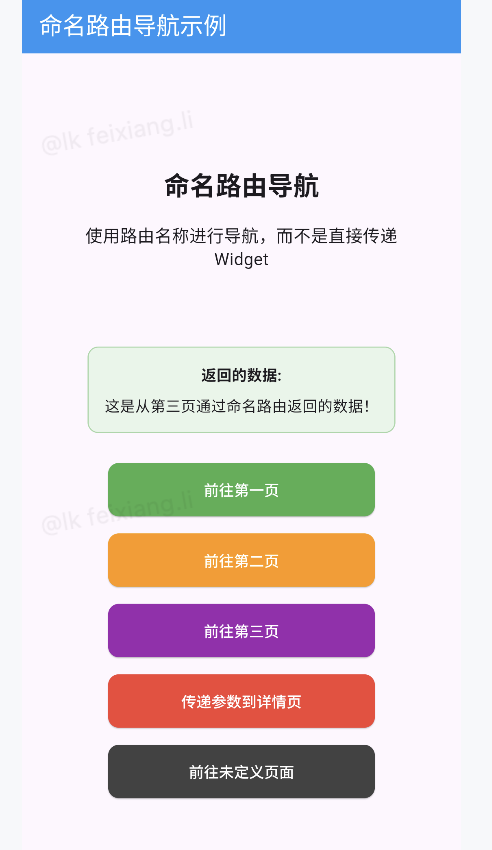
dialog
import 'package:flutter/material.dart';

void main() {
  runApp(const MyApp());
}

class MyApp extends StatelessWidget {
  const MyApp({Key? key}) : super(key: key);

  @override
  Widget build(BuildContext context) {
    return MaterialApp(
      debugShowCheckedModeBanner: false,
      title: 'Flutter 对话框示例',
      theme: ThemeData(
        primarySwatch: Colors.blue,
        useMaterial3: true,
      ),
      home: const DialogDemoPage(),
    );
  }
}

class DialogDemoPage extends StatefulWidget {
  const DialogDemoPage({Key? key}) : super(key: key);

  @override
  State<DialogDemoPage> createState() => _DialogDemoPageState();
}

class _DialogDemoPageState extends State<DialogDemoPage> {
  String _selectedOption = '未选择';
  String _result = '无结果';

  @override
  Widget build(BuildContext context) {
    return Scaffold(
      appBar: AppBar(
        title: const Text('对话框示例'),
        backgroundColor: Colors.blue,
        foregroundColor: Colors.white,
      ),
      body: Center(
        child: Column(
          mainAxisAlignment: MainAxisAlignment.center,
          children: [
            const Text(
              'Flutter 对话框演示',
              style: TextStyle(fontSize: 24, fontWeight: FontWeight.bold),
            ),
            const SizedBox(height: 60),

            // 显示结果
            Container(
              padding: const EdgeInsets.all(16),
              margin: const EdgeInsets.symmetric(horizontal: 40),
              decoration: BoxDecoration(
                color: Colors.grey[100],
                borderRadius: BorderRadius.circular(10),
                border: Border.all(color: Colors.grey[300]!),
              ),
              child: Column(
                children: [
                  Text(
                    '选择的选项: $_selectedOption',
                    style: const TextStyle(fontSize: 16),
                  ),
                  const SizedBox(height: 8),
                  Text(
                    '操作结果: $_result',
                    style: const TextStyle(fontSize: 16),
                  ),
                ],
              ),
            ),

            const SizedBox(height: 60),

            // AlertDialog 按钮
            _buildDialogButton(
              title: '显示 AlertDialog',
              color: Colors.blue,
              onPressed: _showAlertDialog,
            ),

            // SimpleDialog 按钮
            _buildDialogButton(
              title: '显示 SimpleDialog',
              color: Colors.green,
              onPressed: _showSimpleDialog,
            ),

            // ModalBottomSheet 按钮
            _buildDialogButton(
              title: '显示 ModalBottomSheet',
              color: Colors.orange,
              onPressed: _showModalBottomSheet,
            ),
          ],
        ),
      ),
    );
  }

  // 构建按钮
  Widget _buildDialogButton({
    required String title,
    required Color color,
    required VoidCallback onPressed,
  }) {
    return Padding(
      padding: const EdgeInsets.symmetric(vertical: 8),
      child: ElevatedButton(
        style: ElevatedButton.styleFrom(
          backgroundColor: color,
          foregroundColor: Colors.white,
          minimumSize: const Size(250, 50),
          shape: RoundedRectangleBorder(
            borderRadius: BorderRadius.circular(10),
          ),
        ),
        onPressed: onPressed,
        child: Text(title),
      ),
    );
  }

  // 显示 AlertDialog
  void _showAlertDialog() {
    showDialog(
      context: context,
      builder: (BuildContext context) {
        return AlertDialog(
          title: const Text('警告对话框'),
          content: const Text(
            'AlertDialog 通常用于需要用户确认或取消的情况,例如删除操作或其他重要决定。',
          ),
          actions: [
            TextButton(
              onPressed: () {
                Navigator.of(context).pop();
                setState(() {
                  _result = '取消了操作';
                });
              },
              child: const Text('取消'),
            ),
            TextButton(
              onPressed: () {
                Navigator.of(context).pop();
                setState(() {
                  _result = '确认了操作';
                });
              },
              child: const Text('确认'),
            ),
          ],
        );
      },
    );
  }

  // 显示 SimpleDialog
  void _showSimpleDialog() {
    showDialog(
      context: context,
      builder: (BuildContext context) {
        return SimpleDialog(
          title: const Text('选择一个选项'),
          children: [
            SimpleDialogOption(
              onPressed: () {
                Navigator.pop(context);
                setState(() {
                  _selectedOption = '选项 A';
                  _result = '选择了选项 A';
                });
              },
              child: const Row(
                children: [
                  Icon(Icons.account_circle, color: Colors.blue),
                  SizedBox(width: 10),
                  Text('选项 A'),
                ],
              ),
            ),
            SimpleDialogOption(
              onPressed: () {
                Navigator.pop(context);
                setState(() {
                  _selectedOption = '选项 B';
                  _result = '选择了选项 B';
                });
              },
              child: const Row(
                children: [
                  Icon(Icons.account_balance, color: Colors.green),
                  SizedBox(width: 10),
                  Text('选项 B'),
                ],
              ),
            ),
            SimpleDialogOption(
              onPressed: () {
                Navigator.pop(context);
                setState(() {
                  _selectedOption = '选项 C';
                  _result = '选择了选项 C';
                });
              },
              child: const Row(
                children: [
                  Icon(Icons.account_balance_wallet, color: Colors.purple),
                  SizedBox(width: 10),
                  Text('选项 C'),
                ],
              ),
            ),
            Padding(
              padding: const EdgeInsets.all(8.0),
              child: TextButton(
                onPressed: () {
                  Navigator.pop(context);
                  setState(() {
                    _result = '取消了选择';
                  });
                },
                child: const Text('取消'),
              ),
            ),
          ],
        );
      },
    );
  }

  // 显示 ModalBottomSheet
  void _showModalBottomSheet() {
    showModalBottomSheet(
      context: context,
      shape: const RoundedRectangleBorder(
        borderRadius: BorderRadius.vertical(top: Radius.circular(20)),
      ),
      builder: (BuildContext context) {
        return SizedBox(
          height: 350,
          child: Column(
            children: [
              Container(
                padding: const EdgeInsets.all(16),
                child: const Row(
                  children: [
                    Text(
                      '底部菜单',
                      style: TextStyle(
                        fontSize: 20,
                        fontWeight: FontWeight.bold,
                      ),
                    ),
                    Spacer(),
                    Icon(Icons.drag_handle),
                  ],
                ),
              ),
              const Divider(height: 1),
              Expanded(
                child: ListView(
                  children: [
                    _buildBottomSheetItem(
                      icon: Icons.share,
                      title: '分享',
                      onTap: () {
                        Navigator.pop(context);
                        setState(() {
                          _selectedOption = '分享';
                          _result = '点击了分享按钮';
                        });
                      },
                    ),
                    _buildBottomSheetItem(
                      icon: Icons.link,
                      title: '复制链接',
                      onTap: () {
                        Navigator.pop(context);
                        setState(() {
                          _selectedOption = '复制链接';
                          _result = '复制了链接';
                        });
                      },
                    ),
                    _buildBottomSheetItem(
                      icon: Icons.edit,
                      title: '编辑',
                      onTap: () {
                        Navigator.pop(context);
                        setState(() {
                          _selectedOption = '编辑';
                          _result = '进入编辑模式';
                        });
                      },
                    ),
                    _buildBottomSheetItem(
                      icon: Icons.delete,
                      title: '删除',
                      textColor: Colors.red,
                      onTap: () {
                        Navigator.pop(context);
                        setState(() {
                          _selectedOption = '删除';
                          _result = '删除了内容';
                        });
                      },
                    ),
                    const SizedBox(height: 20),
                    Padding(
                      padding: const EdgeInsets.symmetric(horizontal: 16),
                      child: ElevatedButton(
                        style: ElevatedButton.styleFrom(
                          backgroundColor: Colors.grey[200],
                          foregroundColor: Colors.black,
                        ),
                        onPressed: () {
                          Navigator.pop(context);
                          setState(() {
                            _result = '取消了底部菜单操作';
                          });
                        },
                        child: const Text('取消'),
                      ),
                    ),
                  ],
                ),
              ),
            ],
          ),
        );
      },
    );
  }

  // 构建底部菜单项
  Widget _buildBottomSheetItem({
    required IconData icon,
    required String title,
    Color? textColor,
    required VoidCallback onTap,
  }) {
    return ListTile(
      leading: Icon(icon),
      title: Text(
        title,
        style: TextStyle(color: textColor),
      ),
      onTap: onTap,
    );
  }
}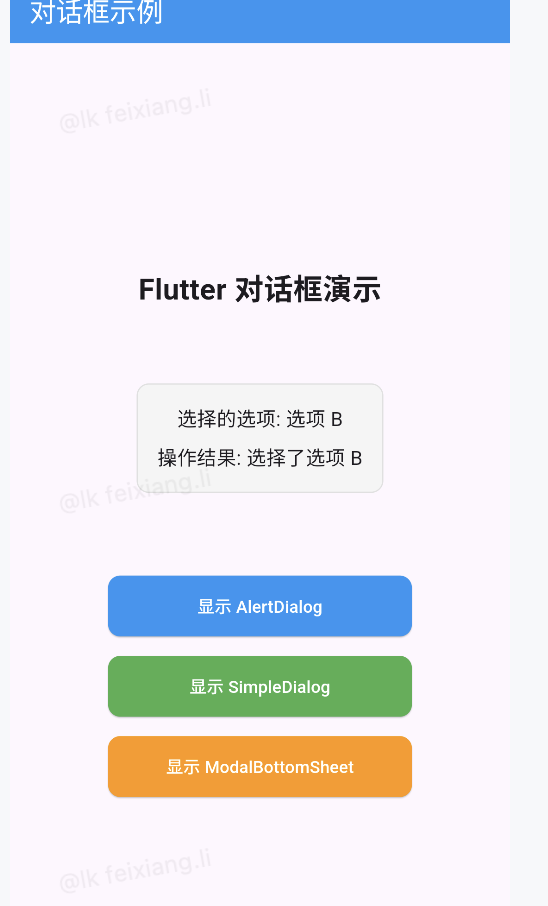
toast
dependencies:
  flutter:
    sdk: flutter

fluttertoast: ^8.2.3 # 添加这一行import 'package:flutter/material.dart';
import 'package:fluttertoast/fluttertoast.dart';
void main() {
runApp(const MyApp());
}
class MyApp extends StatelessWidget {
const MyApp({Key? key}) : super(key: key);
@override
Widget build(BuildContext context) {
return MaterialApp(
debugShowCheckedModeBanner: false,
title: 'Flutter Toast 示例',
theme: ThemeData(
primarySwatch: Colors.blue,
useMaterial3: true,
),
home: const ToastDemoPage(),
);
}
}
class ToastDemoPage extends StatefulWidget {
const ToastDemoPage({Key? key}) : super(key: key);
@override
State<ToastDemoPage> createState() => _ToastDemoPageState();
}
class _ToastDemoPageState extends State<ToastDemoPage> {
String _lastToastMessage = '尚未显示 Toast';
@override
Widget build(BuildContext context) {
return Scaffold(
appBar: AppBar(
title: const Text('Toast 消息示例'),
backgroundColor: Colors.blue,
foregroundColor: Colors.white,
),
body: Center(
child: Column(
mainAxisAlignment: MainAxisAlignment.center,
children: [
const Text(
'Flutter Toast 演示',
style: TextStyle(fontSize: 24, fontWeight: FontWeight.bold),
),
const SizedBox(height: 40),
// 显示上一次Toast信息
Container(
padding: const EdgeInsets.all(16),
margin: const EdgeInsets.symmetric(horizontal: 40),
decoration: BoxDecoration(
color: Colors.grey[100],
borderRadius: BorderRadius.circular(10),
border: Border.all(color: Colors.grey[300]!),
),
child: Column(
children: [
const Text(
'上一次显示:',
style: TextStyle(fontWeight: FontWeight.bold),
),
const SizedBox(height: 8),
Text(
_lastToastMessage,
style: const TextStyle(fontSize: 14),
textAlign: TextAlign.center,
),
],
),
),
const SizedBox(height: 50),
// 显示基本Toast
_buildToastButton(
title: '显示基本 Toast',
color: Colors.blue,
onPressed: () {
_showToast('这是一个基本的 Toast 消息');
},
),
// 显示长时间Toast
_buildToastButton(
title: '显示长时间 Toast',
color: Colors.green,
onPressed: () {
_showLongToast('这是一个长时间显示的 Toast 消息');
},
),
// 显示顶部Toast
_buildToastButton(
title: '显示顶部 Toast',
color: Colors.orange,
onPressed: () {
_showTopToast('这个 Toast 显示在屏幕顶部');
},
),
// 显示中间Toast
_buildToastButton(
title: '显示中间 Toast',
color: Colors.purple,
onPressed: () {
_showCenterToast('这个 Toast 显示在屏幕中间');
},
),
// 显示带背景色的Toast
_buildToastButton(
title: '彩色 Toast',
color: Colors.red,
onPressed: () {
_showColoredToast('这是带有自定义颜色的 Toast');
},
),
// 取消所有Toast
_buildToastButton(
title: '取消所有 Toast',
color: Colors.grey[700]!,
onPressed: () {
Fluttertoast.cancel();
setState(() {
_lastToastMessage = '已取消所有 Toast';
});
},
),
],
),
),
);
}
// 构建Toast按钮
Widget _buildToastButton({
required String title,
required Color color,
required VoidCallback onPressed,
}) {
return Padding(
padding: const EdgeInsets.symmetric(vertical: 8, horizontal: 40),
child: ElevatedButton(
style: ElevatedButton.styleFrom(
backgroundColor: color,
foregroundColor: Colors.white,
minimumSize: const Size(double.infinity, 50),
shape: RoundedRectangleBorder(
borderRadius: BorderRadius.circular(10),
),
),
onPressed: onPressed,
child: Text(title),
),
);
}
// 显示基本Toast
void _showToast(String message) {
Fluttertoast.showToast(
msg: message,
toastLength: Toast.LENGTH_SHORT,
gravity: ToastGravity.BOTTOM,
timeInSecForIosWeb: 1,
backgroundColor: Colors.black87,
textColor: Colors.white,
fontSize: 16.0,
);
setState(() {
_lastToastMessage = message;
});
}
// 显示长时间Toast
void _showLongToast(String message) {
Fluttertoast.showToast(
msg: message,
toastLength: Toast.LENGTH_LONG,
gravity: ToastGravity.BOTTOM,
timeInSecForIosWeb: 3,
backgroundColor: Colors.black87,
textColor: Colors.white,
fontSize: 16.0,
);
setState(() {
_lastToastMessage = message;
});
}
// 显示顶部Toast
void _showTopToast(String message) {
Fluttertoast.showToast(
msg: message,
toastLength: Toast.LENGTH_SHORT,
gravity: ToastGravity.TOP,
timeInSecForIosWeb: 1,
backgroundColor: Colors.black87,
textColor: Colors.white,
fontSize: 16.0,
);
setState(() {
_lastToastMessage = message;
});
}
// 显示中间Toast
void _showCenterToast(String message) {
Fluttertoast.showToast(
msg: message,
toastLength: Toast.LENGTH_SHORT,
gravity: ToastGravity.CENTER,
timeInSecForIosWeb: 1,
backgroundColor: Colors.black87,
textColor: Colors.white,
fontSize: 16.0,
);
setState(() {
_lastToastMessage = message;
});
}
// 显示带颜色的Toast
void _showColoredToast(String message) {
Fluttertoast.showToast(
msg: message,
toastLength: Toast.LENGTH_SHORT,
gravity: ToastGravity.BOTTOM,
timeInSecForIosWeb: 1,
backgroundColor: Colors.red,
textColor: Colors.white,
fontSize: 16.0,
);
setState(() {
_lastToastMessage = message;
});
}
}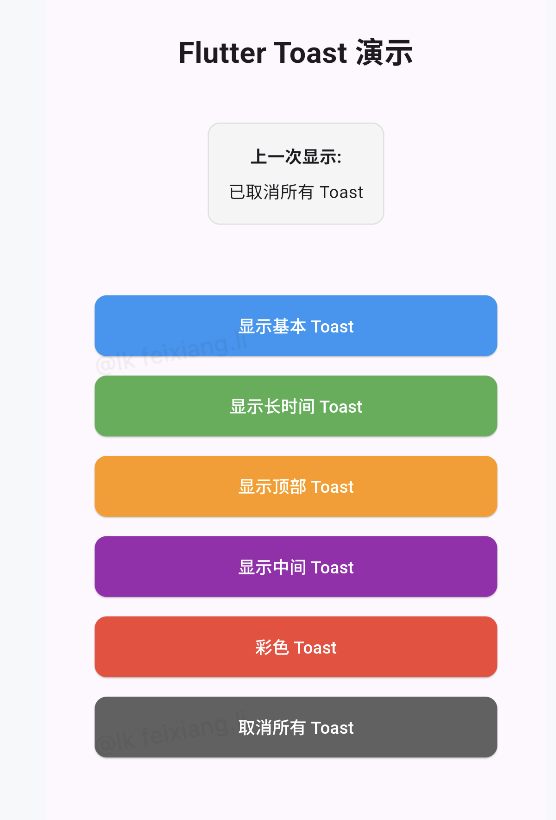
自定义dialog
import 'package:flutter/material.dart';
import 'package:fluttertoast/fluttertoast.dart';
void main() {
runApp(const MyApp());
}
class MyApp extends StatelessWidget {
const MyApp({Key? key}) : super(key: key);
@override
Widget build(BuildContext context) {
return MaterialApp(
debugShowCheckedModeBanner: false,
title: '自定义对话框示例',
theme: ThemeData(
primarySwatch: Colors.blue,
useMaterial3: true,
),
home: const CustomDialogDemoPage(),
);
}
}
class CustomDialogDemoPage extends StatefulWidget {
const CustomDialogDemoPage({Key? key}) : super(key: key);
@override
State<CustomDialogDemoPage> createState() => _CustomDialogDemoPageState();
}
class _CustomDialogDemoPageState extends State<CustomDialogDemoPage> {
String _dialogResult = '未进行操作';
String _inputValue = '';
@override
Widget build(BuildContext context) {
return Scaffold(
appBar: AppBar(
title: const Text('自定义对话框示例'),
backgroundColor: Colors.blue,
foregroundColor: Colors.white,
),
body: Center(
child: Column(
mainAxisAlignment: MainAxisAlignment.center,
children: [
const Text(
'自定义对话框演示',
style: TextStyle(fontSize: 24, fontWeight: FontWeight.bold),
),
const SizedBox(height: 40),
// 显示对话框操作结果
Container(
padding: const EdgeInsets.all(16),
margin: const EdgeInsets.symmetric(horizontal: 40),
decoration: BoxDecoration(
color: Colors.grey[100],
borderRadius: BorderRadius.circular(10),
border: Border.all(color: Colors.grey[300]!),
),
child: Column(
children: [
const Text(
'上一次操作结果:',
style: TextStyle(fontWeight: FontWeight.bold),
),
const SizedBox(height: 8),
Text(
_dialogResult,
style: const TextStyle(fontSize: 14),
textAlign: TextAlign.center,
),
if (_inputValue.isNotEmpty) ...[
const SizedBox(height: 8),
Text(
'输入值: $_inputValue',
style: const TextStyle(
fontSize: 14,
fontStyle: FontStyle.italic,
),
),
],
],
),
),
const SizedBox(height: 50),
// 基本自定义对话框
_buildDialogButton(
title: '基本样式自定义对话框',
color: Colors.blue,
onPressed: () => _showBasicCustomDialog(),
),
// 带输入框的对话框
_buildDialogButton(
title: '带输入框的对话框',
color: Colors.green,
onPressed: () => _showInputDialog(),
),
// 自定义形状对话框
_buildDialogButton(
title: '自定义形状对话框',
color: Colors.orange,
onPressed: () => _showCustomShapeDialog(),
),
// 带动画效果的对话框
_buildDialogButton(
title: '带动画效果的对话框',
color: Colors.purple,
onPressed: () => _showAnimatedDialog(),
),
// 完全自定义对话框
_buildDialogButton(
title: '完全自定义对话框',
color: Colors.red,
onPressed: () => _showFullCustomDialog(),
),
],
),
),
);
}
// 构建对话框按钮
Widget _buildDialogButton({
required String title,
required Color color,
required VoidCallback onPressed,
}) {
return Padding(
padding: const EdgeInsets.symmetric(vertical: 8, horizontal: 40),
child: ElevatedButton(
style: ElevatedButton.styleFrom(
backgroundColor: color,
foregroundColor: Colors.white,
minimumSize: const Size(double.infinity, 50),
shape: RoundedRectangleBorder(
borderRadius: BorderRadius.circular(10),
),
),
onPressed: onPressed,
child: Text(title),
),
);
}
// 基本自定义对话框
Future<void> _showBasicCustomDialog() async {
final result = await showDialog<String>(
context: context,
builder: (BuildContext context) {
return Dialog(
shape: RoundedRectangleBorder(
borderRadius: BorderRadius.circular(16),
),
elevation: 8,
backgroundColor: Colors.white,
child: Padding(
padding: const EdgeInsets.all(20),
child: Column(
mainAxisSize: MainAxisSize.min,
children: [
const Icon(
Icons.info_outline,
color: Colors.blue,
size: 48,
),
const SizedBox(height: 16),
const Text(
'自定义对话框',
style: TextStyle(
fontSize: 20,
fontWeight: FontWeight.bold,
),
),
const SizedBox(height: 12),
const Text(
'这是一个基本样式的自定义对话框,通过修改Dialog组件的属性来自定义外观。',
textAlign: TextAlign.center,
style: TextStyle(fontSize: 16),
),
const SizedBox(height: 24),
Row(
mainAxisAlignment: MainAxisAlignment.spaceEvenly,
children: [
TextButton(
onPressed: () {
Navigator.pop(context, '取消');
},
child: const Text('取消'),
),
ElevatedButton(
style: ElevatedButton.styleFrom(
backgroundColor: Colors.blue,
foregroundColor: Colors.white,
),
onPressed: () {
Navigator.pop(context, '确认');
},
child: const Text('确认'),
),
],
),
],
),
),
);
},
);
if (result != null) {
setState(() {
_dialogResult = '用户点击了: $result';
});
}
}
// 带输入框的对话框
Future<void> _showInputDialog() async {
final TextEditingController controller = TextEditingController();
final result = await showDialog<Map<String, dynamic>>(
context: context,
builder: (BuildContext context) {
return Dialog(
shape: RoundedRectangleBorder(
borderRadius: BorderRadius.circular(16),
),
elevation: 8,
child: Padding(
padding: const EdgeInsets.all(20),
child: Column(
mainAxisSize: MainAxisSize.min,
children: [
const Text(
'请输入信息',
style: TextStyle(
fontSize: 20,
fontWeight: FontWeight.bold,
),
),
const SizedBox(height: 20),
TextField(
controller: controller,
decoration: const InputDecoration(
labelText: '您的名字',
border: OutlineInputBorder(),
prefixIcon: Icon(Icons.person),
),
),
const SizedBox(height: 24),
Row(
mainAxisAlignment: MainAxisAlignment.end,
children: [
TextButton(
onPressed: () {
Navigator.pop(context);
},
child: const Text('取消'),
),
const SizedBox(width: 8),
ElevatedButton(
style: ElevatedButton.styleFrom(
backgroundColor: Colors.green,
foregroundColor: Colors.white,
),
onPressed: () {
Navigator.pop(context, {
'action': '提交',
'input': controller.text,
});
},
child: const Text('提交'),
),
],
),
],
),
),
);
},
);
if (result != null) {
setState(() {
_dialogResult = '用户${result['action']}了表单';
_inputValue = result['input'];
});
}
}
// 自定义形状对话框
Future<void> _showCustomShapeDialog() async {
final result = await showDialog<String>(
context: context,
builder: (BuildContext context) {
return Dialog(
// 完全自定义形状
shape: const RoundedRectangleBorder(
borderRadius: BorderRadius.only(
topLeft: Radius.circular(24),
topRight: Radius.circular(0),
bottomLeft: Radius.circular(0),
bottomRight: Radius.circular(24),
),
),
elevation: 8,
backgroundColor: Colors.orange[50],
child: Container(
padding: const EdgeInsets.all(20),
decoration: BoxDecoration(
border: Border.all(color: Colors.orange, width: 3),
borderRadius: const BorderRadius.only(
topLeft: Radius.circular(20),
topRight: Radius.circular(0),
bottomLeft: Radius.circular(0),
bottomRight: Radius.circular(20),
),
),
child: Column(
mainAxisSize: MainAxisSize.min,
children: [
Row(
children: [
Icon(
Icons.design_services,
color: Colors.orange[800],
size: 30,
),
const SizedBox(width: 12),
const Text(
'自定义形状对话框',
style: TextStyle(
fontSize: 18,
fontWeight: FontWeight.bold,
color: Colors.deepOrange,
),
),
],
),
const SizedBox(height: 16),
const Text(
'这个对话框展示了如何完全自定义形状、边框和背景',
style: TextStyle(fontSize: 15),
),
const SizedBox(height: 24),
ElevatedButton.icon(
icon: const Icon(Icons.check_circle),
label: const Text('知道了'),
style: ElevatedButton.styleFrom(
backgroundColor: Colors.orange,
foregroundColor: Colors.white,
),
onPressed: () {
Navigator.pop(context, '关闭了自定义形状对话框');
},
),
],
),
),
);
},
);
if (result != null) {
setState(() {
_dialogResult = result;
_inputValue = '';
});
}
}
// 带动画效果的对话框
Future<void> _showAnimatedDialog() async {
final result = await showGeneralDialog<String>(
context: context,
pageBuilder: (_, __, ___) => Container(), // 这里不使用
transitionBuilder: (context, animation, secondaryAnimation, child) {
// 自定义动画
final curvedAnimation = CurvedAnimation(
parent: animation,
curve: Curves.easeInOutBack,
);
return ScaleTransition(
scale: Tween<double>(begin: 0.5, end: 1.0).animate(curvedAnimation),
child: FadeTransition(
opacity:
Tween<double>(begin: 0.5, end: 1.0).animate(curvedAnimation),
child: Dialog(
shape: RoundedRectangleBorder(
borderRadius: BorderRadius.circular(20),
),
backgroundColor: Colors.purple[50],
child: Container(
padding: const EdgeInsets.all(20),
child: Column(
mainAxisSize: MainAxisSize.min,
children: [
// 动画图标
TweenAnimationBuilder(
tween: Tween<double>(begin: 0, end: 1),
duration: const Duration(milliseconds: 800),
builder: (context, double value, child) {
return Transform.rotate(
angle: value * 2 * 3.14159,
child: Icon(
Icons.motion_photos_on,
color: Colors.purple,
size: 50 * value,
),
);
},
),
const SizedBox(height: 16),
const Text(
'带动画的对话框',
style: TextStyle(
fontSize: 20,
fontWeight: FontWeight.bold,
color: Colors.purple,
),
),
const SizedBox(height: 12),
const Text(
'这个对话框使用了自定义动画效果,展示了如何创建更生动的用户界面',
textAlign: TextAlign.center,
style: TextStyle(fontSize: 15),
),
const SizedBox(height: 24),
ElevatedButton(
style: ElevatedButton.styleFrom(
backgroundColor: Colors.purple,
foregroundColor: Colors.white,
),
onPressed: () {
Navigator.pop(context, '关闭了动画对话框');
},
child: const Text('关闭'),
),
],
),
),
),
),
);
},
transitionDuration: const Duration(milliseconds: 800),
barrierDismissible: true,
barrierLabel: '',
barrierColor: Colors.black54,
);
if (result != null) {
setState(() {
_dialogResult = result;
_inputValue = '';
});
}
}
// 完全自定义对话框
Future<void> _showFullCustomDialog() async {
final result = await showDialog<String>(
context: context,
builder: (BuildContext context) {
return Dialog(
insetPadding: const EdgeInsets.all(10),
backgroundColor: Colors.transparent,
elevation: 0,
child: Stack(
clipBehavior: Clip.none,
alignment: Alignment.center,
children: [
// 卡片主体
Container(
width: double.infinity,
height: 300,
decoration: BoxDecoration(
borderRadius: BorderRadius.circular(15),
gradient: const LinearGradient(
colors: [Color(0xFFFF416C), Color(0xFFFF4B2B)],
begin: Alignment.topLeft,
end: Alignment.bottomRight,
),
boxShadow: [
BoxShadow(
color: Colors.red.withOpacity(0.5),
blurRadius: 12,
offset: const Offset(0, 5),
),
],
),
padding: const EdgeInsets.fromLTRB(20, 50, 20, 20),
child: Column(
mainAxisSize: MainAxisSize.min,
children: [
const Text(
'完全自定义对话框',
style: TextStyle(
fontSize: 22,
fontWeight: FontWeight.bold,
color: Colors.white,
),
),
const SizedBox(height: 15),
Expanded(
child: Container(
padding: const EdgeInsets.all(15),
decoration: BoxDecoration(
color: Colors.white.withOpacity(0.2),
borderRadius: BorderRadius.circular(10),
),
child: const Center(
child: Text(
'这个对话框展示了如何创建完全自定义的样式,包括渐变背景、自定义形状、悬浮图标等高级定制功能',
textAlign: TextAlign.center,
style: TextStyle(
color: Colors.white,
fontSize: 16,
),
),
),
),
),
const SizedBox(height: 15),
Row(
mainAxisAlignment: MainAxisAlignment.spaceEvenly,
children: [
TextButton.icon(
icon: const Icon(Icons.cancel, color: Colors.white),
label: const Text(
'取消',
style: TextStyle(color: Colors.white),
),
onPressed: () {
Navigator.pop(context, '取消了自定义操作');
},
),
ElevatedButton.icon(
icon: const Icon(Icons.check),
label: const Text('确认'),
style: ElevatedButton.styleFrom(
backgroundColor: Colors.white,
foregroundColor: Colors.red,
),
onPressed: () {
Navigator.pop(context, '确认了自定义操作');
},
),
],
),
],
),
),
// 顶部悬浮图标
Positioned(
top: -30,
child: CircleAvatar(
radius: 40,
backgroundColor: Colors.white,
child: Icon(
Icons.favorite,
size: 50,
color: Colors.red[700],
),
),
),
],
),
);
},
);
if (result != null) {
setState(() {
_dialogResult = result;
_inputValue = '';
});
}
}
}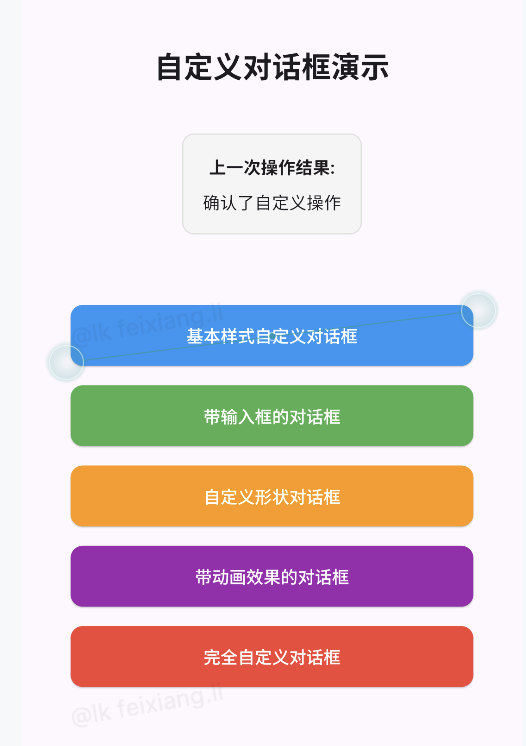
轮播图
import 'package:flutter/material.dart';
import 'package:fluttertoast/fluttertoast.dart';
import 'dart:async';
void main() {
runApp(const MyApp());
}
class MyApp extends StatelessWidget {
const MyApp({Key? key}) : super(key: key);
@override
Widget build(BuildContext context) {
return MaterialApp(
debugShowCheckedModeBanner: false,
title: 'PageView 示例',
theme: ThemeData(
primarySwatch: Colors.blue,
useMaterial3: true,
),
home: const HomePage(),
);
}
}
class HomePage extends StatefulWidget {
const HomePage({Key? key}) : super(key: key);
@override
State<HomePage> createState() => _HomePageState();
}
class _HomePageState extends State<HomePage>
with SingleTickerProviderStateMixin {
// Tab控制器
late TabController _tabController;
@override
void initState() {
super.initState();
_tabController = TabController(length: 2, vsync: this);
}
@override
void dispose() {
_tabController.dispose();
super.dispose();
}
@override
Widget build(BuildContext context) {
return Scaffold(
appBar: AppBar(
title: const Text('PageView 和轮播图示例'),
backgroundColor: Colors.blue,
foregroundColor: Colors.white,
bottom: TabBar(
controller: _tabController,
tabs: const [
Tab(text: '页面切换', icon: Icon(Icons.view_carousel)),
Tab(text: '轮播图', icon: Icon(Icons.slideshow)),
],
labelColor: Colors.white,
unselectedLabelColor: Colors.white70,
indicatorColor: Colors.white,
),
),
body: TabBarView(
controller: _tabController,
children: const [
// 基本PageView页面
BasicPageViewDemo(),
// 轮播图
CarouselDemo(),
],
),
);
}
}
// 基本PageView示例页面
class BasicPageViewDemo extends StatefulWidget {
const BasicPageViewDemo({Key? key}) : super(key: key);
@override
State<BasicPageViewDemo> createState() => _BasicPageViewDemoState();
}
class _BasicPageViewDemoState extends State<BasicPageViewDemo> {
// PageView控制器
final PageController _pageController = PageController(initialPage: 0);
int _currentPage = 0;
// 页面内容列表
final List<PageContent> _pages = [
PageContent(
title: '第一页',
description: '这是PageView的第一页,向左滑动查看更多内容',
color: Colors.blue,
icon: Icons.looks_one,
),
PageContent(
title: '第二页',
description: '这是第二页,您可以在页面之间左右滑动',
color: Colors.green,
icon: Icons.looks_two,
),
PageContent(
title: '第三页',
description: '这是最后一页,您可以尝试不同的PageView滚动方向和物理特性',
color: Colors.orange,
icon: Icons.looks_3,
),
];
// 滚动方向和物理特性设置
Axis _scrollDirection = Axis.horizontal;
bool _pageSnapping = true;
bool _reverse = false;
@override
void dispose() {
_pageController.dispose();
super.dispose();
}
@override
Widget build(BuildContext context) {
return Column(
children: [
// 设置区域
_buildSettings(),
// 分隔线
const Divider(height: 0),
// 页面指示器
Container(
padding: const EdgeInsets.symmetric(vertical: 8),
color: Colors.grey[200],
child: Row(
mainAxisAlignment: MainAxisAlignment.center,
children: [
Text(
'当前页面: ${_currentPage + 1}/${_pages.length}',
style: const TextStyle(fontWeight: FontWeight.bold),
),
const SizedBox(width: 20),
// 页面指示器点
Row(
mainAxisSize: MainAxisSize.min,
children: List.generate(_pages.length, (index) {
return Container(
margin: const EdgeInsets.symmetric(horizontal: 3),
width: _currentPage == index ? 18 : 8,
height: 8,
decoration: BoxDecoration(
color: _currentPage == index
? _pages[_currentPage].color
: Colors.grey[300],
borderRadius: BorderRadius.circular(4),
),
);
}),
),
],
),
),
// PageView主体
Expanded(
child: PageView.builder(
controller: _pageController,
scrollDirection: _scrollDirection,
reverse: _reverse,
pageSnapping: _pageSnapping,
onPageChanged: (int page) {
setState(() {
_currentPage = page;
});
},
itemCount: _pages.length,
itemBuilder: (context, index) {
final page = _pages[index];
return Container(
color: page.color.withOpacity(0.3),
child: Center(
child: Card(
margin: const EdgeInsets.all(30),
elevation: 6,
shape: RoundedRectangleBorder(
borderRadius: BorderRadius.circular(15),
),
color: Colors.white,
child: Padding(
padding: const EdgeInsets.all(20),
child: Column(
mainAxisSize: MainAxisSize.min,
children: [
Icon(
page.icon,
size: 80,
color: page.color,
),
const SizedBox(height: 20),
Text(
page.title,
style: TextStyle(
fontSize: 28,
fontWeight: FontWeight.bold,
color: page.color,
),
),
const SizedBox(height: 15),
Text(
page.description,
textAlign: TextAlign.center,
style: const TextStyle(fontSize: 16),
),
const SizedBox(height: 30),
Row(
mainAxisAlignment: MainAxisAlignment.center,
children: [
// 前一页按钮
if (index > 0)
ElevatedButton.icon(
icon: const Icon(Icons.chevron_left),
label: const Text('上一页'),
style: ElevatedButton.styleFrom(
backgroundColor: Colors.grey[200],
foregroundColor: Colors.black87,
),
onPressed: () {
_pageController.previousPage(
duration:
const Duration(milliseconds: 300),
curve: Curves.easeInOut,
);
},
),
const SizedBox(width: 10),
// 下一页按钮
if (index < _pages.length - 1)
ElevatedButton.icon(
icon: const Icon(Icons.chevron_right),
label: const Text('下一页'),
style: ElevatedButton.styleFrom(
backgroundColor: page.color,
foregroundColor: Colors.white,
),
onPressed: () {
_pageController.nextPage(
duration:
const Duration(milliseconds: 300),
curve: Curves.easeInOut,
);
},
),
],
),
],
),
),
),
),
);
},
),
),
],
);
}
// 页面设置区域
Widget _buildSettings() {
return Container(
padding: const EdgeInsets.all(12),
color: Colors.grey[100],
child: Column(
children: [
// 滚动方向设置
Row(
children: [
const Text('滚动方向:'),
const SizedBox(width: 15),
ChoiceChip(
label: const Text('水平'),
selected: _scrollDirection == Axis.horizontal,
onSelected: (selected) {
if (selected) {
setState(() {
_scrollDirection = Axis.horizontal;
});
}
},
),
const SizedBox(width: 8),
ChoiceChip(
label: const Text('垂直'),
selected: _scrollDirection == Axis.vertical,
onSelected: (selected) {
if (selected) {
setState(() {
_scrollDirection = Axis.vertical;
});
}
},
),
],
),
// 更多设置
Row(
children: [
// 页面对齐设置
Row(
children: [
const Text('页面对齐:'),
Switch(
value: _pageSnapping,
onChanged: (value) {
setState(() {
_pageSnapping = value;
});
},
),
],
),
const SizedBox(width: 15),
// 反向设置
Row(
children: [
const Text('反向:'),
Switch(
value: _reverse,
onChanged: (value) {
setState(() {
_reverse = value;
});
},
),
],
),
],
),
],
),
);
}
}
// 自动轮播图示例
class CarouselDemo extends StatefulWidget {
const CarouselDemo({Key? key}) : super(key: key);
@override
State<CarouselDemo> createState() => _CarouselDemoState();
}
class _CarouselDemoState extends State<CarouselDemo> {
// 轮播图控制器
final PageController _carouselController = PageController(initialPage: 0);
// 轮播图数据
final List<CarouselItem> _carouselItems = [
CarouselItem(
title: '风景图片 1',
description: '美丽的山脉和湖泊',
color: Colors.blue,
image:
'https://images.unsplash.com/photo-1506744038136-46273834b3fb?w=600&q=80',
),
CarouselItem(
title: '风景图片 2',
description: '平静的海洋',
color: Colors.green,
image:
'https://images.unsplash.com/photo-1507525428034-b723cf961d3e?w=600&q=80',
),
CarouselItem(
title: '风景图片 3',
description: '壮观的日落',
color: Colors.orange,
image:
'https://images.unsplash.com/photo-1510414842594-a61c69b5ae57?w=600&q=80',
),
CarouselItem(
title: '风景图片 4',
description: '神秘的森林',
color: Colors.purple,
image:
'https://images.unsplash.com/photo-1542273917363-3b1817f69a2d?w=600&q=80',
),
CarouselItem(
title: '风景图片 5',
description: '城市天际线',
color: Colors.red,
image:
'https://images.unsplash.com/photo-1477959858617-67f85cf4f1df?w=600&q=80',
),
];
int _currentCarouselPage = 0;
bool _isAutoPlay = true;
int _autoPlayIntervalSeconds = 3;
Timer? _autoPlayTimer;
@override
void initState() {
super.initState();
_startAutoPlay();
}
@override
void dispose() {
_stopAutoPlay();
_carouselController.dispose();
super.dispose();
}
// 开始自动播放
void _startAutoPlay() {
if (_isAutoPlay) {
_autoPlayTimer = Timer.periodic(
Duration(seconds: _autoPlayIntervalSeconds),
(timer) {
if (_carouselController.hasClients) {
if (_currentCarouselPage < _carouselItems.length - 1) {
_carouselController.nextPage(
duration: const Duration(milliseconds: 500),
curve: Curves.easeInOut,
);
} else {
_carouselController.animateToPage(
0,
duration: const Duration(milliseconds: 500),
curve: Curves.easeInOut,
);
}
}
},
);
}
}
// 停止自动播放
void _stopAutoPlay() {
_autoPlayTimer?.cancel();
_autoPlayTimer = null;
}
@override
Widget build(BuildContext context) {
return Column(
children: [
// 设置区域
Container(
padding: const EdgeInsets.all(12),
color: Colors.grey[100],
child: Column(
children: [
// 自动播放设置
Row(
children: [
const Text('自动播放:'),
Switch(
value: _isAutoPlay,
onChanged: (value) {
setState(() {
_isAutoPlay = value;
if (_isAutoPlay) {
_startAutoPlay();
} else {
_stopAutoPlay();
}
});
},
),
const SizedBox(width: 20),
const Text('间隔:'),
const SizedBox(width: 5),
DropdownButton<int>(
value: _autoPlayIntervalSeconds,
items: [2, 3, 5, 8].map((int value) {
return DropdownMenuItem<int>(
value: value,
child: Text('$value秒'),
);
}).toList(),
onChanged: (int? newValue) {
if (newValue != null) {
setState(() {
_autoPlayIntervalSeconds = newValue;
if (_isAutoPlay) {
_stopAutoPlay();
_startAutoPlay();
}
});
}
},
),
],
),
],
),
),
// 主轮播图区域
Expanded(
child: Stack(
alignment: Alignment.bottomCenter,
children: [
// 轮播图PageView
PageView.builder(
controller: _carouselController,
onPageChanged: (int page) {
setState(() {
_currentCarouselPage = page;
});
},
itemCount: _carouselItems.length,
itemBuilder: (context, index) {
final item = _carouselItems[index];
return Stack(
fit: StackFit.expand,
children: [
// 背景图片
Image.network(
item.image,
fit: BoxFit.cover,
loadingBuilder: (context, child, loadingProgress) {
if (loadingProgress == null) return child;
return Container(
color: item.color.withOpacity(0.3),
child: const Center(
child: CircularProgressIndicator(),
),
);
},
errorBuilder: (context, error, stackTrace) {
return Container(
color: item.color.withOpacity(0.5),
child: const Center(
child: Icon(
Icons.broken_image,
size: 80,
color: Colors.white,
),
),
);
},
),
// 颜色覆盖层
Container(
decoration: BoxDecoration(
gradient: LinearGradient(
begin: Alignment.topCenter,
end: Alignment.bottomCenter,
colors: [
Colors.transparent,
Colors.black.withOpacity(0.7),
],
),
),
),
// 内容
Padding(
padding: const EdgeInsets.all(20),
child: Column(
mainAxisAlignment: MainAxisAlignment.end,
crossAxisAlignment: CrossAxisAlignment.start,
children: [
Text(
item.title,
style: const TextStyle(
color: Colors.white,
fontSize: 24,
fontWeight: FontWeight.bold,
),
),
const SizedBox(height: 8),
Text(
item.description,
style: const TextStyle(
color: Colors.white,
fontSize: 16,
),
),
const SizedBox(height: 30),
],
),
),
],
);
},
),
// 底部指示器
Padding(
padding: const EdgeInsets.only(bottom: 16),
child: Row(
mainAxisAlignment: MainAxisAlignment.center,
children: List.generate(_carouselItems.length, (index) {
return GestureDetector(
onTap: () {
_carouselController.animateToPage(
index,
duration: const Duration(milliseconds: 300),
curve: Curves.easeInOut,
);
},
child: Container(
margin: const EdgeInsets.symmetric(horizontal: 4),
width: _currentCarouselPage == index ? 20 : 10,
height: 10,
decoration: BoxDecoration(
color: _currentCarouselPage == index
? _carouselItems[index].color
: Colors.white.withOpacity(0.5),
borderRadius: BorderRadius.circular(5),
),
),
);
}),
),
),
],
),
),
// 轮播图手动控制区域
Container(
padding: const EdgeInsets.symmetric(vertical: 15),
color: Colors.grey[200],
child: Row(
mainAxisAlignment: MainAxisAlignment.center,
children: [
// 上一张按钮
ElevatedButton.icon(
icon: const Icon(Icons.chevron_left),
label: const Text('上一张'),
style: ElevatedButton.styleFrom(
backgroundColor: Colors.white,
foregroundColor: Colors.black87,
),
onPressed: () {
if (_currentCarouselPage > 0) {
_carouselController.previousPage(
duration: const Duration(milliseconds: 300),
curve: Curves.easeInOut,
);
} else {
_carouselController.animateToPage(
_carouselItems.length - 1,
duration: const Duration(milliseconds: 300),
curve: Curves.easeInOut,
);
}
},
),
const SizedBox(width: 15),
// 下一张按钮
ElevatedButton.icon(
icon: const Icon(Icons.chevron_right),
label: const Text('下一张'),
style: ElevatedButton.styleFrom(
backgroundColor: _carouselItems[_currentCarouselPage].color,
foregroundColor: Colors.white,
),
onPressed: () {
if (_currentCarouselPage < _carouselItems.length - 1) {
_carouselController.nextPage(
duration: const Duration(milliseconds: 300),
curve: Curves.easeInOut,
);
} else {
_carouselController.animateToPage(
0,
duration: const Duration(milliseconds: 300),
curve: Curves.easeInOut,
);
}
},
),
],
),
),
],
);
}
}
// 页面内容数据类
class PageContent {
final String title;
final String description;
final Color color;
final IconData icon;
PageContent({
required this.title,
required this.description,
required this.color,
required this.icon,
});
}
// 轮播图项目数据类
class CarouselItem {
final String title;
final String description;
final Color color;
final String image;
CarouselItem({
required this.title,
required this.description,
required this.color,
required this.image,
});
}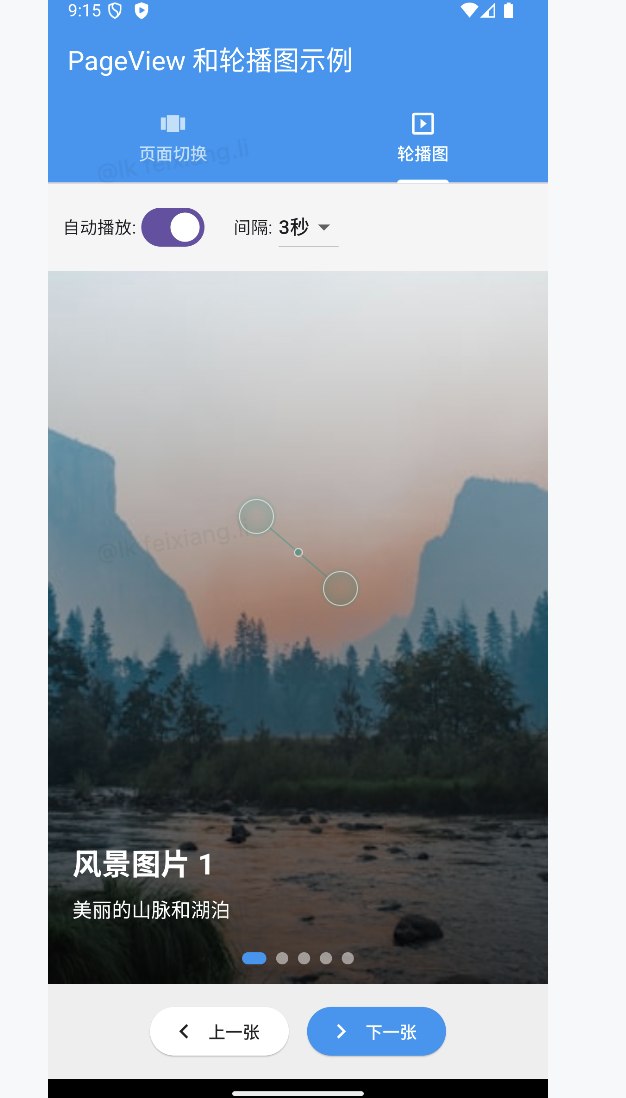
flutter的key
我们平时一定接触过很多的 Widget,比如 Container、 Row、 Column 等,它们在我们绘制界面的过程 中发挥着重要的作用。但是不知道你有没有注意到,在几乎每个 Widget 的构造函数中,都有一个共同 的参数,它们通常在参数列表的第一个,那就是 Key。
在Flutter中, *Key**是不能重复使用的*,所以Key一般用来做唯一标识。组件在更新的时候,其状态的保 存主要是通过判断****组件的类型*或者*key********值****是否一致。因此,当各组件的类型不同的时候,类型已经足够 用来区分不同的组件了,此时我们可以不必使用key。但是如果同时存在多个同一类型的控件的时候, 此时类型已经无法作为区分的条件了,我们就需要使用到key。
Flutter key子类包含
局部键(LocalKey):ValueKey、 ObjectKey、 UniqueKey
全局键(GlobalKey): GlobalKey、 GlobalObjectKey
import 'package:flutter/material.dart';
import 'package:fluttertoast/fluttertoast.dart';
import 'dart:async';
import 'dart:math' as math;
void main() {
runApp(const MyApp());
}
class MyApp extends StatelessWidget {
const MyApp({Key? key}) : super(key: key);
@override
Widget build(BuildContext context) {
return MaterialApp(
debugShowCheckedModeBanner: false,
title: 'Flutter Key 示例',
theme: ThemeData(
primarySwatch: Colors.blue,
useMaterial3: true,
),
home: const KeyDemoHomePage(),
);
}
}
class KeyDemoHomePage extends StatefulWidget {
const KeyDemoHomePage({Key? key}) : super(key: key);
@override
State<KeyDemoHomePage> createState() => _KeyDemoHomePageState();
}
class _KeyDemoHomePageState extends State<KeyDemoHomePage> {
int _selectedIndex = 0;
// 所有演示页面
final List<Widget> _demoPages = [
const ListKeyDemo(),
const GlobalKeyDemo(),
const UniqueKeyDemo(),
const ValueKeyDemo(),
];
@override
Widget build(BuildContext context) {
return Scaffold(
appBar: AppBar(
title: const Text('Flutter Key 示例'),
backgroundColor: Colors.blue,
foregroundColor: Colors.white,
),
body: _demoPages[_selectedIndex],
bottomNavigationBar: BottomNavigationBar(
type: BottomNavigationBarType.fixed,
currentIndex: _selectedIndex,
onTap: (index) {
setState(() {
_selectedIndex = index;
});
},
items: const [
BottomNavigationBarItem(
icon: Icon(Icons.list),
label: '列表Key',
),
BottomNavigationBarItem(
icon: Icon(Icons.public),
label: 'GlobalKey',
),
BottomNavigationBarItem(
icon: Icon(Icons.key),
label: 'UniqueKey',
),
BottomNavigationBarItem(
icon: Icon(Icons.data_object),
label: 'ValueKey',
),
],
),
);
}
}
// 1. 列表Key示例 - 展示使用/不使用Key的差异
class ListKeyDemo extends StatefulWidget {
const ListKeyDemo({Key? key}) : super(key: key);
@override
State<ListKeyDemo> createState() => _ListKeyDemoState();
}
class _ListKeyDemoState extends State<ListKeyDemo> {
final List<String> _items = ['项目 A', '项目 B', '项目 C'];
bool _useKeys = true;
void _swapItems() {
setState(() {
final temp = _items[0];
_items[0] = _items[1];
_items[1] = temp;
});
}
@override
Widget build(BuildContext context) {
return Padding(
padding: const EdgeInsets.all(16.0),
child: Column(
crossAxisAlignment: CrossAxisAlignment.start,
children: [
const Text(
'列表项Key示例',
style: TextStyle(fontSize: 22, fontWeight: FontWeight.bold),
),
const SizedBox(height: 10),
Text(
'这个示例展示了为列表项设置Key的重要性。当列表项位置交换时,如果不使用Key,Flutter无法正确保持状态。',
style: TextStyle(fontSize: 16, color: Colors.grey[700]),
),
const SizedBox(height: 24),
// 使用/不使用Key的开关
SwitchListTile(
title: const Text('使用Key'),
subtitle: Text(_useKeys ? '为每个列表项使用ValueKey' : '不使用Key'),
value: _useKeys,
onChanged: (value) {
setState(() {
_useKeys = value;
});
},
),
const SizedBox(height: 16),
// 交换按钮
ElevatedButton.icon(
icon: const Icon(Icons.swap_horiz),
label: const Text('交换前两个项目'),
onPressed: _swapItems,
),
const SizedBox(height: 24),
Expanded(
child: ListView.builder(
itemCount: _items.length,
itemBuilder: (context, index) {
// 根据开关决定是否使用Key
return _useKeys
? ColorfulItem(
key: ValueKey(_items[index]),
title: _items[index],
)
: ColorfulItem(
title: _items[index],
);
},
),
),
],
),
);
}
}
// 可改变颜色的列表项
class ColorfulItem extends StatefulWidget {
final String title;
const ColorfulItem({
Key? key,
required this.title,
}) : super(key: key);
@override
State<ColorfulItem> createState() => _ColorfulItemState();
}
class _ColorfulItemState extends State<ColorfulItem> {
late Color _color;
@override
void initState() {
super.initState();
// 随机生成颜色
_color =
Color((math.Random().nextDouble() * 0xFFFFFF).toInt()).withOpacity(1.0);
}
@override
Widget build(BuildContext context) {
return Card(
margin: const EdgeInsets.symmetric(vertical: 8),
child: ListTile(
leading: CircleAvatar(
backgroundColor: _color,
child: Text(widget.title.substring(widget.title.length - 1)),
),
title: Text(widget.title),
subtitle:
Text('颜色代码: 0x${_color.value.toRadixString(16).toUpperCase()}'),
trailing: IconButton(
icon: const Icon(Icons.refresh),
onPressed: () {
setState(() {
// 更改颜色
_color = Color((math.Random().nextDouble() * 0xFFFFFF).toInt())
.withOpacity(1.0);
});
},
),
),
);
}
}
// 2. GlobalKey示例 - 访问其他Widget的状态
class GlobalKeyDemo extends StatefulWidget {
const GlobalKeyDemo({Key? key}) : super(key: key);
@override
State<GlobalKeyDemo> createState() => _GlobalKeyDemoState();
}
class _GlobalKeyDemoState extends State<GlobalKeyDemo> {
// 创建GlobalKey
final GlobalKey<_CounterWidgetState> _counterKey =
GlobalKey<_CounterWidgetState>();
@override
Widget build(BuildContext context) {
return Padding(
padding: const EdgeInsets.all(16.0),
child: Column(
crossAxisAlignment: CrossAxisAlignment.start,
children: [
const Text(
'GlobalKey示例',
style: TextStyle(fontSize: 22, fontWeight: FontWeight.bold),
),
const SizedBox(height: 10),
Text(
'GlobalKey允许访问其他小部件的状态。本例中,父Widget可以直接调用子Widget的方法。',
style: TextStyle(fontSize: 16, color: Colors.grey[700]),
),
const SizedBox(height: 30),
// 使用GlobalKey的计数器部件
CounterWidget(key: _counterKey),
const SizedBox(height: 30),
// 通过GlobalKey控制计数器的按钮
Row(
mainAxisAlignment: MainAxisAlignment.center,
children: [
ElevatedButton.icon(
icon: const Icon(Icons.add),
label: const Text('外部增加'),
onPressed: () {
// 通过GlobalKey调用子Widget的方法
_counterKey.currentState?.increment();
},
style: ElevatedButton.styleFrom(
backgroundColor: Colors.green,
foregroundColor: Colors.white,
),
),
const SizedBox(width: 16),
ElevatedButton.icon(
icon: const Icon(Icons.remove),
label: const Text('外部减少'),
onPressed: () {
// 通过GlobalKey调用子Widget的方法
_counterKey.currentState?.decrement();
},
style: ElevatedButton.styleFrom(
backgroundColor: Colors.red,
foregroundColor: Colors.white,
),
),
],
),
const SizedBox(height: 16),
ElevatedButton(
child: const Text('获取当前计数值'),
onPressed: () {
// 通过GlobalKey获取状态信息
final currentValue = _counterKey.currentState?.counter ?? 0;
ScaffoldMessenger.of(context).showSnackBar(
SnackBar(
content: Text('当前计数: $currentValue'),
duration: const Duration(seconds: 1),
),
);
},
),
],
),
);
}
}
// GlobalKey示例中的计数器Widget
class CounterWidget extends StatefulWidget {
const CounterWidget({Key? key}) : super(key: key);
@override
State<CounterWidget> createState() => _CounterWidgetState();
}
class _CounterWidgetState extends State<CounterWidget> {
int counter = 0;
// 供外部通过GlobalKey调用的方法
void increment() {
setState(() {
counter++;
});
}
void decrement() {
setState(() {
if (counter > 0) counter--;
});
}
@override
Widget build(BuildContext context) {
return Container(
padding: const EdgeInsets.all(16),
decoration: BoxDecoration(
color: Colors.blue.withOpacity(0.1),
borderRadius: BorderRadius.circular(16),
border: Border.all(color: Colors.blue.withOpacity(0.5)),
),
child: Column(
children: [
const Text(
'计数器组件',
style: TextStyle(fontSize: 18, fontWeight: FontWeight.bold),
),
const SizedBox(height: 16),
Text(
'$counter',
style: const TextStyle(fontSize: 48, fontWeight: FontWeight.bold),
),
const SizedBox(height: 16),
Row(
mainAxisAlignment: MainAxisAlignment.center,
children: [
ElevatedButton(
child: const Text('内部增加'),
onPressed: increment,
),
const SizedBox(width: 16),
ElevatedButton(
child: const Text('内部减少'),
onPressed: decrement,
),
],
),
],
),
);
}
}
// 3. UniqueKey示例 - 强制重建Widget
class UniqueKeyDemo extends StatefulWidget {
const UniqueKeyDemo({Key? key}) : super(key: key);
@override
State<UniqueKeyDemo> createState() => _UniqueKeyDemoState();
}
class _UniqueKeyDemoState extends State<UniqueKeyDemo> {
// 初始创建两个UniqueKey
Key _leftWidgetKey = UniqueKey();
Key _rightWidgetKey = UniqueKey();
void _resetWidgets() {
setState(() {
// 重新分配新的UniqueKey,强制两个组件重建
_leftWidgetKey = UniqueKey();
_rightWidgetKey = UniqueKey();
});
}
void _swapWidgets() {
setState(() {
// 交换两个Key,这会导致状态移动
final tempKey = _leftWidgetKey;
_leftWidgetKey = _rightWidgetKey;
_rightWidgetKey = tempKey;
});
}
@override
Widget build(BuildContext context) {
return Padding(
padding: const EdgeInsets.all(16.0),
child: Column(
crossAxisAlignment: CrossAxisAlignment.start,
children: [
const Text(
'UniqueKey示例',
style: TextStyle(fontSize: 22, fontWeight: FontWeight.bold),
),
const SizedBox(height: 10),
Text(
'UniqueKey每次创建都是唯一的。当需要强制组件重建或保持状态跟随部件移动时非常有用。',
style: TextStyle(fontSize: 16, color: Colors.grey[700]),
),
const SizedBox(height: 24),
// 操作按钮
Row(
mainAxisAlignment: MainAxisAlignment.center,
children: [
ElevatedButton(
onPressed: _swapWidgets,
child: const Text('交换位置'),
),
const SizedBox(width: 16),
ElevatedButton(
onPressed: _resetWidgets,
child: const Text('重置组件'),
),
],
),
const SizedBox(height: 40),
// 两个使用UniqueKey的组件
Expanded(
child: Row(
children: [
Expanded(
child: Container(
margin: const EdgeInsets.all(8),
padding: const EdgeInsets.all(8),
decoration: BoxDecoration(
color: Colors.blue.withOpacity(0.1),
borderRadius: BorderRadius.circular(12),
),
child: Column(
children: [
const Text('左侧',
style: TextStyle(fontWeight: FontWeight.bold)),
Expanded(
child: Center(
child: RandomColorTile(key: _leftWidgetKey),
),
),
],
),
),
),
Expanded(
child: Container(
margin: const EdgeInsets.all(8),
padding: const EdgeInsets.all(8),
decoration: BoxDecoration(
color: Colors.orange.withOpacity(0.1),
borderRadius: BorderRadius.circular(12),
),
child: Column(
children: [
const Text('右侧',
style: TextStyle(fontWeight: FontWeight.bold)),
Expanded(
child: Center(
child: RandomColorTile(key: _rightWidgetKey),
),
),
],
),
),
),
],
),
),
],
),
);
}
}
// 随机颜色方块组件
class RandomColorTile extends StatefulWidget {
const RandomColorTile({Key? key}) : super(key: key);
@override
State<RandomColorTile> createState() => _RandomColorTileState();
}
class _RandomColorTileState extends State<RandomColorTile> {
late Color _color;
int _clickCount = 0;
@override
void initState() {
super.initState();
_color =
Color((math.Random().nextDouble() * 0xFFFFFF).toInt()).withOpacity(1.0);
}
void _changeColor() {
setState(() {
_color = Color((math.Random().nextDouble() * 0xFFFFFF).toInt())
.withOpacity(1.0);
_clickCount++;
});
}
@override
Widget build(BuildContext context) {
return Column(
mainAxisSize: MainAxisSize.min,
children: [
GestureDetector(
onTap: _changeColor,
child: Container(
width: 120,
height: 120,
decoration: BoxDecoration(
color: _color,
borderRadius: BorderRadius.circular(12),
boxShadow: [
BoxShadow(
color: Colors.black.withOpacity(0.2),
blurRadius: 5,
offset: const Offset(0, 2),
),
],
),
child: Center(
child: Text(
'$_clickCount',
style: const TextStyle(
color: Colors.white,
fontSize: 24,
fontWeight: FontWeight.bold,
),
),
),
),
),
const SizedBox(height: 12),
Text('点击改变颜色'),
Text(
'颜色: 0x${_color.value.toRadixString(16).toUpperCase()}',
style: const TextStyle(fontSize: 12),
),
],
);
}
}
// 4. ValueKey示例 - 基于值的键
class ValueKeyDemo extends StatefulWidget {
const ValueKeyDemo({Key? key}) : super(key: key);
@override
State<ValueKeyDemo> createState() => _ValueKeyDemoState();
}
class _ValueKeyDemoState extends State<ValueKeyDemo> {
List<TodoItem> _todos = [];
final TextEditingController _controller = TextEditingController();
@override
void initState() {
super.initState();
// 初始数据
_todos = [
TodoItem(id: '1', text: '学习Flutter Key'),
TodoItem(id: '2', text: '理解StatefulWidget生命周期'),
TodoItem(id: '3', text: '掌握状态管理'),
];
}
@override
void dispose() {
_controller.dispose();
super.dispose();
}
void _addTodo() {
if (_controller.text.isNotEmpty) {
setState(() {
final newId = DateTime.now().millisecondsSinceEpoch.toString();
_todos.add(TodoItem(id: newId, text: _controller.text));
_controller.clear();
});
}
}
void _removeTodo(String id) {
setState(() {
_todos.removeWhere((todo) => todo.id == id);
});
}
void _moveUp(int index) {
if (index > 0) {
setState(() {
final item = _todos.removeAt(index);
_todos.insert(index - 1, item);
});
}
}
void _moveDown(int index) {
if (index < _todos.length - 1) {
setState(() {
final item = _todos.removeAt(index);
_todos.insert(index + 1, item);
});
}
}
@override
Widget build(BuildContext context) {
return Padding(
padding: const EdgeInsets.all(16.0),
child: Column(
crossAxisAlignment: CrossAxisAlignment.start,
children: [
const Text(
'ValueKey示例',
style: TextStyle(fontSize: 22, fontWeight: FontWeight.bold),
),
const SizedBox(height: 10),
Text(
'ValueKey基于值创建Key,适用于列表项具有唯一标识符的情况。每个待办项的状态跟随其ID移动。',
style: TextStyle(fontSize: 16, color: Colors.grey[700]),
),
const SizedBox(height: 20),
// 添加待办事项
Row(
children: [
Expanded(
child: TextField(
controller: _controller,
decoration: const InputDecoration(
hintText: '输入新待办事项',
border: OutlineInputBorder(),
),
),
),
const SizedBox(width: 16),
ElevatedButton(
onPressed: _addTodo,
child: const Text('添加'),
),
],
),
const SizedBox(height: 20),
const Text(
'待办事项列表:',
style: TextStyle(fontSize: 18, fontWeight: FontWeight.bold),
),
const SizedBox(height: 10),
Expanded(
child: ListView.builder(
itemCount: _todos.length,
itemBuilder: (context, index) {
final todo = _todos[index];
// 使用ValueKey作为每个待办项的Key
return TodoListItem(
key: ValueKey(todo.id),
todo: todo,
onDelete: () => _removeTodo(todo.id),
onMoveUp: () => _moveUp(index),
onMoveDown: () => _moveDown(index),
);
},
),
),
],
),
);
}
}
// 待办事项数据类
class TodoItem {
final String id;
final String text;
TodoItem({required this.id, required this.text});
}
// 待办事项列表项
class TodoListItem extends StatefulWidget {
final TodoItem todo;
final VoidCallback onDelete;
final VoidCallback onMoveUp;
final VoidCallback onMoveDown;
const TodoListItem({
Key? key,
required this.todo,
required this.onDelete,
required this.onMoveUp,
required this.onMoveDown,
}) : super(key: key);
@override
State<TodoListItem> createState() => _TodoListItemState();
}
class _TodoListItemState extends State<TodoListItem> {
bool _isCompleted = false;
@override
Widget build(BuildContext context) {
return Card(
margin: const EdgeInsets.symmetric(vertical: 6),
child: ListTile(
leading: Checkbox(
value: _isCompleted,
onChanged: (value) {
setState(() {
_isCompleted = value ?? false;
});
},
),
title: Text(
widget.todo.text,
style: TextStyle(
decoration: _isCompleted ? TextDecoration.lineThrough : null,
color: _isCompleted ? Colors.grey : null,
),
),
subtitle: Text('ID: ${widget.todo.id}'),
trailing: Row(
mainAxisSize: MainAxisSize.min,
children: [
IconButton(
icon: const Icon(Icons.arrow_upward),
onPressed: widget.onMoveUp,
tooltip: '上移',
),
IconButton(
icon: const Icon(Icons.arrow_downward),
onPressed: widget.onMoveDown,
tooltip: '下移',
),
IconButton(
icon: const Icon(Icons.delete),
onPressed: widget.onDelete,
tooltip: '删除',
),
],
),
),
);
}
}AnimatedList 实现动态列表
| 属性 | 描述 | |
|---|---|---|
| key | globalKey final globalKey = GlobalKey(); | |
| initialItemCount | 子元素数量 | |
| itemBuilder | 方法 ( BuildContext context, int index, Animation animation) {} |
import 'package:flutter/material.dart';
import 'dart:math' as math;

void main() {
  runApp(const MyApp());
}

class MyApp extends StatelessWidget {
  const MyApp({Key? key}) : super(key: key);

  @override
  Widget build(BuildContext context) {
    return MaterialApp(
      debugShowCheckedModeBanner: false,
      title: 'AnimatedList 示例',
      theme: ThemeData(
        primarySwatch: Colors.blue,
        useMaterial3: true,
      ),
      home: const AnimatedListDemo(),
    );
  }
}

class AnimatedListDemo extends StatefulWidget {
  const AnimatedListDemo({Key? key}) : super(key: key);

  @override
  State<AnimatedListDemo> createState() => _AnimatedListDemoState();
}

class _AnimatedListDemoState extends State<AnimatedListDemo> {
  // 列表项数据
  final List<ItemData> _items = [];

  // AnimatedList的GlobalKey - 用于访问AnimatedList的状态
  final GlobalKey<AnimatedListState> _listKey = GlobalKey<AnimatedListState>();

  // 添加项目时选择随机颜色
  final List<Color> _colors = [
    Colors.red,
    Colors.blue,
    Colors.green,
    Colors.purple,
    Colors.orange,
    Colors.teal,
    Colors.pink,
    Colors.indigo,
  ];

  // 动画持续时间
  final Duration _duration = const Duration(milliseconds: 350);

  // 滑入方向
  SlideDirection _slideDirection = SlideDirection.fromBottom;

  @override
  void initState() {
    super.initState();
    // 初始化列表数据
    _addItem(); // 添加一个初始项目
  }

  @override
  Widget build(BuildContext context) {
    return Scaffold(
      appBar: AppBar(
        title: const Text('AnimatedList 示例'),
        backgroundColor: Colors.blue,
        foregroundColor: Colors.white,
      ),
      body: Column(
        children: [
          // 顶部控制面板
          _buildControlPanel(),

          // 分隔线
          const Divider(height: 0),

          // AnimatedList
          Expanded(
            child: AnimatedList(
              key: _listKey,
              initialItemCount: _items.length,
              padding: const EdgeInsets.all(10),
              itemBuilder: (context, index, animation) {
                // 使用动画构建列表项
                return _buildItem(_items[index], animation, index);
              },
            ),
          ),
        ],
      ),
      // 浮动添加按钮
      floatingActionButton: FloatingActionButton(
        child: const Icon(Icons.add),
        onPressed: _addItem,
        tooltip: '添加项目',
      ),
    );
  }

  // 构建控制面板
  Widget _buildControlPanel() {
    return Container(
      padding: const EdgeInsets.all(12),
      color: Colors.grey[100],
      child: Column(
        crossAxisAlignment: CrossAxisAlignment.start,
        children: [
          const Text(
            'AnimatedList 演示',
            style: TextStyle(fontSize: 18, fontWeight: FontWeight.bold),
          ),
          const SizedBox(height: 4),
          Text(
            '当添加或删除列表项时,将显示动画效果',
            style: TextStyle(fontSize: 14, color: Colors.grey[700]),
          ),
          const SizedBox(height: 12),

          // 操作按钮行
          Row(
            children: [
              // 添加项目按钮
              ElevatedButton.icon(
                icon: const Icon(Icons.add),
                label: const Text('添加项目'),
                style: ElevatedButton.styleFrom(
                  backgroundColor: Colors.green,
                  foregroundColor: Colors.white,
                ),
                onPressed: _addItem,
              ),
              const SizedBox(width: 10),

              // 删除第一个项目按钮
              ElevatedButton.icon(
                icon: const Icon(Icons.remove),
                label: const Text('删除第一项'),
                style: ElevatedButton.styleFrom(
                  backgroundColor: Colors.red,
                  foregroundColor: Colors.white,
                ),
                onPressed: _items.isNotEmpty ? () => _removeItem(0) : null,
              ),
              const SizedBox(width: 10),

              // 清空列表按钮
              ElevatedButton.icon(
                icon: const Icon(Icons.clear_all),
                label: const Text('清空列表'),
                style: ElevatedButton.styleFrom(
                  backgroundColor: Colors.orange,
                  foregroundColor: Colors.white,
                ),
                onPressed: _items.isNotEmpty ? _clearList : null,
              ),
            ],
          ),

          const SizedBox(height: 10),

          // 动画方向设置
          Wrap(
            spacing: 8,
            runSpacing: 8,
            children: [
              const Text('滑入方向:'),
              ChoiceChip(
                label: const Text('从底部'),
                selected: _slideDirection == SlideDirection.fromBottom,
                onSelected: (selected) {
                  if (selected) {
                    setState(() {
                      _slideDirection = SlideDirection.fromBottom;
                    });
                  }
                },
              ),
              ChoiceChip(
                label: const Text('从顶部'),
                selected: _slideDirection == SlideDirection.fromTop,
                onSelected: (selected) {
                  if (selected) {
                    setState(() {
                      _slideDirection = SlideDirection.fromTop;
                    });
                  }
                },
              ),
              ChoiceChip(
                label: const Text('从左侧'),
                selected: _slideDirection == SlideDirection.fromLeft,
                onSelected: (selected) {
                  if (selected) {
                    setState(() {
                      _slideDirection = SlideDirection.fromLeft;
                    });
                  }
                },
              ),
              ChoiceChip(
                label: const Text('从右侧'),
                selected: _slideDirection == SlideDirection.fromRight,
                onSelected: (selected) {
                  if (selected) {
                    setState(() {
                      _slideDirection = SlideDirection.fromRight;
                    });
                  }
                },
              ),
            ],
          ),
        ],
      ),
    );
  }

  // 构建动画列表项
  Widget _buildItem(ItemData item, Animation<double> animation, int index) {
    // 根据滑入方向决定初始偏移
    Offset beginOffset;
    switch (_slideDirection) {
      case SlideDirection.fromTop:
        beginOffset = const Offset(0.0, -1.0);
        break;
      case SlideDirection.fromBottom:
        beginOffset = const Offset(0.0, 1.0);
        break;
      case SlideDirection.fromLeft:
        beginOffset = const Offset(-1.0, 0.0);
        break;
      case SlideDirection.fromRight:
        beginOffset = const Offset(1.0, 0.0);
        break;
    }

    // 组合动画:滑动 + 透明度
    return SlideTransition(
      position: Tween<Offset>(
        begin: beginOffset,
        end: Offset.zero,
      ).animate(
        CurvedAnimation(
          parent: animation,
          curve: Curves.easeOutCubic,
        ),
      ),
      child: FadeTransition(
        opacity: animation,
        child: Card(
          elevation: 4,
          margin: const EdgeInsets.symmetric(vertical: 8, horizontal: 4),
          color: item.color.withOpacity(0.9),
          child: ListTile(
            contentPadding: const EdgeInsets.symmetric(
              horizontal: 16,
              vertical: 8,
            ),
            leading: CircleAvatar(
              radius: 25,
              backgroundColor: Colors.white.withOpacity(0.5),
              child: Text(
                item.id.toString(),
                style: TextStyle(
                  fontWeight: FontWeight.bold,
                  color: item.color.withOpacity(1.0),
                ),
              ),
            ),
            title: Text(
              '项目 ${item.id}',
              style: const TextStyle(
                fontSize: 18,
                fontWeight: FontWeight.bold,
                color: Colors.white,
              ),
            ),
            subtitle: Text(
              '添加时间: ${item.timestamp}',
              style: TextStyle(
                color: Colors.white.withOpacity(0.8),
              ),
            ),
            trailing: IconButton(
              icon: const Icon(Icons.delete, color: Colors.white),
              onPressed: () => _removeItem(index),
              tooltip: '删除此项',
            ),
          ),
        ),
      ),
    );
  }

  // 添加项目
  void _addItem() {
    int id = _items.isNotEmpty ? _items.last.id + 1 : 1;
    Color color = _colors[math.Random().nextInt(_colors.length)];

    // 格式化当前时间
    final now = DateTime.now();
    final timeString =
        '${now.hour.toString().padLeft(2, '0')}:${now.minute.toString().padLeft(2, '0')}:${now.second.toString().padLeft(2, '0')}';

    // 创建新项目
    final newItem = ItemData(
      id: id,
      color: color,
      timestamp: timeString,
    );

    // 1. 更新数据源
    _items.add(newItem);

    // 2. 通知 AnimatedList 插入了一个新项目
    _listKey.currentState?.insertItem(
      _items.length - 1,
      duration: _duration,
    );
  }

  // 删除项目
  void _removeItem(int index) {
    if (index >= 0 && index < _items.length) {
      // 1. 保存要删除的项目,以便在动画期间显示
      final removedItem = _items[index];

      // 2. 从数据源中移除
      _items.removeAt(index);

      // 3. 通知 AnimatedList 移除一个项目,并提供一个构建器来显示移除动画
      _listKey.currentState?.removeItem(
        index,
        (context, animation) => _buildItem(removedItem, animation, index),
        duration: _duration,
      );
    }
  }

  // 清空列表
  void _clearList() {
    // 从最后一个开始删除,直到列表为空
    while (_items.isNotEmpty) {
      _removeItem(_items.length - 1);
    }
  }
}

// 列表项数据类
class ItemData {
  final int id;
  final Color color;
  final String timestamp;

  ItemData({
    required this.id,
    required this.color,
    required this.timestamp,
  });
}

// 滑入方向枚举
enum SlideDirection {
  fromTop,
  fromBottom,
  fromLeft,
  fromRight,
}
动画
在任何系统的UI框架中,动画实现的原理都是相同的,即:在一段时间内,快速地多次改变UI外观;由
于人眼会产生视觉暂留,所以最终看到的就是一个“连续”的动画,这和电影的原理是一样的。我们将UI
的一次改变称为一个动画帧,对应一次屏幕刷新,而决定动画流畅度的一个重要指标就是帧率
FPS(Frame Per Second),即每秒的动画帧数。很明显,帧率越高则动画就会越流畅!一般情况下,
对于人眼来说,动画帧率超过16 FPS,就基本能看了,超过 32 FPS就会感觉相对平滑,而超过 32
FPS,大多数人基本上就感受不到差别了。由于动画的每一帧都是要改变UI输出,所以在一个时间段内
连续的改变UI输出是比较耗资源的,对设备的软硬件系统要求都较高,所以在UI系统中,动画的平均帧
率是重要的性能指标,而在Flutter中,理想情况下是可以实现 60FPS 的,这和原生应用能达到的帧率
是基本是持平的。
FLutter中的动画主要分为;隐式动画、显式动画、自定义隐式动画、自定义显式动画、和Hero动画
隐式动画
通过几行代码就可以实现隐式动画,由于隐式动画背后的实现原理和繁琐的操作细节都被隐去了,所以
叫隐式动画,FLutter中提供的 AnimatedContainer、AnimatedPadding、AnimatedPositioned、
AnimatedOpacity、AnimatedDefaultTextStyle、AnimatedSwitcher都属于隐式动画。
隐式动画中可以通过 duration 配置动画时长、可以通过 Curve (曲线)来配置动画过程
import 'package:flutter/material.dart';
import 'dart:math' as math;
void main() {
runApp(const MyApp());
}
class MyApp extends StatelessWidget {
const MyApp({Key? key}) : super(key: key);
@override
Widget build(BuildContext context) {
return MaterialApp(
debugShowCheckedModeBanner: false,
title: '隐式动画示例',
theme: ThemeData(
primarySwatch: Colors.blue,
useMaterial3: true,
),
home: const ImplicitAnimationsDemo(),
);
}
}
class ImplicitAnimationsDemo extends StatefulWidget {
const ImplicitAnimationsDemo({Key? key}) : super(key: key);
@override
State<ImplicitAnimationsDemo> createState() => _ImplicitAnimationsDemoState();
}
class _ImplicitAnimationsDemoState extends State<ImplicitAnimationsDemo> {
int _selectedIndex = 0;
// 所有动画页面
final List<Widget> _demoPages = [
const AnimatedContainerDemo(),
const AnimatedOpacityDemo(),
const AnimatedPositionedDemo(),
const AnimatedCrossFadeDemo(),
const TweenAnimationBuilderDemo(),
];
@override
Widget build(BuildContext context) {
return Scaffold(
appBar: AppBar(
title: const Text('隐式动画示例'),
backgroundColor: Colors.blue,
foregroundColor: Colors.white,
),
body: _demoPages[_selectedIndex],
bottomNavigationBar: BottomNavigationBar(
currentIndex: _selectedIndex,
onTap: (index) {
setState(() {
_selectedIndex = index;
});
},
type: BottomNavigationBarType.fixed,
selectedItemColor: Colors.blue,
unselectedItemColor: Colors.grey,
items: const [
BottomNavigationBarItem(
icon: Icon(Icons.animation),
label: 'Container',
),
BottomNavigationBarItem(
icon: Icon(Icons.opacity),
label: 'Opacity',
),
BottomNavigationBarItem(
icon: Icon(Icons.moving),
label: 'Positioned',
),
BottomNavigationBarItem(
icon: Icon(Icons.swap_horiz),
label: 'CrossFade',
),
BottomNavigationBarItem(
icon: Icon(Icons.build),
label: 'Tween',
),
],
),
);
}
}
// 1. AnimatedContainer Demo
class AnimatedContainerDemo extends StatefulWidget {
const AnimatedContainerDemo({Key? key}) : super(key: key);
@override
State<AnimatedContainerDemo> createState() => _AnimatedContainerDemoState();
}
class _AnimatedContainerDemoState extends State<AnimatedContainerDemo> {
// 容器属性状态
double _width = 100;
double _height = 100;
Color _color = Colors.blue;
double _borderRadius = 8;
double _rotation = 0;
// 动画持续时间
Duration _duration = const Duration(milliseconds: 500);
// 动画曲线
Curve _curve = Curves.easeInOut;
@override
Widget build(BuildContext context) {
return Column(
children: [
Expanded(
child: Center(
child: Padding(
padding: const EdgeInsets.all(16.0),
child: Column(
mainAxisAlignment: MainAxisAlignment.center,
children: [
const Text(
'AnimatedContainer',
style: TextStyle(fontSize: 24, fontWeight: FontWeight.bold),
),
const SizedBox(height: 8),
Text(
'点击按钮改变容器属性,观察平滑过渡效果',
style: TextStyle(color: Colors.grey[600]),
),
const SizedBox(height: 40),
// 动画容器
TweenAnimationBuilder<double>(
tween: Tween<double>(begin: 0, end: _rotation),
duration: _duration,
curve: _curve,
builder: (context, value, child) {
return Transform.rotate(
angle: value,
child: child,
);
},
child: AnimatedContainer(
width: _width,
height: _height,
decoration: BoxDecoration(
color: _color,
borderRadius: BorderRadius.circular(_borderRadius),
boxShadow: [
BoxShadow(
color: _color.withOpacity(0.5),
blurRadius: 10,
offset: const Offset(0, 5),
),
],
),
duration: _duration,
curve: _curve,
child: const Center(
child: Text(
'Hello!',
style: TextStyle(
color: Colors.white,
fontWeight: FontWeight.bold,
),
),
),
),
),
],
),
),
),
),
// 控制面板
Container(
padding: const EdgeInsets.all(16),
color: Colors.grey[200],
child: Column(
children: [
// 动画控制按钮行
Row(
mainAxisAlignment: MainAxisAlignment.spaceEvenly,
children: [
ElevatedButton(
child: const Text('改变尺寸'),
onPressed: _changeSize,
),
ElevatedButton(
child: const Text('改变颜色'),
onPressed: _changeColor,
),
ElevatedButton(
child: const Text('改变形状'),
onPressed: _changeShape,
),
],
),
const SizedBox(height: 10),
// 动画持续时间设置
Row(
children: [
const Text('持续时间: '),
Expanded(
child: Slider(
min: 200,
max: 2000,
divisions: 9,
value: _duration.inMilliseconds.toDouble(),
label: '${_duration.inMilliseconds} ms',
onChanged: (value) {
setState(() {
_duration = Duration(milliseconds: value.round());
});
},
),
),
Text('${_duration.inMilliseconds} ms'),
],
),
// 动画曲线选择
Row(
children: [
const Text('动画曲线: '),
Expanded(
child: DropdownButton<Curve>(
value: _curve,
isExpanded: true,
onChanged: (Curve? newValue) {
if (newValue != null) {
setState(() {
_curve = newValue;
});
}
},
items: [
DropdownMenuItem(
value: Curves.linear,
child: const Text('线性'),
),
DropdownMenuItem(
value: Curves.easeInOut,
child: const Text('渐入渐出'),
),
DropdownMenuItem(
value: Curves.bounceOut,
child: const Text('弹跳'),
),
DropdownMenuItem(
value: Curves.elasticOut,
child: const Text('弹性'),
),
DropdownMenuItem(
value: Curves.fastOutSlowIn,
child: const Text('快出慢入'),
),
],
),
),
],
),
],
),
),
],
);
}
// 改变尺寸
void _changeSize() {
setState(() {
_width = _width == 100 ? 200 : 100;
_height = _height == 100 ? 150 : 100;
_rotation = _rotation == 0 ? math.pi / 4 : 0;
});
}
// 改变颜色
void _changeColor() {
setState(() {
_color = _color == Colors.blue
? Colors.orange
: _color == Colors.orange
? Colors.green
: Colors.blue;
});
}
// 改变形状
void _changeShape() {
setState(() {
_borderRadius = _borderRadius == 8 ? 50 : 8;
});
}
}
// 2. AnimatedOpacity Demo
class AnimatedOpacityDemo extends StatefulWidget {
const AnimatedOpacityDemo({Key? key}) : super(key: key);
@override
State<AnimatedOpacityDemo> createState() => _AnimatedOpacityDemoState();
}
class _AnimatedOpacityDemoState extends State<AnimatedOpacityDemo> {
double _opacity1 = 1.0;
double _opacity2 = 1.0;
double _opacity3 = 1.0;
Duration _duration = const Duration(milliseconds: 500);
@override
Widget build(BuildContext context) {
return Column(
children: [
Expanded(
child: Padding(
padding: const EdgeInsets.all(16),
child: Column(
mainAxisAlignment: MainAxisAlignment.center,
children: [
const Text(
'AnimatedOpacity',
style: TextStyle(fontSize: 24, fontWeight: FontWeight.bold),
),
const SizedBox(height: 8),
Text(
'控制不同元素的透明度动画',
style: TextStyle(color: Colors.grey[600]),
),
const SizedBox(height: 60),
// 三个可切换透明度的卡片
Row(
mainAxisAlignment: MainAxisAlignment.spaceEvenly,
children: [
_buildOpacityCard(
'Card 1',
Colors.red,
_opacity1,
() => setState(
() => _opacity1 = _opacity1 == 1.0 ? 0.0 : 1.0),
),
_buildOpacityCard(
'Card 2',
Colors.green,
_opacity2,
() => setState(
() => _opacity2 = _opacity2 == 1.0 ? 0.0 : 1.0),
),
_buildOpacityCard(
'Card 3',
Colors.blue,
_opacity3,
() => setState(
() => _opacity3 = _opacity3 == 1.0 ? 0.0 : 1.0),
),
],
),
],
),
),
),
// 控制面板
Container(
padding: const EdgeInsets.all(16),
color: Colors.grey[200],
child: Column(
children: [
// 所有卡片控制
Row(
mainAxisAlignment: MainAxisAlignment.spaceEvenly,
children: [
ElevatedButton(
child: const Text('显示全部'),
onPressed: () {
setState(() {
_opacity1 = 1.0;
_opacity2 = 1.0;
_opacity3 = 1.0;
});
},
),
ElevatedButton(
child: const Text('隐藏全部'),
onPressed: () {
setState(() {
_opacity1 = 0.0;
_opacity2 = 0.0;
_opacity3 = 0.0;
});
},
),
ElevatedButton(
child: const Text('交替显示'),
onPressed: () {
setState(() {
_opacity1 = _opacity1 == 0.0 ? 1.0 : 0.0;
_opacity2 = _opacity2 == 0.0 ? 1.0 : 0.0;
_opacity3 = _opacity3 == 0.0 ? 1.0 : 0.0;
});
},
),
],
),
const SizedBox(height: 10),
// 动画持续时间
Row(
children: [
const Text('持续时间: '),
Expanded(
child: Slider(
min: 200,
max: 2000,
divisions: 9,
value: _duration.inMilliseconds.toDouble(),
label: '${_duration.inMilliseconds} ms',
onChanged: (value) {
setState(() {
_duration = Duration(milliseconds: value.round());
});
},
),
),
Text('${_duration.inMilliseconds} ms'),
],
),
],
),
),
],
);
}
// 构建一个可切换透明度的卡片
Widget _buildOpacityCard(
String title,
Color color,
double opacity,
VoidCallback onTap,
) {
return GestureDetector(
onTap: onTap,
child: Column(
children: [
AnimatedOpacity(
opacity: opacity,
duration: _duration,
child: Container(
width: 100,
height: 100,
decoration: BoxDecoration(
color: color,
borderRadius: BorderRadius.circular(10),
boxShadow: [
BoxShadow(
color: color.withOpacity(0.5),
blurRadius: 10,
offset: const Offset(0, 5),
),
],
),
child: Center(
child: Text(
title,
style: const TextStyle(
color: Colors.white,
fontWeight: FontWeight.bold,
),
),
),
),
),
const SizedBox(height: 10),
Text(
'透明度: ${opacity.toStringAsFixed(1)}',
style: TextStyle(color: Colors.grey[700]),
),
Text(
'点击切换',
style: TextStyle(color: Colors.grey[500], fontSize: 12),
),
],
),
);
}
}
// 3. AnimatedPositioned Demo
class AnimatedPositionedDemo extends StatefulWidget {
const AnimatedPositionedDemo({Key? key}) : super(key: key);
@override
State<AnimatedPositionedDemo> createState() => _AnimatedPositionedDemoState();
}
class _AnimatedPositionedDemoState extends State<AnimatedPositionedDemo> {
// 位置状态
double _top = 20;
double _left = 20;
double _width = 100;
double _height = 100;
// 预设位置
final List<Map<String, double>> _positions = [
{'top': 20, 'left': 20, 'width': 100, 'height': 100},
{'top': 20, 'left': 200, 'width': 150, 'height': 80},
{'top': 200, 'left': 20, 'width': 80, 'height': 150},
{'top': 200, 'left': 200, 'width': 120, 'height': 120},
{'top': 100, 'left': 100, 'width': 150, 'height': 150},
];
int _currentPosition = 0;
Duration _duration = const Duration(milliseconds: 500);
Curve _curve = Curves.easeInOut;
@override
Widget build(BuildContext context) {
return Column(
children: [
Expanded(
child: Stack(
children: [
// 背景网格
...List.generate(10, (row) {
return List.generate(10, (col) {
return Positioned(
top: row * 40.0,
left: col * 40.0,
child: Container(
width: 40,
height: 40,
decoration: BoxDecoration(
border: Border.all(color: Colors.grey.withOpacity(0.2)),
),
),
);
});
}).expand((element) => element).toList(),
// 可移动元素
AnimatedPositioned(
top: _top,
left: _left,
width: _width,
height: _height,
duration: _duration,
curve: _curve,
child: GestureDetector(
onTap: _moveToNextPosition,
child: Container(
decoration: BoxDecoration(
color: Colors.blue,
borderRadius: BorderRadius.circular(10),
boxShadow: [
BoxShadow(
color: Colors.blue.withOpacity(0.5),
blurRadius: 10,
offset: const Offset(0, 5),
),
],
),
child: const Center(
child: Text(
'点击移动',
style: TextStyle(
color: Colors.white,
fontWeight: FontWeight.bold,
),
),
),
),
),
),
// 标题
Positioned(
top: 16,
left: 16,
child: Column(
crossAxisAlignment: CrossAxisAlignment.start,
children: [
const Text(
'AnimatedPositioned',
style:
TextStyle(fontSize: 24, fontWeight: FontWeight.bold),
),
Text(
'点击蓝色方块或按钮切换位置',
style: TextStyle(color: Colors.grey[600]),
),
],
),
),
],
),
),
// 控制面板
Container(
padding: const EdgeInsets.all(16),
color: Colors.grey[200],
child: Column(
children: [
// 位置切换按钮
Row(
mainAxisAlignment: MainAxisAlignment.spaceEvenly,
children: [
ElevatedButton(
child: const Text('上一个位置'),
onPressed: _moveToPreviousPosition,
),
ElevatedButton(
child: const Text('随机位置'),
onPressed: _moveToRandomPosition,
),
ElevatedButton(
child: const Text('下一个位置'),
onPressed: _moveToNextPosition,
),
],
),
const SizedBox(height: 10),
// 动画设置
Row(
mainAxisAlignment: MainAxisAlignment.spaceBetween,
children: [
// 动画持续时间设置
Expanded(
child: Row(
children: [
const Text('持续时间: '),
Expanded(
child: Slider(
min: 200,
max: 2000,
divisions: 9,
value: _duration.inMilliseconds.toDouble(),
label: '${_duration.inMilliseconds} ms',
onChanged: (value) {
setState(() {
_duration =
Duration(milliseconds: value.round());
});
},
),
),
],
),
),
Text('${_duration.inMilliseconds} ms'),
],
),
// 动画曲线选择
Row(
children: [
const Text('动画曲线: '),
Expanded(
child: DropdownButton<Curve>(
value: _curve,
isExpanded: true,
onChanged: (Curve? newValue) {
if (newValue != null) {
setState(() {
_curve = newValue;
});
}
},
items: [
DropdownMenuItem(
value: Curves.linear,
child: const Text('线性'),
),
DropdownMenuItem(
value: Curves.easeInOut,
child: const Text('渐入渐出'),
),
DropdownMenuItem(
value: Curves.bounceOut,
child: const Text('弹跳'),
),
DropdownMenuItem(
value: Curves.elasticOut,
child: const Text('弹性'),
),
],
),
),
],
),
],
),
),
],
);
}
// 切换到下一个位置
void _moveToNextPosition() {
setState(() {
_currentPosition = (_currentPosition + 1) % _positions.length;
_updatePosition();
});
}
// 切换到上一个位置
void _moveToPreviousPosition() {
setState(() {
_currentPosition =
(_currentPosition - 1 + _positions.length) % _positions.length;
_updatePosition();
});
}
// 切换到随机位置
void _moveToRandomPosition() {
setState(() {
_currentPosition = math.Random().nextInt(_positions.length);
_updatePosition();
});
}
// 更新位置
void _updatePosition() {
_top = _positions[_currentPosition]['top']!;
_left = _positions[_currentPosition]['left']!;
_width = _positions[_currentPosition]['width']!;
_height = _positions[_currentPosition]['height']!;
}
}
// 4. AnimatedCrossFade Demo
class AnimatedCrossFadeDemo extends StatefulWidget {
const AnimatedCrossFadeDemo({Key? key}) : super(key: key);
@override
State<AnimatedCrossFadeDemo> createState() => _AnimatedCrossFadeDemoState();
}
class _AnimatedCrossFadeDemoState extends State<AnimatedCrossFadeDemo> {
// 当前显示状态
CrossFadeState _crossFadeState = CrossFadeState.showFirst;
Duration _duration = const Duration(milliseconds: 500);
@override
Widget build(BuildContext context) {
return Column(
children: [
Expanded(
child: Padding(
padding: const EdgeInsets.all(16),
child: Column(
mainAxisAlignment: MainAxisAlignment.center,
children: [
const Text(
'AnimatedCrossFade',
style: TextStyle(fontSize: 24, fontWeight: FontWeight.bold),
),
const SizedBox(height: 8),
Text(
'在两个子组件之间平滑切换',
style: TextStyle(color: Colors.grey[600]),
),
const SizedBox(height: 40),
// 交叉淡入淡出动画
AnimatedCrossFade(
firstChild: _buildFirstChild(),
secondChild: _buildSecondChild(),
crossFadeState: _crossFadeState,
duration: _duration,
layoutBuilder:
(topChild, topChildKey, bottomChild, bottomChildKey) {
return Stack(
alignment: Alignment.center,
children: [
Positioned(
key: bottomChildKey,
child: bottomChild,
),
Positioned(
key: topChildKey,
child: topChild,
),
],
);
},
),
const SizedBox(height: 40),
// 切换按钮
ElevatedButton.icon(
icon: Icon(_crossFadeState == CrossFadeState.showFirst
? Icons.arrow_forward
: Icons.arrow_back),
label: Text(_crossFadeState == CrossFadeState.showFirst
? '显示第二个'
: '显示第一个'),
onPressed: () {
setState(() {
_crossFadeState =
_crossFadeState == CrossFadeState.showFirst
? CrossFadeState.showSecond
: CrossFadeState.showFirst;
});
},
),
],
),
),
),
// 控制面板
Container(
padding: const EdgeInsets.all(16),
color: Colors.grey[200],
child: Column(
children: [
// 动画持续时间
Row(
children: [
const Text('持续时间: '),
Expanded(
child: Slider(
min: 200,
max: 2000,
divisions: 9,
value: _duration.inMilliseconds.toDouble(),
label: '${_duration.inMilliseconds} ms',
onChanged: (value) {
setState(() {
_duration = Duration(milliseconds: value.round());
});
},
),
),
Text('${_duration.inMilliseconds} ms'),
],
),
// 当前状态
Padding(
padding: const EdgeInsets.symmetric(vertical: 8),
child: Text(
'当前显示: ${_crossFadeState == CrossFadeState.showFirst ? "第一个组件" : "第二个组件"}',
style: const TextStyle(fontWeight: FontWeight.bold),
),
),
],
),
),
],
);
}
// 第一个子组件
Widget _buildFirstChild() {
return Container(
width: 250,
height: 250,
decoration: BoxDecoration(
color: Colors.blue,
borderRadius: BorderRadius.circular(20),
boxShadow: [
BoxShadow(
color: Colors.blue.withOpacity(0.5),
blurRadius: 10,
offset: const Offset(0, 5),
),
],
),
child: const Center(
child: Column(
mainAxisAlignment: MainAxisAlignment.center,
children: [
Icon(
Icons.brightness_7,
size: 80,
color: Colors.white,
),
SizedBox(height: 16),
Text(
'白天模式',
style: TextStyle(
color: Colors.white,
fontSize: 24,
fontWeight: FontWeight.bold,
),
),
],
),
),
);
}
// 第二个子组件
Widget _buildSecondChild() {
return Container(
width: 250,
height: 250,
decoration: BoxDecoration(
color: Colors.indigo[900],
borderRadius: BorderRadius.circular(20),
boxShadow: [
BoxShadow(
color: Colors.indigo.withOpacity(0.5),
blurRadius: 10,
offset: const Offset(0, 5),
),
],
),
child: Center(
child: Column(
mainAxisAlignment: MainAxisAlignment.center,
children: [
const Icon(
Icons.brightness_3,
size: 80,
color: Colors.white,
),
const SizedBox(height: 16),
const Text(
'夜间模式',
style: TextStyle(
color: Colors.white,
fontSize: 24,
fontWeight: FontWeight.bold,
),
),
const SizedBox(height: 16),
// 添加星星
Row(
mainAxisAlignment: MainAxisAlignment.center,
children: List.generate(5, (index) {
return Padding(
padding: const EdgeInsets.symmetric(horizontal: 4),
child: Icon(
Icons.star,
size: 16,
color: Colors.yellow[300],
),
);
}),
),
],
),
),
);
}
}
// 5. TweenAnimationBuilder Demo
class TweenAnimationBuilderDemo extends StatefulWidget {
const TweenAnimationBuilderDemo({Key? key}) : super(key: key);
@override
State<TweenAnimationBuilderDemo> createState() =>
_TweenAnimationBuilderDemoState();
}
class _TweenAnimationBuilderDemoState extends State<TweenAnimationBuilderDemo> {
double _progress = 0.0;
Duration _duration = const Duration(milliseconds: 1500);
Color _colorStart = Colors.blue;
Color _colorEnd = Colors.red;
double _rotationEnd = 0;
@override
Widget build(BuildContext context) {
return Column(
children: [
Expanded(
child: Padding(
padding: const EdgeInsets.all(16),
child: Column(
mainAxisAlignment: MainAxisAlignment.center,
children: [
const Text(
'TweenAnimationBuilder',
style: TextStyle(fontSize: 24, fontWeight: FontWeight.bold),
),
const SizedBox(height: 8),
Text(
'使用Tween创建自定义动画',
style: TextStyle(color: Colors.grey[600]),
),
const SizedBox(height: 40),
// 自定义Tween动画
TweenAnimationBuilder<double>(
tween: Tween<double>(begin: 0, end: _progress),
duration: _duration,
curve: Curves.easeInOut,
builder: (context, value, _) {
return Column(
children: [
// 进度指示器
Container(
width: 300,
height: 20,
decoration: BoxDecoration(
color: Colors.grey[200],
borderRadius: BorderRadius.circular(10),
),
child: Stack(
children: [
// 进度条
FractionallySizedBox(
widthFactor: value,
child: Container(
decoration: BoxDecoration(
gradient: LinearGradient(
colors: [_colorStart, _colorEnd],
),
borderRadius: BorderRadius.circular(10),
),
),
),
],
),
),
const SizedBox(height: 8),
// 进度百分比
Text(
'${(value * 100).toInt()}%',
style: const TextStyle(
fontSize: 16,
fontWeight: FontWeight.bold,
),
),
const SizedBox(height: 40),
// 旋转和颜色动画
TweenAnimationBuilder<double>(
tween: Tween<double>(begin: 0, end: _rotationEnd),
duration: _duration,
curve: Curves.easeInOut,
builder: (context, rotation, child) {
return Transform.rotate(
angle: rotation,
child: TweenAnimationBuilder<Color?>(
tween: ColorTween(
begin: _colorStart, end: _colorEnd),
duration: _duration,
curve: Curves.easeInOut,
builder: (context, color, _) {
return Container(
width: 150,
height: 150,
decoration: BoxDecoration(
color: color,
borderRadius:
BorderRadius.circular(value * 75),
boxShadow: [
BoxShadow(
color: (color ?? Colors.grey)
.withOpacity(0.5),
blurRadius: 10,
offset: const Offset(0, 5),
),
],
),
child: Center(
child: Text(
'${(value * 100).toInt()}%',
style: const TextStyle(
color: Colors.white,
fontSize: 24,
fontWeight: FontWeight.bold,
),
),
),
);
},
),
);
},
),
],
);
},
),
],
),
),
),
// 控制面板
Container(
padding: const EdgeInsets.all(16),
color: Colors.grey[200],
child: Column(
children: [
// 进度滑块
Row(
children: [
const Text('进度: '),
Expanded(
child: Slider(
min: 0,
max: 1,
divisions: 100,
value: _progress,
label: '${(_progress * 100).toInt()}%',
onChanged: (value) {
setState(() {
_progress = value;
});
},
),
),
Text('${(_progress * 100).toInt()}%'),
],
),
// 颜色选择
Row(
mainAxisAlignment: MainAxisAlignment.spaceEvenly,
children: [
_buildColorButton('蓝->红', Colors.blue, Colors.red),
_buildColorButton('绿->紫', Colors.green, Colors.purple),
_buildColorButton('黄->橙', Colors.yellow, Colors.orange),
_buildColorButton('青->粉', Colors.cyan, Colors.pink),
],
),
const SizedBox(height: 10),
// 旋转按钮
Row(
mainAxisAlignment: MainAxisAlignment.spaceEvenly,
children: [
ElevatedButton(
child: const Text('旋转 0°'),
onPressed: () {
setState(() {
_rotationEnd = 0;
});
},
),
ElevatedButton(
child: const Text('旋转 90°'),
onPressed: () {
setState(() {
_rotationEnd = math.pi / 2;
});
},
),
ElevatedButton(
child: const Text('旋转 180°'),
onPressed: () {
setState(() {
_rotationEnd = math.pi;
});
},
),
],
),
const SizedBox(height: 10),
// 动画持续时间
Row(
children: [
const Text('持续时间: '),
Expanded(
child: Slider(
min: 500,
max: 3000,
divisions: 25,
value: _duration.inMilliseconds.toDouble(),
label: '${_duration.inMilliseconds} ms',
onChanged: (value) {
setState(() {
_duration = Duration(milliseconds: value.round());
});
},
),
),
Text('${_duration.inMilliseconds} ms'),
],
),
],
),
),
],
);
}
// 构建颜色选择按钮
Widget _buildColorButton(String label, Color start, Color end) {
return ElevatedButton(
style: ElevatedButton.styleFrom(
backgroundColor: Colors.white,
padding: const EdgeInsets.symmetric(horizontal: 10),
),
onPressed: () {
setState(() {
_colorStart = start;
_colorEnd = end;
});
},
child: Text(
label,
style: TextStyle(
color: _colorStart == start && _colorEnd == end
? Colors.black
: Colors.grey,
),
),
);
}
}显式动画
常见的显式动画有RotationTransition、 FadeTransition、 ScaleTransition、 SlideTransition、
AnimatedIcon。在显示动画中开发者需要创建一个AnimationController,通过AnimationController 控制动画的开始、暂停、重置、跳转、倒播等。
import 'package:flutter/material.dart';
import 'dart:math' as math;

void main() {
  runApp(const MyApp());
}

class MyApp extends StatelessWidget {
  const MyApp({Key? key}) : super(key: key);

  @override
  Widget build(BuildContext context) {
    return MaterialApp(
      debugShowCheckedModeBanner: false,
      title: '显式动画示例',
      theme: ThemeData(
        primarySwatch: Colors.blue,
        useMaterial3: true,
      ),
      home: const TransitionAnimationDemo(),
    );
  }
}

class TransitionAnimationDemo extends StatefulWidget {
  const TransitionAnimationDemo({Key? key}) : super(key: key);

  @override
  State<TransitionAnimationDemo> createState() =>
      _TransitionAnimationDemoState();
}

class _TransitionAnimationDemoState extends State<TransitionAnimationDemo>
    with SingleTickerProviderStateMixin {
  // 动画控制器
  late AnimationController _controller;

  // 各种动画
  late Animation<double> _rotationAnimation;
  late Animation<double> _opacityAnimation;
  late Animation<double> _scaleAnimation;
  late Animation<Offset> _slideAnimation;

  // 动画状态跟踪
  bool _isRotating = false;
  bool _isFading = false;
  bool _isScaling = false;
  bool _isSliding = false;

  // 滑动方向
  Offset _slideDirection = const Offset(0.0, 0.0);

  @override
  void initState() {
    super.initState();

    // 初始化动画控制器
    _controller = AnimationController(
      duration: const Duration(milliseconds: 800),
      vsync: this,
    );

    // 初始化各种动画
    _rotationAnimation = Tween<double>(
      begin: 0.0,
      end: 2 * math.pi,
    ).animate(CurvedAnimation(
      parent: _controller,
      curve: Curves.easeInOut,
    ));

    _opacityAnimation = Tween<double>(
      begin: 1.0,
      end: 0.3,
    ).animate(CurvedAnimation(
      parent: _controller,
      curve: Curves.easeInOut,
    ));

    _scaleAnimation = Tween<double>(
      begin: 1.0,
      end: 1.5,
    ).animate(CurvedAnimation(
      parent: _controller,
      curve: Curves.easeInOut,
    ));

    _slideAnimation = Tween<Offset>(
      begin: Offset.zero,
      end: const Offset(0.0, 0.5), // 默认向下滑动
    ).animate(CurvedAnimation(
      parent: _controller,
      curve: Curves.easeInOut,
    ));

    // 添加状态监听,用于重置动画状态
    _controller.addStatusListener((status) {
      if (status == AnimationStatus.completed) {
        _controller.reverse();
      } else if (status == AnimationStatus.dismissed) {
        // 在动画完全返回后更新状态
        if (mounted) {
          setState(() {
            _isRotating = false;
            _isFading = false;
            _isScaling = false;
            _isSliding = false;
          });
        }
      }
    });
  }

  @override
  void dispose() {
    _controller.dispose();
    super.dispose();
  }

  @override
  Widget build(BuildContext context) {
    return Scaffold(
      appBar: AppBar(
        title: const Text('显式动画转换示例'),
        backgroundColor: Colors.blue,
        foregroundColor: Colors.white,
      ),
      body: Center(
        child: Column(
          mainAxisAlignment: MainAxisAlignment.center,
          children: [
            // 动画容器
            SizedBox(
              height: 250,
              child: Center(
                child: _buildAnimatedContainer(),
              ),
            ),

            const SizedBox(height: 30),

            // 动画控制按钮
            Wrap(
              spacing: 10,
              runSpacing: 10,
              alignment: WrapAlignment.center,
              children: [
                _buildAnimationButton(
                  title: '旋转 (Rotation)',
                  color: Colors.blue,
                  isActive: _isRotating,
                  onPressed: _toggleRotation,
                ),
                _buildAnimationButton(
                  title: '淡入淡出 (Fade)',
                  color: Colors.green,
                  isActive: _isFading,
                  onPressed: _toggleFade,
                ),
                _buildAnimationButton(
                  title: '缩放 (Scale)',
                  color: Colors.orange,
                  isActive: _isScaling,
                  onPressed: _toggleScale,
                ),
                _buildAnimationButton(
                  title: '滑动 (Slide)',
                  color: Colors.purple,
                  isActive: _isSliding,
                  onPressed: _toggleSlide,
                ),
                _buildAnimationButton(
                  title: '播放全部',
                  color: Colors.red,
                  isActive:
                      _isRotating && _isFading && _isScaling && _isSliding,
                  onPressed: _playAllAnimations,
                ),
              ],
            ),

            const SizedBox(height: 20),

            // 滑动方向控制
            if (_isSliding)
              Padding(
                padding: const EdgeInsets.all(16.0),
                child: Column(
                  children: [
                    const Text('滑动方向:',
                        style: TextStyle(fontWeight: FontWeight.bold)),
                    const SizedBox(height: 8),
                    Row(
                      mainAxisAlignment: MainAxisAlignment.spaceEvenly,
                      children: [
                        _buildDirectionButton(
                          icon: Icons.arrow_upward,
                          direction: const Offset(0.0, -0.5),
                          isSelected:
                              _slideDirection == const Offset(0.0, -0.5),
                        ),
                        _buildDirectionButton(
                          icon: Icons.arrow_downward,
                          direction: const Offset(0.0, 0.5),
                          isSelected: _slideDirection == const Offset(0.0, 0.5),
                        ),
                        _buildDirectionButton(
                          icon: Icons.arrow_back,
                          direction: const Offset(-0.5, 0.0),
                          isSelected:
                              _slideDirection == const Offset(-0.5, 0.0),
                        ),
                        _buildDirectionButton(
                          icon: Icons.arrow_forward,
                          direction: const Offset(0.5, 0.0),
                          isSelected: _slideDirection == const Offset(0.5, 0.0),
                        ),
                      ],
                    ),
                  ],
                ),
              ),

            const SizedBox(height: 20),

            // 显示动画状态
            Padding(
              padding: const EdgeInsets.symmetric(horizontal: 20),
              child: Text(
                '活动动画: ' +
                    (_isRotating ? '旋转 ' : '') +
                    (_isFading ? '淡入淡出 ' : '') +
                    (_isScaling ? '缩放 ' : '') +
                    (_isSliding ? '滑动 ' : '') +
                    ((!_isRotating && !_isFading && !_isScaling && !_isSliding)
                        ? '无'
                        : ''),
                textAlign: TextAlign.center,
                style: const TextStyle(fontWeight: FontWeight.bold),
              ),
            ),
          ],
        ),
      ),
    );
  }

  // 构建带有所有转换效果的动画容器
  Widget _buildAnimatedContainer() {
    // 从内到外嵌套各种转换
    Widget container = Container(
      width: 100,
      height: 100,
      decoration: BoxDecoration(
        color: Colors.blue,
        borderRadius: BorderRadius.circular(20),
        boxShadow: [
          BoxShadow(
            color: Colors.blue.withOpacity(0.5),
            blurRadius: 10,
            offset: const Offset(0, 5),
          ),
        ],
      ),
      child: const Center(
        child: Text(
          'Flutter',
          style: TextStyle(
            color: Colors.white,
            fontWeight: FontWeight.bold,
          ),
        ),
      ),
    );

    // 应用淡入淡出效果
    if (_isFading) {
      container = FadeTransition(
        opacity: _opacityAnimation,
        child: container,
      );
    }

    // 应用缩放效果
    if (_isScaling) {
      container = ScaleTransition(
        scale: _scaleAnimation,
        child: container,
      );
    }

    // 应用旋转效果
    if (_isRotating) {
      container = RotationTransition(
        turns: _rotationAnimation,
        child: container,
      );
    }

    // 应用滑动效果
    if (_isSliding) {
      container = SlideTransition(
        position: _slideAnimation,
        child: container,
      );
    }

    return container;
  }

  // 构建动画按钮
  Widget _buildAnimationButton({
    required String title,
    required Color color,
    required bool isActive,
    required VoidCallback onPressed,
  }) {
    return ElevatedButton(
      style: ElevatedButton.styleFrom(
        backgroundColor: isActive ? color : Colors.grey[300],
        foregroundColor: isActive ? Colors.white : Colors.black87,
        padding: const EdgeInsets.symmetric(horizontal: 16, vertical: 12),
      ),
      onPressed: onPressed,
      child: Text(title),
    );
  }

  // 构建方向按钮
  Widget _buildDirectionButton({
    required IconData icon,
    required Offset direction,
    required bool isSelected,
  }) {
    return IconButton(
      icon: Icon(icon),
      color: isSelected ? Colors.blue : Colors.grey,
      style: IconButton.styleFrom(
        backgroundColor: isSelected ? Colors.blue.withOpacity(0.2) : null,
      ),
      onPressed: () {
        _changeSlideDirection(direction);
      },
    );
  }

  // 切换旋转动画
  void _toggleRotation() {
    setState(() {
      _isRotating = !_isRotating;
      if (_isRotating) {
        _controller.forward(from: 0.0);
      } else {
        _controller.stop();
        _controller.reverse();
      }
    });
  }

  // 切换淡入淡出动画
  void _toggleFade() {
    setState(() {
      _isFading = !_isFading;
      if (_isFading) {
        _controller.forward(from: 0.0);
      } else {
        _controller.stop();
        _controller.reverse();
      }
    });
  }

  // 切换缩放动画
  void _toggleScale() {
    setState(() {
      _isScaling = !_isScaling;
      if (_isScaling) {
        _controller.forward(from: 0.0);
      } else {
        _controller.stop();
        _controller.reverse();
      }
    });
  }

  // 切换滑动动画
  void _toggleSlide() {
    setState(() {
      _isSliding = !_isSliding;
      if (_isSliding) {
        _controller.forward(from: 0.0);
      } else {
        _controller.stop();
        _controller.reverse();
      }
    });
  }

  // 改变滑动方向
  void _changeSlideDirection(Offset direction) {
    if (_slideDirection != direction) {
      setState(() {
        _slideDirection = direction;
        _slideAnimation = Tween<Offset>(
          begin: Offset.zero,
          end: direction,
        ).animate(CurvedAnimation(
          parent: _controller,
          curve: Curves.easeInOut,
        ));

        if (_isSliding) {
          _controller.forward(from: 0.0);
        }
      });
    }
  }

  // 播放所有动画
  void _playAllAnimations() {
    setState(() {
      _isRotating = true;
      _isFading = true;
      _isScaling = true;
      _isSliding = true;
      _controller.forward(from: 0.0);
    });
  }
}
交错动画
AnimationController 用于控制动画,它包含动画的启动forward()、停止 stop()、反向播放 reverse()等方法。AnimationController 会在动画的每一帧,就会生成一个新的值。默认情况 下, AnimationController 在给定的时间段内线性的生成从0.0到1.0(默认区间)的数字,我们也 可以通过 lowerbound 和 upperBound 来修改 AnimationController 生成数字的区间。
import 'package:flutter/material.dart';
import 'dart:math' as math;
void main() {
runApp(const MyApp());
}
class MyApp extends StatelessWidget {
const MyApp({Key? key}) : super(key: key);
@override
Widget build(BuildContext context) {
return MaterialApp(
debugShowCheckedModeBanner: false,
title: '交错式动画示例',
theme: ThemeData(
primarySwatch: Colors.blue,
useMaterial3: true,
),
home: const StaggeredAnimationDemo(),
);
}
}
class StaggeredAnimationDemo extends StatefulWidget {
const StaggeredAnimationDemo({Key? key}) : super(key: key);
@override
State<StaggeredAnimationDemo> createState() => _StaggeredAnimationDemoState();
}
class _StaggeredAnimationDemoState extends State<StaggeredAnimationDemo>
with SingleTickerProviderStateMixin {
// 动画控制器
late AnimationController _controller;
// 动画类型
int _selectedAnimationIndex = 0;
final List<String> _animationTypes = [
'登录表单',
'卡片列表',
'波浪效果',
'菜单展开',
'加载指示器'
];
@override
void initState() {
super.initState();
// 初始化动画控制器
_controller = AnimationController(
duration: const Duration(milliseconds: 2000),
vsync: this,
);
}
@override
void dispose() {
_controller.dispose();
super.dispose();
}
@override
Widget build(BuildContext context) {
return Scaffold(
appBar: AppBar(
title: const Text('交错式动画示例'),
backgroundColor: Colors.blue,
foregroundColor: Colors.white,
),
body: Column(
children: [
// 动画类型选择器
Container(
padding: const EdgeInsets.all(16),
color: Colors.grey[100],
child: Column(
crossAxisAlignment: CrossAxisAlignment.start,
children: [
const Text(
'交错式动画示例',
style: TextStyle(
fontSize: 18,
fontWeight: FontWeight.bold,
),
),
const SizedBox(height: 4),
Text(
'多个动画按照时间顺序依次或部分重叠执行',
style: TextStyle(
fontSize: 14,
color: Colors.grey[700],
),
),
const SizedBox(height: 16),
// 动画类型选择
SingleChildScrollView(
scrollDirection: Axis.horizontal,
child: Row(
children: List.generate(
_animationTypes.length,
(index) => Padding(
padding: const EdgeInsets.only(right: 8),
child: ChoiceChip(
label: Text(_animationTypes[index]),
selected: _selectedAnimationIndex == index,
onSelected: (selected) {
if (selected) {
setState(() {
_selectedAnimationIndex = index;
});
// 重置动画
_controller.reset();
}
},
),
),
),
),
),
const SizedBox(height: 16),
// 动画控制按钮
Row(
mainAxisAlignment: MainAxisAlignment.center,
children: [
ElevatedButton.icon(
icon: const Icon(Icons.play_arrow),
label: const Text('播放'),
style: ElevatedButton.styleFrom(
backgroundColor: Colors.green,
foregroundColor: Colors.white,
),
onPressed: () {
_controller.reset();
_controller.forward();
},
),
const SizedBox(width: 16),
ElevatedButton.icon(
icon: const Icon(Icons.replay),
label: const Text('重置'),
style: ElevatedButton.styleFrom(
backgroundColor: Colors.orange,
foregroundColor: Colors.white,
),
onPressed: () {
_controller.reset();
},
),
],
),
],
),
),
// 动画展示区域
Expanded(
child: _buildSelectedAnimation(),
),
],
),
);
}
// 构建选中的动画
Widget _buildSelectedAnimation() {
switch (_selectedAnimationIndex) {
case 0:
return LoginFormAnimation(controller: _controller);
case 1:
return CardListAnimation(controller: _controller);
case 2:
return WaveAnimation(controller: _controller);
case 3:
return MenuAnimation(controller: _controller);
case 4:
return LoadingAnimation(controller: _controller);
default:
return const Center(child: Text('未知动画类型'));
}
}
}
// 1. 登录表单动画
class LoginFormAnimation extends StatelessWidget {
final AnimationController controller;
// 各个元素的动画
late final Animation<double> _logoSizeAnimation;
late final Animation<double> _logoOpacityAnimation;
late final Animation<Offset> _usernameSlideAnimation;
late final Animation<Offset> _passwordSlideAnimation;
late final Animation<double> _buttonScaleAnimation;
LoginFormAnimation({Key? key, required this.controller}) : super(key: key) {
// Logo大小动画 (0.0-0.2)
_logoSizeAnimation = Tween<double>(
begin: 0.0,
end: 1.0,
).animate(
CurvedAnimation(
parent: controller,
curve: const Interval(0.0, 0.2, curve: Curves.easeOut),
),
);
// Logo透明度动画 (0.0-0.3)
_logoOpacityAnimation = Tween<double>(
begin: 0.0,
end: 1.0,
).animate(
CurvedAnimation(
parent: controller,
curve: const Interval(0.0, 0.3, curve: Curves.easeOut),
),
);
// 用户名输入框滑入动画 (0.2-0.5)
_usernameSlideAnimation = Tween<Offset>(
begin: const Offset(1.5, 0.0),
end: Offset.zero,
).animate(
CurvedAnimation(
parent: controller,
curve: const Interval(0.2, 0.5, curve: Curves.easeOut),
),
);
// 密码输入框滑入动画 (0.3-0.6)
_passwordSlideAnimation = Tween<Offset>(
begin: const Offset(1.5, 0.0),
end: Offset.zero,
).animate(
CurvedAnimation(
parent: controller,
curve: const Interval(0.3, 0.6, curve: Curves.easeOut),
),
);
// 登录按钮缩放动画 (0.5-0.8)
_buttonScaleAnimation = Tween<double>(
begin: 0.0,
end: 1.0,
).animate(
CurvedAnimation(
parent: controller,
curve: const Interval(0.5, 0.8, curve: Curves.elasticOut),
),
);
}
@override
Widget build(BuildContext context) {
return AnimatedBuilder(
animation: controller,
builder: (context, child) {
return Center(
child: Padding(
padding: const EdgeInsets.all(32.0),
child: Column(
mainAxisSize: MainAxisSize.min,
children: [
// Logo
Opacity(
opacity: _logoOpacityAnimation.value,
child: Transform.scale(
scale: _logoSizeAnimation.value,
child: Container(
width: 100,
height: 100,
decoration: const BoxDecoration(
shape: BoxShape.circle,
color: Colors.blue,
),
child: const Icon(
Icons.person,
size: 60,
color: Colors.white,
),
),
),
),
const SizedBox(height: 40),
// 用户名输入框
SlideTransition(
position: _usernameSlideAnimation,
child: const TextField(
decoration: InputDecoration(
labelText: '用户名',
prefixIcon: Icon(Icons.person_outline),
border: OutlineInputBorder(),
),
),
),
const SizedBox(height: 16),
// 密码输入框
SlideTransition(
position: _passwordSlideAnimation,
child: const TextField(
obscureText: true,
decoration: InputDecoration(
labelText: '密码',
prefixIcon: Icon(Icons.lock_outline),
border: OutlineInputBorder(),
),
),
),
const SizedBox(height: 32),
// 登录按钮
ScaleTransition(
scale: _buttonScaleAnimation,
child: SizedBox(
width: double.infinity,
height: 50,
child: ElevatedButton(
style: ElevatedButton.styleFrom(
backgroundColor: Colors.blue,
foregroundColor: Colors.white,
),
onPressed: () {},
child: const Text(
'登录',
style: TextStyle(fontSize: 18),
),
),
),
),
],
),
),
);
},
);
}
}
// 2. 卡片列表动画
class CardListAnimation extends StatelessWidget {
final AnimationController controller;
final int itemCount = 10;
CardListAnimation({Key? key, required this.controller}) : super(key: key);
// 获取每个卡片的动画
Animation<Offset> _getItemSlideAnimation(int index) {
// 为每个卡片设置不同的动画间隔,使它们依次出现
final startTime = 0.05 * index;
final endTime = startTime + 0.3; // 每个动画持续0.3
return Tween<Offset>(
begin: const Offset(0.0, 1.0),
end: Offset.zero,
).animate(
CurvedAnimation(
parent: controller,
curve: Interval(startTime, endTime, curve: Curves.easeOut),
),
);
}
Animation<double> _getItemOpacityAnimation(int index) {
final startTime = 0.05 * index;
final endTime = startTime + 0.3;
return Tween<double>(
begin: 0.0,
end: 1.0,
).animate(
CurvedAnimation(
parent: controller,
curve: Interval(startTime, endTime, curve: Curves.easeOut),
),
);
}
@override
Widget build(BuildContext context) {
return AnimatedBuilder(
animation: controller,
builder: (context, child) {
return ListView.builder(
padding: const EdgeInsets.all(16),
itemCount: itemCount,
itemBuilder: (context, index) {
final slideAnimation = _getItemSlideAnimation(index);
final opacityAnimation = _getItemOpacityAnimation(index);
return SlideTransition(
position: slideAnimation,
child: FadeTransition(
opacity: opacityAnimation,
child: Padding(
padding: const EdgeInsets.only(bottom: 16),
child: Card(
elevation: 4,
child: ListTile(
leading: CircleAvatar(
backgroundColor:
Colors.primaries[index % Colors.primaries.length],
child: Text('${index + 1}'),
),
title: Text('卡片项目 ${index + 1}'),
subtitle: Text('这是一个交错动画的卡片项目'),
trailing: const Icon(Icons.arrow_forward_ios, size: 16),
),
),
),
),
);
},
);
},
);
}
}
// 3. 波浪效果动画
class WaveAnimation extends StatelessWidget {
final AnimationController controller;
final int itemCount = 20;
WaveAnimation({Key? key, required this.controller}) : super(key: key);
@override
Widget build(BuildContext context) {
return AnimatedBuilder(
animation: controller,
builder: (context, child) {
return Center(
child: Wrap(
spacing: 10,
runSpacing: 10,
alignment: WrapAlignment.center,
children: List.generate(itemCount, (index) {
// 为每个点创建一个波浪效果的动画
final delay = index % 5 * 0.1; // 每行5个,同一列的延迟相同
final scaleAnimation = Tween<double>(
begin: 0.0,
end: 1.0,
).animate(
CurvedAnimation(
parent: controller,
curve: Interval(
delay,
delay + 0.5,
curve: Curves.elasticOut,
),
),
);
final colorAnimation = ColorTween(
begin: Colors.blue[100],
end: Colors.primaries[index % Colors.primaries.length],
).animate(
CurvedAnimation(
parent: controller,
curve: Interval(
delay,
delay + 0.5,
curve: Curves.easeOut,
),
),
);
return ScaleTransition(
scale: scaleAnimation,
child: Container(
width: 60,
height: 60,
decoration: BoxDecoration(
color: colorAnimation.value,
shape: BoxShape.circle,
boxShadow: [
BoxShadow(
color: (colorAnimation.value ?? Colors.grey)
.withOpacity(0.5),
blurRadius: 5,
offset: const Offset(0, 3),
),
],
),
child: Center(
child: Text(
'${index + 1}',
style: const TextStyle(
color: Colors.white,
fontWeight: FontWeight.bold,
),
),
),
),
);
}),
),
);
},
);
}
}
// 4. 菜单展开动画
class MenuAnimation extends StatelessWidget {
final AnimationController controller;
// 菜单项
final List<MenuItemData> _menuItems = [
MenuItemData(icon: Icons.home, label: '首页', color: Colors.blue),
MenuItemData(icon: Icons.search, label: '搜索', color: Colors.green),
MenuItemData(icon: Icons.notifications, label: '通知', color: Colors.orange),
MenuItemData(icon: Icons.settings, label: '设置', color: Colors.purple),
MenuItemData(icon: Icons.person, label: '个人', color: Colors.red),
];
MenuAnimation({Key? key, required this.controller}) : super(key: key);
@override
Widget build(BuildContext context) {
// 主按钮旋转动画
final mainButtonRotation = Tween<double>(
begin: 0.0,
end: 0.875, // 旋转315度
).animate(
CurvedAnimation(
parent: controller,
curve: const Interval(0.0, 0.3, curve: Curves.easeOut),
),
);
return AnimatedBuilder(
animation: controller,
builder: (context, child) {
return Stack(
alignment: Alignment.center,
children: [
// 菜单项
..._buildMenuItems(context),
// 主按钮
Positioned(
bottom: 50,
child: Transform.rotate(
angle: mainButtonRotation.value * 2 * math.pi,
child: FloatingActionButton(
backgroundColor: Colors.blue,
onPressed: () {},
child: const Icon(
Icons.add,
size: 30,
color: Colors.white,
),
),
),
),
],
);
},
);
}
// 构建菜单项
List<Widget> _buildMenuItems(BuildContext context) {
return List.generate(_menuItems.length, (index) {
// 计算每个菜单项的位置
final double angle = math.pi / 2 / (_menuItems.length - 1) * index;
final double radius = 120; // 菜单半径
// 计算菜单项的位置
final double x = radius * math.cos(angle);
final double y = -radius * math.sin(angle); // 负号使菜单向上展开
// 菜单项的动画
final delay = 0.1 * index;
final itemAnimation = Tween<double>(
begin: 0.0,
end: 1.0,
).animate(
CurvedAnimation(
parent: controller,
curve: Interval(0.2 + delay, 0.5 + delay, curve: Curves.easeOut),
),
);
final item = _menuItems[index];
return Positioned(
bottom: 50 + y * itemAnimation.value,
left: MediaQuery.of(context).size.width / 2 +
x * itemAnimation.value -
28,
child: Transform.scale(
scale: itemAnimation.value,
child: Opacity(
opacity: itemAnimation.value,
child: FloatingActionButton.small(
heroTag: 'menu_$index',
backgroundColor: item.color,
onPressed: () {},
child: Icon(
item.icon,
color: Colors.white,
),
),
),
),
);
});
}
}
// 菜单项数据
class MenuItemData {
final IconData icon;
final String label;
final Color color;
MenuItemData({
required this.icon,
required this.label,
required this.color,
});
}
// 5. 加载指示器动画
class LoadingAnimation extends StatelessWidget {
final AnimationController controller;
final int dotCount = 5;
LoadingAnimation({Key? key, required this.controller}) : super(key: key);
@override
Widget build(BuildContext context) {
return AnimatedBuilder(
animation: controller,
builder: (context, child) {
return Center(
child: Column(
mainAxisAlignment: MainAxisAlignment.center,
children: [
// 加载文本
FadeTransition(
opacity: Tween<double>(begin: 0.0, end: 1.0).animate(
CurvedAnimation(
parent: controller,
curve: const Interval(0.0, 0.2, curve: Curves.easeOut),
),
),
child: const Text(
'加载中...',
style: TextStyle(
fontSize: 24,
fontWeight: FontWeight.bold,
),
),
),
const SizedBox(height: 40),
// 加载点
Row(
mainAxisAlignment: MainAxisAlignment.center,
children: List.generate(dotCount, (index) {
// 为每个点创建一个弹跳动画
final delay = index * 0.1;
final jumpAnimation = TweenSequence<double>([
TweenSequenceItem(
tween: Tween<double>(begin: 0, end: 20),
weight: 1,
),
TweenSequenceItem(
tween: Tween<double>(begin: 20, end: 0),
weight: 1,
),
]).animate(
CurvedAnimation(
parent: controller,
curve: Interval(
delay,
delay + 0.4,
curve: Curves.easeInOut,
),
),
);
// 颜色动画
final colorAnimation = ColorTween(
begin: Colors.blue[100],
end: Colors.blue,
).animate(
CurvedAnimation(
parent: controller,
curve: Interval(
delay,
delay + 0.4,
curve: Curves.easeInOut,
),
),
);
return Container(
margin: const EdgeInsets.symmetric(horizontal: 5),
child: Transform.translate(
offset: Offset(0, -jumpAnimation.value),
child: Container(
width: 20,
height: 20,
decoration: BoxDecoration(
color: colorAnimation.value,
shape: BoxShape.circle,
),
),
),
);
}),
),
const SizedBox(height: 60),
// 进度条
Padding(
padding: const EdgeInsets.symmetric(horizontal: 50),
child: LinearProgressIndicator(
value: controller.value,
backgroundColor: Colors.grey[200],
color: Colors.blue,
minHeight: 10,
borderRadius: BorderRadius.circular(5),
),
),
const SizedBox(height: 20),
// 进度文本
Text(
'${(controller.value * 100).toInt()}%',
style: const TextStyle(
fontSize: 18,
fontWeight: FontWeight.bold,
),
),
],
),
);
},
);
}
}自定义动画
import 'package:flutter/material.dart';
import 'dart:math' as math;
void main() {
runApp(const MyApp());
}
class MyApp extends StatelessWidget {
const MyApp({Key? key}) : super(key: key);
@override
Widget build(BuildContext context) {
return MaterialApp(
debugShowCheckedModeBanner: false,
title: 'TweenAnimationBuilder 示例',
theme: ThemeData(
primarySwatch: Colors.blue,
useMaterial3: true,
),
home: const TweenAnimationDemo(),
);
}
}
class TweenAnimationDemo extends StatefulWidget {
const TweenAnimationDemo({Key? key}) : super(key: key);
@override
State<TweenAnimationDemo> createState() => _TweenAnimationDemoState();
}
class _TweenAnimationDemoState extends State<TweenAnimationDemo> {
// 动画属性
double _size = 100;
Color _color = Colors.blue;
double _borderRadius = 20;
double _rotation = 0;
Offset _offset = Offset.zero;
double _progress = 0.0;
// 动画持续时间
Duration _duration = const Duration(milliseconds: 800);
// 动画曲线
Curve _curve = Curves.easeInOut;
@override
Widget build(BuildContext context) {
return Scaffold(
appBar: AppBar(
title: const Text('TweenAnimationBuilder 示例'),
backgroundColor: Colors.blue,
foregroundColor: Colors.white,
),
body: Column(
children: [
// 动画展示区域
Expanded(
child: Center(
child: Stack(
alignment: Alignment.center,
children: [
// 进度指示器背景
Container(
width: 300,
height: 300,
decoration: BoxDecoration(
color: Colors.grey[200],
shape: BoxShape.circle,
),
child: Center(
child: TweenAnimationBuilder<double>(
tween: Tween<double>(begin: 0, end: _progress),
duration: _duration,
curve: _curve,
builder: (context, value, _) {
return SizedBox(
width: 280,
height: 280,
child: CircularProgressIndicator(
value: value,
strokeWidth: 10,
backgroundColor: Colors.grey[300],
color: _color,
),
);
},
),
),
),
// 主要动画元素
TweenAnimationBuilder<Offset>(
tween: Tween<Offset>(begin: Offset.zero, end: _offset),
duration: _duration,
curve: _curve,
builder: (context, offset, child) {
return Transform.translate(
offset: offset * 100, // 放大偏移量
child: child,
);
},
child: TweenAnimationBuilder<double>(
tween: Tween<double>(begin: 0, end: _rotation),
duration: _duration,
curve: _curve,
builder: (context, rotation, child) {
return Transform.rotate(
angle: rotation,
child: child,
);
},
child: TweenAnimationBuilder<double>(
tween: Tween<double>(begin: 0, end: _size),
duration: _duration,
curve: _curve,
builder: (context, size, child) {
return TweenAnimationBuilder<double>(
tween: Tween<double>(begin: 0, end: _borderRadius),
duration: _duration,
curve: _curve,
builder: (context, borderRadius, child) {
return TweenAnimationBuilder<Color?>(
tween:
ColorTween(begin: Colors.grey, end: _color),
duration: _duration,
curve: _curve,
builder: (context, color, child) {
return Container(
width: size,
height: size,
decoration: BoxDecoration(
color: color,
borderRadius:
BorderRadius.circular(borderRadius),
boxShadow: [
BoxShadow(
color: (color ?? Colors.grey)
.withOpacity(0.5),
blurRadius: 10,
offset: const Offset(0, 5),
),
],
),
child: child,
);
},
child: Center(
child: Text(
'${(_progress * 100).toInt()}%',
style: const TextStyle(
color: Colors.white,
fontWeight: FontWeight.bold,
fontSize: 20,
),
),
),
);
},
);
},
),
),
),
],
),
),
),
// 控制面板
Container(
padding: const EdgeInsets.all(16),
color: Colors.grey[200],
child: Column(
crossAxisAlignment: CrossAxisAlignment.start,
children: [
const Text(
'TweenAnimationBuilder 控制面板',
style: TextStyle(
fontSize: 18,
fontWeight: FontWeight.bold,
),
),
const SizedBox(height: 16),
// 进度控制
Row(
children: [
const Text('进度: '),
Expanded(
child: Slider(
value: _progress,
min: 0.0,
max: 1.0,
divisions: 100,
label: '${(_progress * 100).toInt()}%',
onChanged: (value) {
setState(() {
_progress = value;
});
},
),
),
Text('${(_progress * 100).toInt()}%'),
],
),
// 大小控制
Row(
children: [
const Text('大小: '),
Expanded(
child: Slider(
value: _size,
min: 50,
max: 200,
divisions: 15,
label: '${_size.toInt()}',
onChanged: (value) {
setState(() {
_size = value;
});
},
),
),
Text('${_size.toInt()}'),
],
),
// 圆角控制
Row(
children: [
const Text('圆角: '),
Expanded(
child: Slider(
value: _borderRadius,
min: 0,
max: 100,
divisions: 10,
label: '${_borderRadius.toInt()}',
onChanged: (value) {
setState(() {
_borderRadius = value;
});
},
),
),
Text('${_borderRadius.toInt()}'),
],
),
// 旋转控制
Row(
children: [
const Text('旋转: '),
Expanded(
child: Slider(
value: _rotation / (2 * math.pi),
min: 0,
max: 1,
divisions: 8,
label: '${(_rotation / (2 * math.pi) * 360).toInt()}°',
onChanged: (value) {
setState(() {
_rotation = value * 2 * math.pi;
});
},
),
),
Text('${(_rotation / (2 * math.pi) * 360).toInt()}°'),
],
),
const SizedBox(height: 16),
// 颜色选择
Row(
children: [
const Text('颜色: '),
const SizedBox(width: 8),
_buildColorButton(Colors.blue),
_buildColorButton(Colors.red),
_buildColorButton(Colors.green),
_buildColorButton(Colors.orange),
_buildColorButton(Colors.purple),
],
),
const SizedBox(height: 16),
// 位置控制
Row(
children: [
const Text('位置: '),
const SizedBox(width: 8),
IconButton(
icon: const Icon(Icons.arrow_upward),
onPressed: () => _setOffset(0, -1),
color: _offset.dy < 0 ? Colors.blue : Colors.grey,
),
IconButton(
icon: const Icon(Icons.arrow_downward),
onPressed: () => _setOffset(0, 1),
color: _offset.dy > 0 ? Colors.blue : Colors.grey,
),
IconButton(
icon: const Icon(Icons.arrow_back),
onPressed: () => _setOffset(-1, 0),
color: _offset.dx < 0 ? Colors.blue : Colors.grey,
),
IconButton(
icon: const Icon(Icons.arrow_forward),
onPressed: () => _setOffset(1, 0),
color: _offset.dx > 0 ? Colors.blue : Colors.grey,
),
IconButton(
icon: const Icon(Icons.center_focus_strong),
onPressed: () => _setOffset(0, 0),
color: _offset == Offset.zero ? Colors.blue : Colors.grey,
),
],
),
const SizedBox(height: 16),
// 预设动画按钮
Row(
mainAxisAlignment: MainAxisAlignment.spaceEvenly,
children: [
ElevatedButton(
onPressed: _animateToCircle,
child: const Text('圆形'),
),
ElevatedButton(
onPressed: _animateToSquare,
child: const Text('方形'),
),
ElevatedButton(
onPressed: _animateToRandom,
child: const Text('随机'),
),
ElevatedButton(
onPressed: _resetAnimation,
child: const Text('重置'),
),
],
),
const SizedBox(height: 16),
// 动画持续时间
Row(
children: [
const Text('持续时间: '),
Expanded(
child: Slider(
value: _duration.inMilliseconds.toDouble(),
min: 200,
max: 2000,
divisions: 9,
label: '${_duration.inMilliseconds} ms',
onChanged: (value) {
setState(() {
_duration = Duration(milliseconds: value.toInt());
});
},
),
),
Text('${_duration.inMilliseconds} ms'),
],
),
// 动画曲线
Row(
children: [
const Text('动画曲线: '),
const SizedBox(width: 8),
Expanded(
child: DropdownButton<Curve>(
value: _curve,
isExpanded: true,
onChanged: (Curve? newValue) {
if (newValue != null) {
setState(() {
_curve = newValue;
});
}
},
items: [
DropdownMenuItem(
value: Curves.linear,
child: const Text('线性'),
),
DropdownMenuItem(
value: Curves.easeInOut,
child: const Text('渐入渐出'),
),
DropdownMenuItem(
value: Curves.bounceOut,
child: const Text('弹跳'),
),
DropdownMenuItem(
value: Curves.elasticOut,
child: const Text('弹性'),
),
DropdownMenuItem(
value: Curves.fastOutSlowIn,
child: const Text('快出慢入'),
),
],
),
),
],
),
],
),
),
],
),
);
}
// 构建颜色选择按钮
Widget _buildColorButton(Color color) {
return GestureDetector(
onTap: () {
setState(() {
_color = color;
});
},
child: Container(
margin: const EdgeInsets.symmetric(horizontal: 4),
width: 30,
height: 30,
decoration: BoxDecoration(
color: color,
shape: BoxShape.circle,
border: Border.all(
color: _color == color ? Colors.white : Colors.grey,
width: _color == color ? 2 : 1,
),
boxShadow: [
if (_color == color)
BoxShadow(
color: color.withOpacity(0.5),
blurRadius: 6,
spreadRadius: 1,
),
],
),
),
);
}
// 设置偏移量
void _setOffset(double dx, double dy) {
setState(() {
_offset = Offset(dx, dy);
});
}
// 预设动画:圆形
void _animateToCircle() {
setState(() {
_size = 150;
_borderRadius = 75;
_color = Colors.blue;
_rotation = 0;
_offset = Offset.zero;
_progress = 1.0;
});
}
// 预设动画:方形
void _animateToSquare() {
setState(() {
_size = 150;
_borderRadius = 0;
_color = Colors.red;
_rotation = math.pi / 4; // 45度
_offset = Offset.zero;
_progress = 0.75;
});
}
// 预设动画:随机
void _animateToRandom() {
final random = math.Random();
setState(() {
_size = random.nextDouble() * 150 + 50;
_borderRadius = random.nextDouble() * 100;
_color = Color.fromRGBO(
random.nextInt(255),
random.nextInt(255),
random.nextInt(255),
1,
);
_rotation = random.nextDouble() * 2 * math.pi;
_offset = Offset(
(random.nextDouble() * 2 - 1) * 0.5,
(random.nextDouble() * 2 - 1) * 0.5,
);
_progress = random.nextDouble();
});
}
// 重置动画
void _resetAnimation() {
setState(() {
_size = 100;
_borderRadius = 20;
_color = Colors.blue;
_rotation = 0;
_offset = Offset.zero;
_progress = 0.0;
});
}
}Getx学习
通俗的讲:当我们想在多个页面(组件/idget)之间共享状态(数据),或者一个页面(组 件/idget)中的多个子组件之间共享状态(数据),这个时候我们就可以用Flutter中的状态管理来管 理统一的状态(数据),实现不同组件之间的传值和数据共享。 现在Flutter的状态管埋方案很多,redux、bloc、state、provider、Getx, provider是官方提供的状态管理解决方案,主要功能就是状态管理。Getx是第三方的状态管理插件, 不仅具有状态管理的功能,还具有路由管理、主题管理、国际化多语言管理,Obx局部更新、网络请 求、数据验证等功能,相比其他状态管理插件Getx简单、功能星大并且高性能。
状态
import 'package:flutter/material.dart';
import 'package:get/get.dart';
void main() {
runApp(const MyApp());
}
class MyApp extends StatelessWidget {
const MyApp({Key? key}) : super(key: key);
@override
Widget build(BuildContext context) {
// 使用GetMaterialApp替代MaterialApp
return GetMaterialApp(
title: 'GetX 状态管理示例',
debugShowCheckedModeBanner: false,
theme: ThemeData(
primarySwatch: Colors.blue,
useMaterial3: true,
),
// 定义命名路由
getPages: [
GetPage(name: '/', page: () => const HomePage()),
GetPage(name: '/detail', page: () => const DetailPage()),
GetPage(name: '/settings', page: () => const SettingsPage()),
GetPage(name: '/user', page: () => const UserProfilePage()),
],
initialRoute: '/',
);
}
}
// 计数器控制器 - 简单状态管理
class CounterController extends GetxController {
// 使用.obs使变量变为可观察对象
RxInt count = 0.obs;
RxBool isDarkMode = false.obs;
RxString userName = "访客".obs;
RxString email= "".obs;
// 增加计数
void increment() {
count++;
// 不需要调用notifyListeners或setState
}
// 减少计数
void decrement() {
if (count > 0) {
count--;
}
}
// 重置计数
void reset() {
count.value = 0;
}
// 切换主题
void toggleTheme() {
isDarkMode.value = !isDarkMode.value;
Get.changeTheme(
isDarkMode.value ? ThemeData.dark() : ThemeData.light(),
);
}
// 更新用户名
void updateUserName(String name) {
userName.value = name;
}
void updateEmail(String email) {
this.email.value = email;
}
}
// 产品控制器 - 管理产品列表
class ProductController extends GetxController {
RxList<Product> products = <Product>[].obs;
RxBool isLoading = false.obs;
@override
void onInit() {
super.onInit();
// 模拟从API加载数据
fetchProducts();
}
// 模拟API调用
Future<void> fetchProducts() async {
isLoading.value = true;
// 模拟网络延迟
await Future.delayed(const Duration(seconds: 1));
// 模拟数据
final List<Product> fetchedProducts = [
Product(id: 1, name: '智能手机', price: 4999, quantity: 10),
Product(id: 2, name: '笔记本电脑', price: 8999, quantity: 5),
Product(id: 3, name: '无线耳机', price: 999, quantity: 20),
Product(id: 4, name: '智能手表', price: 1999, quantity: 15),
Product(id: 5, name: '平板电脑', price: 3999, quantity: 8),
];
products.value = fetchedProducts;
isLoading.value = false;
}
// 添加产品到购物车
void addToCart(Product product) {
final index = products.indexWhere((p) => p.id == product.id);
if (index != -1 && products[index].quantity > 0) {
// 减少库存
products[index].quantity--;
// 通知购物车控制器
Get.find<CartController>().addItem(product);
// 显示提示
Get.snackbar(
'已添加到购物车',
'${product.name} 已添加到您的购物车',
snackPosition: SnackPosition.BOTTOM,
duration: const Duration(seconds: 2),
);
} else {
Get.snackbar(
'无法添加',
'${product.name} 库存不足',
snackPosition: SnackPosition.BOTTOM,
backgroundColor: Colors.red,
colorText: Colors.white,
);
}
}
// 刷新产品列表
void refreshProducts() {
fetchProducts();
}
}
// 购物车控制器
class CartController extends GetxController {
RxList<CartItem> items = <CartItem>[].obs;
// 计算总价
double get totalPrice =>
items.fold(0, (sum, item) => sum + (item.product.price * item.quantity));
// 计算商品总数
int get itemCount => items.fold(0, (sum, item) => sum + item.quantity);
// 添加商品到购物车
void addItem(Product product) {
final index = items.indexWhere((item) => item.product.id == product.id);
if (index != -1) {
// 如果商品已在购物车中,增加数量
items[index].quantity++;
} else {
// 否则添加新商品
items.add(CartItem(product: product, quantity: 1));
}
update(); // 通知监听器更新
}
// 从购物车移除商品
void removeItem(int productId) {
final index = items.indexWhere((item) => item.product.id == productId);
if (index != -1) {
// 如果数量大于1,减少数量
if (items[index].quantity > 1) {
items[index].quantity--;
} else {
// 否则移除商品
items.removeAt(index);
}
update();
}
}
// 清空购物车
void clearCart() {
items.clear();
update();
}
}
// 产品模型
class Product {
final int id;
final String name;
final double price;
int quantity;
Product({
required this.id,
required this.name,
required this.price,
required this.quantity,
});
}
// 购物车项模型
class CartItem {
final Product product;
int quantity;
CartItem({
required this.product,
required this.quantity,
});
}
// 主页
class HomePage extends StatelessWidget {
const HomePage({Key? key}) : super(key: key);
@override
Widget build(BuildContext context) {
// 注册控制器 - 懒加载模式
final CounterController counterController = Get.put(CounterController());
final ProductController productController = Get.put(ProductController());
// 注册购物车控制器为单例
Get.put(CartController(), permanent: true);
return Scaffold(
appBar: AppBar(
title: const Text('GetX 状态管理示例'),
actions: [
// 使用Obx观察购物车数量变化
Obx(() {
final cartController = Get.find<CartController>();
return Badge(
label: Text('${cartController.itemCount}'),
isLabelVisible: cartController.itemCount > 0,
child: IconButton(
icon: const Icon(Icons.shopping_cart),
onPressed: () {
Get.toNamed('/detail');
},
),
);
}),
IconButton(
icon: const Icon(Icons.settings),
onPressed: () {
Get.toNamed('/settings');
},
),
],
),
drawer: _buildDrawer(),
body: Column(
children: [
// 计数器部分
Card(
margin: const EdgeInsets.all(16),
child: Padding(
padding: const EdgeInsets.all(16),
child: Column(
children: [
const Text(
'计数器示例',
style: TextStyle(
fontSize: 18,
fontWeight: FontWeight.bold,
),
),
const SizedBox(height: 16),
// 使用Obx观察计数变化
Obx(() => Text(
'当前计数: ${counterController.count.value}',
style: const TextStyle(fontSize: 24),
)),
const SizedBox(height: 16),
Row(
mainAxisAlignment: MainAxisAlignment.center,
children: [
ElevatedButton(
onPressed: counterController.decrement,
child: const Icon(Icons.remove),
),
const SizedBox(width: 16),
ElevatedButton(
onPressed: counterController.increment,
child: const Icon(Icons.add),
),
const SizedBox(width: 16),
ElevatedButton(
onPressed: counterController.reset,
child: const Icon(Icons.refresh),
),
],
),
],
),
),
),
// 产品列表部分
Expanded(
child: Obx(() {
if (productController.isLoading.value) {
return const Center(child: CircularProgressIndicator());
}
return RefreshIndicator(
onRefresh: () => productController.fetchProducts(),
child: ListView.builder(
padding: const EdgeInsets.all(16),
itemCount: productController.products.length,
itemBuilder: (context, index) {
final product = productController.products[index];
return Card(
margin: const EdgeInsets.only(bottom: 16),
child: ListTile(
title: Text(product.name),
subtitle:
Text('价格: ¥${product.price.toStringAsFixed(2)}'),
trailing: Row(
mainAxisSize: MainAxisSize.min,
children: [
Text('库存: ${product.quantity}'),
const SizedBox(width: 16),
IconButton(
icon: const Icon(Icons.add_shopping_cart),
onPressed: () =>
productController.addToCart(product),
),
],
),
),
);
},
),
);
}),
),
],
),
);
}
// 构建抽屉菜单
Widget _buildDrawer() {
final CounterController counterController = Get.find<CounterController>();
return Drawer(
child: ListView(
padding: EdgeInsets.zero,
children: [
// 抽屉头部
Obx(() => UserAccountsDrawerHeader(
accountName: Text(counterController.userName.value),
accountEmail: const Text('user@example.com'),
currentAccountPicture: const CircleAvatar(
child: Icon(Icons.person, size: 50),
),
decoration: BoxDecoration(
color: counterController.isDarkMode.value
? Colors.grey[800]
: Colors.blue,
),
)),
// 抽屉菜单项
ListTile(
leading: const Icon(Icons.home),
title: const Text('首页'),
onTap: () {
Get.back();
},
),
ListTile(
leading: const Icon(Icons.shopping_cart),
title: const Text('购物车'),
onTap: () {
Get.back();
Get.toNamed('/detail');
},
),
ListTile(
leading: const Icon(Icons.settings),
title: const Text('设置'),
onTap: () {
Get.back();
Get.toNamed('/settings');
},
),
ListTile(
leading: const Icon(Icons.person),
title: const Text('用户资料'),
onTap: () {
Get.back();
Get.toNamed('/user');
},
),
const Divider(),
// 主题切换
Obx(() => ListTile(
leading: Icon(
counterController.isDarkMode.value
? Icons.light_mode
: Icons.dark_mode,
),
title: Text(
counterController.isDarkMode.value ? '切换到亮色模式' : '切换到暗色模式',
),
onTap: () {
counterController.toggleTheme();
Get.back();
},
)),
],
),
);
}
}
// 详情页 - 购物车
class DetailPage extends StatelessWidget {
const DetailPage({Key? key}) : super(key: key);
@override
Widget build(BuildContext context) {
// 获取购物车控制器
final CartController cartController = Get.find<CartController>();
return Scaffold(
appBar: AppBar(
title: const Text('购物车'),
),
body: Column(
children: [
Expanded(
// 使用GetBuilder监听CartController的更新
child: GetBuilder<CartController>(
builder: (controller) {
if (controller.items.isEmpty) {
return const Center(
child: Text(
'购物车为空',
style: TextStyle(fontSize: 18),
),
);
}
return ListView.builder(
padding: const EdgeInsets.all(16),
itemCount: controller.items.length,
itemBuilder: (context, index) {
final item = controller.items[index];
return Card(
margin: const EdgeInsets.only(bottom: 16),
child: ListTile(
title: Text(item.product.name),
subtitle: Text(
'单价: ¥${item.product.price.toStringAsFixed(2)} × ${item.quantity}',
),
trailing: Row(
mainAxisSize: MainAxisSize.min,
children: [
Text(
'¥${(item.product.price * item.quantity).toStringAsFixed(2)}',
style:
const TextStyle(fontWeight: FontWeight.bold),
),
const SizedBox(width: 16),
IconButton(
icon: const Icon(Icons.remove_circle_outline),
onPressed: () =>
controller.removeItem(item.product.id),
),
],
),
),
);
},
);
},
),
),
// 底部结算栏
Container(
padding: const EdgeInsets.all(16),
decoration: BoxDecoration(
color: Colors.white,
boxShadow: [
BoxShadow(
color: Colors.grey.withOpacity(0.3),
blurRadius: 5,
offset: const Offset(0, -3),
),
],
),
child: Row(
mainAxisAlignment: MainAxisAlignment.spaceBetween,
children: [
// 使用Obx观察总价变化
Obx(() => Text(
'总计: ¥${cartController.totalPrice.toStringAsFixed(2)}',
style: const TextStyle(
fontSize: 18,
fontWeight: FontWeight.bold,
),
)),
Row(
children: [
OutlinedButton(
onPressed: () {
cartController.clearCart();
},
child: const Text('清空购物车'),
),
const SizedBox(width: 16),
ElevatedButton(
onPressed: () {
if (cartController.items.isNotEmpty) {
Get.snackbar(
'订单已提交',
'您的订单已成功提交',
snackPosition: SnackPosition.BOTTOM,
backgroundColor: Colors.green,
colorText: Colors.white,
);
cartController.clearCart();
} else {
Get.snackbar(
'无法提交',
'购物车为空',
snackPosition: SnackPosition.BOTTOM,
backgroundColor: Colors.red,
colorText: Colors.white,
);
}
},
child: const Text('结算'),
),
],
),
],
),
),
],
),
);
}
}
// 设置页面
class SettingsPage extends StatelessWidget {
const SettingsPage({Key? key}) : super(key: key);
@override
Widget build(BuildContext context) {
final CounterController counterController = Get.find<CounterController>();
return Scaffold(
appBar: AppBar(
title: const Text('设置'),
),
body: ListView(
padding: const EdgeInsets.all(16),
children: [
Card(
child: Padding(
padding: const EdgeInsets.all(16),
child: Column(
crossAxisAlignment: CrossAxisAlignment.start,
children: [
const Text(
'主题设置',
style: TextStyle(
fontSize: 18,
fontWeight: FontWeight.bold,
),
),
const SizedBox(height: 16),
// 使用Obx观察主题变化
Obx(() => SwitchListTile(
title: const Text('暗色模式'),
subtitle: const Text('切换应用主题'),
value: counterController.isDarkMode.value,
onChanged: (value) {
counterController.toggleTheme();
},
)),
],
),
),
),
const SizedBox(height: 16),
Card(
child: Padding(
padding: const EdgeInsets.all(16),
child: Column(
crossAxisAlignment: CrossAxisAlignment.start,
children: [
const Text(
'通知设置',
style: TextStyle(
fontSize: 18,
fontWeight: FontWeight.bold,
),
),
const SizedBox(height: 16),
SwitchListTile(
title: const Text('推送通知'),
subtitle: const Text('接收应用推送通知'),
value: true,
onChanged: (value) {
Get.snackbar(
'设置已更新',
'推送通知设置已更改',
snackPosition: SnackPosition.BOTTOM,
);
},
),
SwitchListTile(
title: const Text('电子邮件通知'),
subtitle: const Text('接收电子邮件通知'),
value: false,
onChanged: (value) {
Get.snackbar(
'设置已更新',
'电子邮件通知设置已更改',
snackPosition: SnackPosition.BOTTOM,
);
},
),
],
),
),
),
const SizedBox(height: 16),
Card(
child: Padding(
padding: const EdgeInsets.all(16),
child: Column(
crossAxisAlignment: CrossAxisAlignment.start,
children: [
const Text(
'关于',
style: TextStyle(
fontSize: 18,
fontWeight: FontWeight.bold,
),
),
const SizedBox(height: 16),
const ListTile(
title: Text('应用版本'),
subtitle: Text('1.0.0'),
trailing: Icon(Icons.info_outline),
),
ListTile(
title: const Text('检查更新'),
trailing: const Icon(Icons.update),
onTap: () {
Get.dialog(
AlertDialog(
title: const Text('检查更新'),
content: const Text('您的应用已是最新版本'),
actions: [
TextButton(
onPressed: () => Get.back(),
child: const Text('确定'),
),
],
),
);
},
),
ListTile(
title: const Text('隐私政策'),
trailing: const Icon(Icons.privacy_tip_outlined),
onTap: () {
Get.dialog(
AlertDialog(
title: const Text('隐私政策'),
content: const SingleChildScrollView(
child: Text(
'这是一个示例隐私政策,实际应用中应包含完整的隐私条款。\n\n'
'我们重视您的隐私,并致力于保护您的个人信息。本隐私政策描述了我们如何收集、使用和共享您的信息。',
),
),
actions: [
TextButton(
onPressed: () => Get.back(),
child: const Text('关闭'),
),
],
),
);
},
),
],
),
),
),
],
),
);
}
}
// 用户资料页面
class UserProfilePage extends StatelessWidget {
const UserProfilePage({Key? key}) : super(key: key);
@override
Widget build(BuildContext context) {
final CounterController counterController = Get.find<CounterController>();
final TextEditingController textController = TextEditingController();
final TextEditingController emailController = TextEditingController();
final TextEditingController phoneController = TextEditingController();
// 初始化文本控制器
textController.text = counterController.userName.value;
emailController.text = counterController.email.value;
return Scaffold(
appBar: AppBar(
title: const Text('用户资料'),
),
body: ListView(
padding: const EdgeInsets.all(16),
children: [
// 用户头像
Center(
child: Column(
children: [
const CircleAvatar(
radius: 50,
child: Icon(Icons.person, size: 50),
),
const SizedBox(height: 16),
// 使用Obx观察用户名变化
Obx(() => Text(
counterController.userName.value,
style: const TextStyle(
fontSize: 24,
fontWeight: FontWeight.bold,
),
)),
const Text(
'user@example.com',
style: TextStyle(
color: Colors.grey,
),
),
],
),
),
const SizedBox(height: 32),
// 用户信息表单
Card(
child: Padding(
padding: const EdgeInsets.all(16),
child: Column(
crossAxisAlignment: CrossAxisAlignment.start,
children: [
const Text(
'个人信息',
style: TextStyle(
fontSize: 18,
fontWeight: FontWeight.bold,
),
),
const SizedBox(height: 16),
TextField(
controller: textController,
decoration: const InputDecoration(
labelText: '用户名',
border: OutlineInputBorder(),
prefixIcon: Icon(Icons.person_outline),
),
),
const SizedBox(height: 16),
TextField(
decoration: InputDecoration(
labelText: '电子邮件',
border: OutlineInputBorder(),
prefixIcon: Icon(Icons.email_outlined),
),
controller: emailController,
// initialValue: 'user@example.com',
keyboardType: TextInputType.emailAddress,
),
const SizedBox(height: 16),
TextField(
decoration: InputDecoration(
labelText: '电话号码',
border: OutlineInputBorder(),
prefixIcon: Icon(Icons.phone_outlined),
),
keyboardType: TextInputType.phone,
controller: phoneController,
),
const SizedBox(height: 24),
SizedBox(
width: double.infinity,
child: ElevatedButton(
onPressed: () {
// 更新用户名
counterController.updateUserName(textController.text);
counterController.updateEmail(emailController.text);
Get.snackbar(
'资料已更新',
'您的个人资料已成功更新',
snackPosition: SnackPosition.BOTTOM,
backgroundColor: Colors.green,
colorText: Colors.white,
);
},
child: const Padding(
padding: EdgeInsets.symmetric(vertical: 12),
child: Text(
'保存更改',
style: TextStyle(fontSize: 16),
),
),
),
),
],
),
),
),
],
),
);
}
}路由
diglog
import 'package:flutter/material.dart';
import 'package:get/get.dart';
void main() {
runApp(const MyApp());
}
class MyApp extends StatelessWidget {
const MyApp({Key? key}) : super(key: key);
@override
Widget build(BuildContext context) {
return GetMaterialApp(
title: 'GetX 对话框和提示消息示例',
debugShowCheckedModeBanner: false,
theme: ThemeData(
primarySwatch: Colors.blue,
useMaterial3: true,
),
home: const DialogSnackbarDemo(),
);
}
}
class DialogSnackbarDemo extends StatelessWidget {
const DialogSnackbarDemo({Key? key}) : super(key: key);
@override
Widget build(BuildContext context) {
return Scaffold(
appBar: AppBar(
title: const Text('GetX 对话框和提示消息'),
backgroundColor: Colors.blue,
foregroundColor: Colors.white,
),
body: SingleChildScrollView(
padding: const EdgeInsets.all(16),
child: Column(
crossAxisAlignment: CrossAxisAlignment.stretch,
children: [
// 对话框部分
_buildSectionTitle('对话框示例 (Get.dialog)'),
const SizedBox(height: 16),
// 基本对话框
_buildDemoCard(
title: '基本对话框',
description: '显示一个简单的确认对话框',
buttonText: '显示对话框',
onPressed: _showBasicDialog,
),
// 自定义对话框
_buildDemoCard(
title: '自定义对话框',
description: '显示一个带有自定义内容和样式的对话框',
buttonText: '显示自定义对话框',
onPressed: _showCustomDialog,
),
// 全屏对话框
_buildDemoCard(
title: '全屏对话框',
description: '显示一个占据整个屏幕的对话框',
buttonText: '显示全屏对话框',
onPressed: _showFullScreenDialog,
),
// 表单对话框
_buildDemoCard(
title: '表单对话框',
description: '显示一个包含表单的对话框',
buttonText: '显示表单对话框',
onPressed: _showFormDialog,
),
// 底部弹出对话框
_buildDemoCard(
title: '底部弹出对话框',
description: '从底部弹出的对话框',
buttonText: '显示底部对话框',
onPressed: _showBottomDialog,
),
const SizedBox(height: 32),
// Snackbar部分
_buildSectionTitle('提示消息示例 (Get.snackbar)'),
const SizedBox(height: 16),
// 基本Snackbar
_buildDemoCard(
title: '基本提示消息',
description: '显示一个简单的提示消息',
buttonText: '显示提示消息',
onPressed: _showBasicSnackbar,
),
// 不同位置的Snackbar
_buildDemoCard(
title: '不同位置的提示消息',
description: '在屏幕顶部或底部显示提示消息',
buttonText: '显示不同位置的提示消息',
onPressed: _showPositionedSnackbar,
),
// 自定义样式的Snackbar
_buildDemoCard(
title: '自定义样式的提示消息',
description: '自定义提示消息的颜色、图标和按钮',
buttonText: '显示自定义提示消息',
onPressed: _showCustomSnackbar,
),
// 持续时间不同的Snackbar
_buildDemoCard(
title: '不同持续时间的提示消息',
description: '设置提示消息的显示时长',
buttonText: '显示长时间提示消息',
onPressed: _showLongDurationSnackbar,
),
// 带进度条的Snackbar
_buildDemoCard(
title: '带进度条的提示消息',
description: '显示一个带有进度指示的提示消息',
buttonText: '显示进度提示消息',
onPressed: _showProgressSnackbar,
),
],
),
),
);
}
// 构建章节标题
Widget _buildSectionTitle(String title) {
return Container(
padding: const EdgeInsets.symmetric(vertical: 8, horizontal: 16),
decoration: BoxDecoration(
color: Colors.blue.withOpacity(0.1),
borderRadius: BorderRadius.circular(8),
border: Border.all(color: Colors.blue.withOpacity(0.3)),
),
child: Text(
title,
style: const TextStyle(
fontSize: 20,
fontWeight: FontWeight.bold,
color: Colors.blue,
),
),
);
}
// 构建演示卡片
Widget _buildDemoCard({
required String title,
required String description,
required String buttonText,
required VoidCallback onPressed,
}) {
return Card(
margin: const EdgeInsets.only(bottom: 16),
elevation: 2,
child: Padding(
padding: const EdgeInsets.all(16),
child: Column(
crossAxisAlignment: CrossAxisAlignment.start,
children: [
Text(
title,
style: const TextStyle(
fontSize: 18,
fontWeight: FontWeight.bold,
),
),
const SizedBox(height: 8),
Text(
description,
style: TextStyle(
color: Colors.grey[700],
),
),
const SizedBox(height: 16),
SizedBox(
width: double.infinity,
child: ElevatedButton(
onPressed: onPressed,
style: ElevatedButton.styleFrom(
padding: const EdgeInsets.symmetric(vertical: 12),
),
child: Text(buttonText),
),
),
],
),
),
);
}
// ===== 对话框示例方法 =====
// 基本对话框
void _showBasicDialog() {
Get.dialog(
AlertDialog(
title: const Text('确认操作'),
content: const Text('您确定要执行此操作吗?'),
actions: [
TextButton(
onPressed: () => Get.back(),
child: const Text('取消'),
),
TextButton(
onPressed: () {
Get.back();
Get.snackbar('操作成功', '您已确认操作');
},
child: const Text('确认'),
),
],
),
barrierDismissible: true, // 点击背景可关闭对话框
);
}
// 自定义对话框
void _showCustomDialog() {
Get.dialog(
Dialog(
shape: RoundedRectangleBorder(
borderRadius: BorderRadius.circular(16),
),
elevation: 0,
backgroundColor: Colors.transparent,
child: Container(
padding: const EdgeInsets.all(20),
decoration: BoxDecoration(
color: Colors.white,
shape: BoxShape.rectangle,
borderRadius: BorderRadius.circular(16),
boxShadow: const [
BoxShadow(
color: Colors.black26,
blurRadius: 10.0,
offset: Offset(0.0, 10.0),
),
],
),
child: Column(
mainAxisSize: MainAxisSize.min,
children: [
Container(
padding: const EdgeInsets.all(16),
decoration: const BoxDecoration(
color: Colors.blue,
shape: BoxShape.circle,
),
child: const Icon(
Icons.info_outline,
color: Colors.white,
size: 40,
),
),
const SizedBox(height: 24),
const Text(
'自定义对话框',
style: TextStyle(
fontSize: 22,
fontWeight: FontWeight.bold,
),
),
const SizedBox(height: 16),
const Text(
'这是一个使用自定义样式的对话框示例,您可以根据需要自定义对话框的外观和内容。',
textAlign: TextAlign.center,
style: TextStyle(fontSize: 16),
),
const SizedBox(height: 24),
Row(
mainAxisAlignment: MainAxisAlignment.center,
children: [
ElevatedButton(
onPressed: () => Get.back(),
style: ElevatedButton.styleFrom(
backgroundColor: Colors.blue,
foregroundColor: Colors.white,
shape: RoundedRectangleBorder(
borderRadius: BorderRadius.circular(30),
),
padding: const EdgeInsets.symmetric(
horizontal: 30,
vertical: 12,
),
),
child: const Text('确定'),
),
],
),
],
),
),
),
);
}
// 全屏对话框
void _showFullScreenDialog() {
Get.dialog(
Dialog.fullscreen(
child: Scaffold(
appBar: AppBar(
title: const Text('全屏对话框'),
leading: IconButton(
icon: const Icon(Icons.close),
onPressed: () => Get.back(),
),
),
body: Center(
child: Column(
mainAxisAlignment: MainAxisAlignment.center,
children: [
const Icon(
Icons.fullscreen,
size: 80,
color: Colors.blue,
),
const SizedBox(height: 24),
const Text(
'这是一个全屏对话框',
style: TextStyle(
fontSize: 24,
fontWeight: FontWeight.bold,
),
),
const SizedBox(height: 16),
const Padding(
padding: EdgeInsets.symmetric(horizontal: 32),
child: Text(
'全屏对话框适用于需要显示大量内容或复杂交互的场景',
textAlign: TextAlign.center,
style: TextStyle(fontSize: 16),
),
),
const SizedBox(height: 40),
ElevatedButton(
onPressed: () => Get.back(),
style: ElevatedButton.styleFrom(
padding: const EdgeInsets.symmetric(
horizontal: 32,
vertical: 16,
),
),
child: const Text('关闭对话框'),
),
],
),
),
),
),
);
}
// 表单对话框
void _showFormDialog() {
final TextEditingController nameController = TextEditingController();
final TextEditingController emailController = TextEditingController();
Get.dialog(
AlertDialog(
title: const Text('用户信息'),
content: SingleChildScrollView(
child: Column(
mainAxisSize: MainAxisSize.min,
children: [
TextField(
controller: nameController,
decoration: const InputDecoration(
labelText: '姓名',
prefixIcon: Icon(Icons.person),
),
),
const SizedBox(height: 16),
TextField(
controller: emailController,
decoration: const InputDecoration(
labelText: '电子邮件',
prefixIcon: Icon(Icons.email),
),
keyboardType: TextInputType.emailAddress,
),
],
),
),
actions: [
TextButton(
onPressed: () => Get.back(),
child: const Text('取消'),
),
ElevatedButton(
onPressed: () {
if (nameController.text.isEmpty || emailController.text.isEmpty) {
Get.snackbar(
'错误',
'请填写所有字段',
backgroundColor: Colors.red,
colorText: Colors.white,
);
} else {
Get.back();
Get.snackbar(
'提交成功',
'姓名: ${nameController.text}\n电子邮件: ${emailController.text}',
backgroundColor: Colors.green,
colorText: Colors.white,
);
}
},
child: const Text('提交'),
),
],
),
);
}
// 底部弹出对话框
void _showBottomDialog() {
Get.bottomSheet(
Container(
padding: const EdgeInsets.all(20),
decoration: const BoxDecoration(
color: Colors.white,
borderRadius: BorderRadius.only(
topLeft: Radius.circular(20),
topRight: Radius.circular(20),
),
),
child: Column(
mainAxisSize: MainAxisSize.min,
children: [
Container(
width: 40,
height: 5,
margin: const EdgeInsets.only(bottom: 20),
decoration: BoxDecoration(
color: Colors.grey[300],
borderRadius: BorderRadius.circular(10),
),
),
const Text(
'底部弹出对话框',
style: TextStyle(
fontSize: 20,
fontWeight: FontWeight.bold,
),
),
const SizedBox(height: 16),
const Text(
'这是一个从底部弹出的对话框,通常用于显示操作菜单或简单表单。',
textAlign: TextAlign.center,
),
const SizedBox(height: 24),
ListTile(
leading: const Icon(Icons.share),
title: const Text('分享'),
onTap: () {
Get.back();
Get.snackbar('操作', '您点击了分享');
},
),
ListTile(
leading: const Icon(Icons.link),
title: const Text('复制链接'),
onTap: () {
Get.back();
Get.snackbar('操作', '您点击了复制链接');
},
),
ListTile(
leading: const Icon(Icons.edit),
title: const Text('编辑'),
onTap: () {
Get.back();
Get.snackbar('操作', '您点击了编辑');
},
),
const SizedBox(height: 16),
SizedBox(
width: double.infinity,
child: ElevatedButton(
onPressed: () => Get.back(),
style: ElevatedButton.styleFrom(
backgroundColor: Colors.red,
foregroundColor: Colors.white,
padding: const EdgeInsets.symmetric(vertical: 12),
),
child: const Text('关闭'),
),
),
],
),
),
isDismissible: true,
enableDrag: true,
);
}
// ===== Snackbar示例方法 =====
// 基本Snackbar
void _showBasicSnackbar() {
Get.snackbar(
'提示',
'这是一个基本的提示消息',
snackPosition: SnackPosition.BOTTOM,
);
}
// 不同位置的Snackbar
void _showPositionedSnackbar() {
// 先显示顶部Snackbar
Get.snackbar(
'顶部提示',
'这个提示消息显示在屏幕顶部',
snackPosition: SnackPosition.TOP,
);
// 延迟1秒后显示底部Snackbar
Future.delayed(const Duration(seconds: 1), () {
Get.snackbar(
'底部提示',
'这个提示消息显示在屏幕底部',
snackPosition: SnackPosition.BOTTOM,
);
});
}
// 自定义样式的Snackbar
void _showCustomSnackbar() {
Get.snackbar(
'自定义提示',
'这是一个自定义样式的提示消息',
backgroundColor: Colors.purple,
colorText: Colors.white,
borderRadius: 10,
margin: const EdgeInsets.all(15),
padding: const EdgeInsets.symmetric(horizontal: 20, vertical: 15),
icon: const Icon(
Icons.notifications,
color: Colors.white,
),
mainButton: TextButton(
onPressed: () {
Get.closeCurrentSnackbar();
},
child: const Text(
'关闭',
style: TextStyle(color: Colors.white),
),
),
snackPosition: SnackPosition.BOTTOM,
);
}
// 持续时间不同的Snackbar
void _showLongDurationSnackbar() {
Get.snackbar(
'长时间提示',
'这个提示消息将显示5秒钟',
duration: const Duration(seconds: 5),
snackPosition: SnackPosition.BOTTOM,
backgroundColor: Colors.amber[700],
colorText: Colors.white,
icon: const Icon(
Icons.timer,
color: Colors.white,
),
);
}
// 带进度条的Snackbar
void _showProgressSnackbar() {
// 创建一个进度控制器
final RxDouble progress = 0.0.obs;
// 显示带进度条的Snackbar
Get.snackbar(
'下载中',
'正在下载文件...',
isDismissible: false,
duration: const Duration(seconds: 10),
backgroundColor: Colors.blue,
colorText: Colors.white,
icon: const Icon(
Icons.download,
color: Colors.white,
),
mainButton: TextButton(
onPressed: () {
Get.closeCurrentSnackbar();
},
child: const Text(
'取消',
style: TextStyle(color: Colors.white),
),
),
snackPosition: SnackPosition.BOTTOM,
// 使用Obx观察进度变化
messageText: Obx(() => Column(
crossAxisAlignment: CrossAxisAlignment.start,
children: [
Text(
'正在下载文件... ${(progress.value * 100).toInt()}%',
style: const TextStyle(color: Colors.white),
),
const SizedBox(height: 8),
LinearProgressIndicator(
value: progress.value,
backgroundColor: Colors.white.withOpacity(0.3),
valueColor: const AlwaysStoppedAnimation<Color>(Colors.white),
),
],
)),
);
// 模拟下载进度
for (int i = 1; i <= 10; i++) {
Future.delayed(Duration(milliseconds: i * 300), () {
progress.value = i / 10;
if (i == 10) {
Get.closeCurrentSnackbar();
Get.snackbar(
'下载完成',
'文件已成功下载',
backgroundColor: Colors.green,
colorText: Colors.white,
icon: const Icon(
Icons.check_circle,
color: Colors.white,
),
snackPosition: SnackPosition.BOTTOM,
);
}
});
}
}
}3.1 第一个flutter应用-计数器
使用flutter创建项目后,就是这个样子
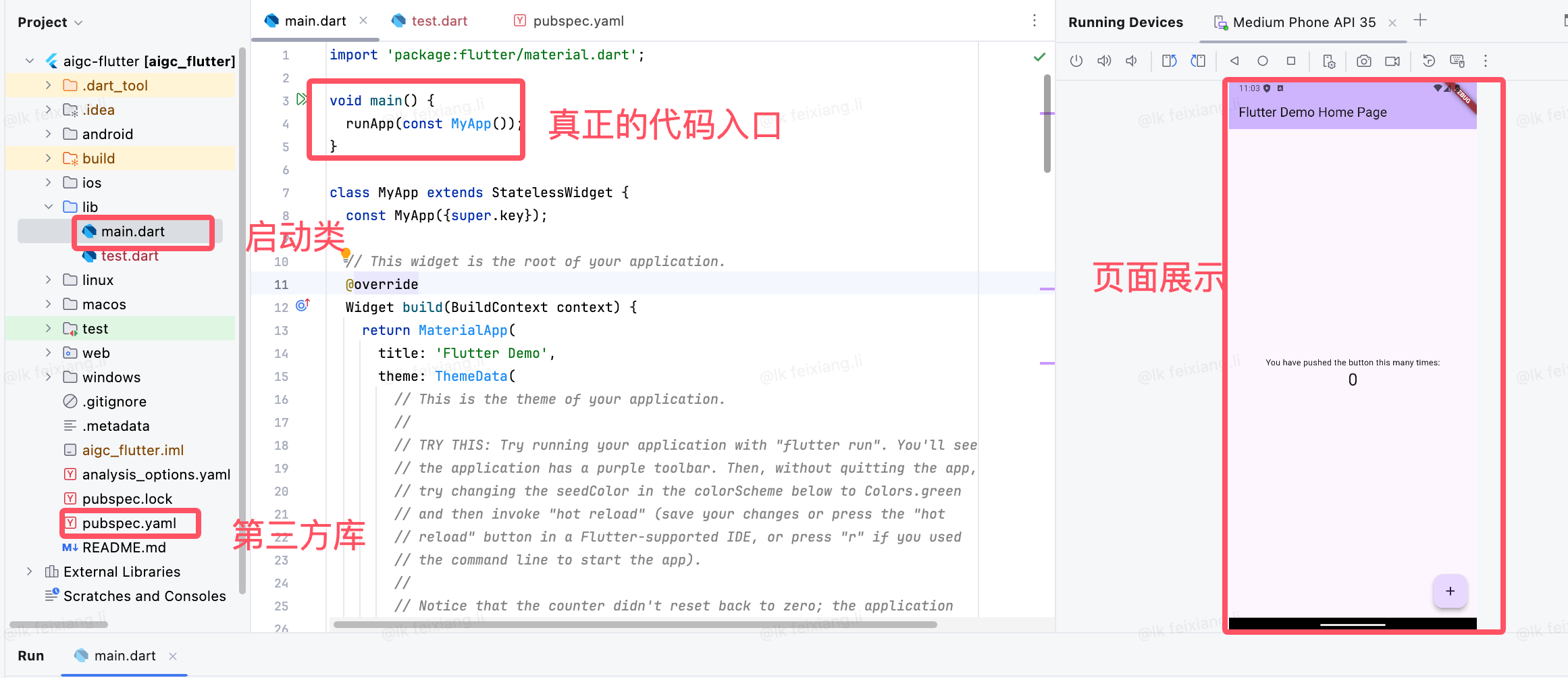
导入包
import 'package:flutter/material.dart';此行代码作用是导入了 Material UI 组件库。Material (opens new window)是一种标准的移动端和web端的视觉设计语言, Flutter 默认提供了一套丰富的 Material 风格的UI组件。
应用入口
void main() => runApp(MyApp());与 C/C++、Java 类似,Flutter 应用中
main函数为应用程序的入口。main函数中调用了runApp方法,它的功能是启动Flutter应用。runApp它接受一个Widget参数,在本示例中它是一个MyApp对象,MyApp()是 Flutter 应用的根组件。读者现在只需知道 runApp 是 Flutter 应用的入口即可,关于 Flutter 应用的启动流程,我们会在本书后面原理篇中做详细介绍。
main函数使用了(=>)符号,这是 Dart 中单行函数或方法的简写。
应用结构
class MyApp extends StatelessWidget {
  @override
  Widget build(BuildContext context) {
    return MaterialApp(
      //应用名称
      title: 'Flutter Demo',
      theme: ThemeData(
        //蓝色主题
        primarySwatch: Colors.blue,
      ),
      //应用首页路由
      home: MyHomePage(title: 'Flutter Demo Home Page'),
    );
  }
}MyApp类代表 Flutter 应用,它继承了StatelessWidget类,这也就意味着应用本身也是一个widget。- 在 Flutter 中,大多数东西都是 widget(后同“组件”或“部件”),包括对齐(Align)、填充(Padding)、手势处理(GestureDetector)等,它们都是以 widget 的形式提供。
- Flutter 在构建页面时,会调用组件的
build方法,widget 的主要工作是提供一个 build() 方法来描述如何构建 UI 界面(通常是通过组合、拼装其他基础 widget )。 MaterialApp是Material 库中提供的 Flutter APP 框架,通过它可以设置应用的名称、主题、语言、首页及路由列表等。MaterialApp也是一个 widget。home为 Flutter 应用的首页,它也是一个 widget。
初识widget
class MyHomePage extends StatefulWidget {
  MyHomePage({Key? key, required this.title}) : super(key: key);
  final String title;

  @override
  _MyHomePageState createState() => _MyHomePageState();
}

class _MyHomePageState extends State<MyHomePage> {
 ...
}
MyHomePage 是应用的首页,它继承自StatefulWidget类,表示它是一个有状态的组件(Stateful widget)。现在我们只需简单认为有状态的组件(Stateful widget) 和无状态的组件(Stateless widget)有两点不同:
Stateful widget 可以拥有状态,这些状态在 widget 生命周期中是可以变的,而 Stateless widget 是不可变的。
Stateful widget 至少由两个类组成:
- 一个
StatefulWidget类。 - 一个
State类;StatefulWidget类本身是不变的,但是State类中持有的状态在 widget 生命周期中可能会发生变化。
_MyHomePageState类是MyHomePage类对应的状态类。- 一个
State类
_MyHomePageState 类解析
接下来,我们看看_MyHomePageState中都包含哪些东西:
组件的状态。
由于我们只需要维护一个点击次数计数器,所以定义一个
_counter状态:- dart
int _counter = 0; //用于记录按钮点击的总次数_counter为保存屏幕右下角带“+”号按钮点击次数的状态。 设置状态的自增函数。
dartvoid _incrementCounter() { setState(() { _counter++; }); }当按钮点击时,会调用此函数,该函数的作用是先自增
_counter,然后调用setState方法。setState方法的作用是通知 Flutter 框架,有状态发生了改变,Flutter 框架收到通知后,会执行build方法来根据新的状态重新构建界面, Flutter 对此方法做了优化,使重新执行变的很快,所以你可以重新构建任何需要更新的东西,而无需分别去修改各个 widget。构建UI界面的
build方法构建UI界面的逻辑在
build方法中,当MyHomePage第一次创建时,_MyHomePageState类会被创建,当初始化完成后,Flutter框架会调用 widget 的build方法来构建 widget 树,最终将 widget 树渲染到设备屏幕上。所以,我们看看_MyHomePageState的build方法中都干了什么事:dartWidget build(BuildContext context) { return Scaffold( appBar: AppBar( title: Text(widget.title), ), body: Center( child: Column( mainAxisAlignment: MainAxisAlignment.center, children: <Widget>[ Text('You have pushed the button this many times:'), Text( '$_counter', style: Theme.of(context).textTheme.headline4, ), ], ), ), floatingActionButton: FloatingActionButton( onPressed: _incrementCounter, tooltip: 'Increment', child: Icon(Icons.add), ), ); }Scaffold是 Material 库中提供的页面脚手架,它提供了默认的导航栏、标题和包含主屏幕 widget 树(后同“组件树”或“部件树”)的body属性,组件树可以很复杂。本书后面示例中,路由默认都是通过Scaffold创建。body的组件树中包含了一个Center组件,Center可以将其子组件树对齐到屏幕中心。此例中,Center子组件是一个Column组件,Column的作用是将其所有子组件沿屏幕垂直方向依次排列; 此例中Column子组件是两个Text,第一个Text显示固定文本 “You have pushed the button this many times:”,第二个Text显示_counter状态的数值。floatingActionButton是页面右下角的带“+”的悬浮按钮,它的onPressed属性接受一个回调函数,代表它被点击后的处理器,本例中直接将_incrementCounter方法作为其处理函数。
现在,我们将整个计数器执行流程串起来:当右下角的floatingActionButton按钮被点击之后,会调用_incrementCounter方法。在_incrementCounter方法中,首先会自增_counter计数器(状态),然后setState会通知 Flutter 框架状态发生变化,接着,Flutter 框架会调用build方法以新的状态重新构建UI,最终显示在设备屏幕上。
为什么要将 build 方法放在 State 中,而不是放在StatefulWidget中?
- 状态访问不便。
试想一下,如果我们的StatefulWidget有很多状态,而每次状态改变都要调用build方法,由于状态是保存在 State 中的,如果build方法在StatefulWidget中,那么build方法和状态分别在两个类中,那么构建时读取状态将会很不方便!试想一下,如果真的将build方法放在 StatefulWidget 中的话,由于构建用户界面过程需要依赖 State,所以build方法将必须加一个State参数,大概是下面这样:
  Widget build(BuildContext context, State state){
      //state.counter
      ...
}这样的话就只能将State的所有状态声明为公开的状态,这样才能在State类外部访问状态!但是,将状态设置为公开后,状态将不再具有私密性,这就会导致对状态的修改将会变的不可控。但如果将build()方法放在State中的话,构建过程不仅可以直接访问状态,而且也无需公开私有状态,这会非常方便。
3.2 入门
widget接口
在 Flutter 中, widget 的功能是“描述一个UI元素的配置信息”,它就是说, Widget 其实并不是表示最终绘制在设备屏幕上的显示元素,所谓的配置信息就是 Widget 接收的参数,比如对于 Text 来讲,文本的内容、对齐方式、文本样式都是它的配置信息。下面我们先来看一下 Widget 类的声明:
@immutable // 不可变的
abstract class Widget extends DiagnosticableTree {
  const Widget({ this.key });

  final Key? key;

  @protected
  @factory
  Element createElement();

  @override
  String toStringShort() {
    final String type = objectRuntimeType(this, 'Widget');
    return key == null ? type : '$type-$key';
  }

  @override
  void debugFillProperties(DiagnosticPropertiesBuilder properties) {
    super.debugFillProperties(properties);
    properties.defaultDiagnosticsTreeStyle = DiagnosticsTreeStyle.dense;
  }

  @override
  @nonVirtual
  bool operator ==(Object other) => super == other;

  @override
  @nonVirtual
  int get hashCode => super.hashCode;

  static bool canUpdate(Widget oldWidget, Widget newWidget) {
    return oldWidget.runtimeType == newWidget.runtimeType
        && oldWidget.key == newWidget.key;
  }
  ...
}@immutable代表 Widget 是不可变的,这会限制 Widget 中定义的属性(即配置信息)必须是不可变的(final),为什么不允许 Widget 中定义的属性变化呢?这是因为,Flutter 中如果属性发生变化则会重新构建Widget树,即重新创建新的 Widget 实例来替换旧的 Widget 实例,所以允许 Widget 的属性变化是没有意义的,因为一旦 Widget 自己的属性变了自己就会被替换。这也是为什么 Widget 中定义的属性必须是 final 的原因。widget类继承自DiagnosticableTree,DiagnosticableTree即“诊断树”,主要作用是提供调试信息。Key: 这个key属性类似于 React/Vue 中的key,主要的作用是决定是否在下一次build时复用旧的 widget ,决定的条件在canUpdate()方法中。createElement():正如前文所述“一个 widget 可以对应多个Element”;Flutter 框架在构建UI树时,会先调用此方法生成对应节点的Element对象。此方法是 Flutter 框架隐式调用的,在我们开发过程中基本不会调用到。debugFillProperties(...)复写父类的方法,主要是设置诊断树的一些特性。canUpdate(...)是一个静态方法,它主要用于在 widget 树重新build时复用旧的 widget ,其实具体来说,应该是:是否用新的 widget 对象去更新旧UI树上所对应的Element对象的配置;通过其源码我们可以看到,只要newWidget与oldWidget的runtimeType和key同时相等时就会用new widget去更新Element对象的配置,否则就会创建新的Element。
另外Widget类本身是一个抽象类,其中最核心的就是定义了createElement()接口,在 Flutter 开发中,我们一般都不用直接继承Widget类来实现一个新组件,相反,我们通常会通过继承StatelessWidget或StatefulWidget来间接继承widget类来实现。StatelessWidget和StatefulWidget都是直接继承自Widget类,而这两个类也正是 Flutter 中非常重要的两个抽象类,它们引入了两种 widget 模型,
既然 Widget 只是描述一个UI元素的配置信息,那么真正的布局、绘制是由谁来完成的呢?Flutter 框架的处理流程是这样的:
- 根据 Widget 树生成一个 Element 树,Element 树中的节点都继承自
Element类。 - 根据 Element 树生成 Render 树(渲染树),渲染树中的节点都继承自
RenderObject类。 - 根据渲染树生成 Layer 树,然后上屏显示,Layer 树中的节点都继承自
Layer类。
真正的布局和渲染逻辑在 Render 树中,Element 是 Widget 和 RenderObject 的粘合剂,可以理解为一个中间代理。我们通过一个例子来说明,假设有如下 Widget 树:
比如创建
import 'package:flutter/cupertino.dart';
import 'package:flutter/material.dart';

class Echo extends StatelessWidget  {
  const Echo({
    Key? key,
    required this.text,
    this.backgroundColor = Colors.white, //默认为灰色
  }):super(key:key);

  final String text;
  final Color backgroundColor;

  @override
  Widget build(BuildContext context) {
    return Center(
      child: Container(
        color: backgroundColor,
        child: Text(text),
      ),
    );
  }
}
修改一下homepage
class _MyHomePageState extends State<MyHomePage> {
  int _counter = 0;

  void _incrementCounter() {
    setState(() {
      // This call to setState tells the Flutter framework that something has
      // changed in this State, which causes it to rerun the build method below
      // so that the display can reflect the updated values. If we changed
      // _counter without calling setState(), then the build method would not be
      // called again, and so nothing would appear to happen.
      _counter+=2;
    });
  }

  @override
  Widget build(BuildContext context) {
    return Echo(text: "hello world");
  }
}